Le Storie in evidenza di Instagram aiutano i brand a mantenere visibili le loro storie migliori sul profilo anche dopo le 24 ore di visualizzazione. Per le aziende, le Storie in evidenza possono fungere da mini landing page, organizzando recensioni, FAQ, dettagli sui prodotti, offerte, eventi, tutorial e contenuti generati dagli utenti per i visitatori del profilo.
Le Storie di Instagram scompaiono dal profilo, dal Feed e dai messaggi dopo 24 ore, a meno che non vengano aggiunte alla sezione Storie in evidenza. Questo rende le Storie in evidenza utili per i brand che desiderano trasformare i contenuti temporanei delle Storie in contenuti permanenti per il profilo.
Per i brand, le Storie in evidenza di Instagram non sono solo un elemento decorativo del profilo. Possono aiutare i visitatori a comprendere la tua attività, esplorare i prodotti, leggere le recensioni, trovare risposte e agire più rapidamente.


Cosa sono gli highlights di Instagram?
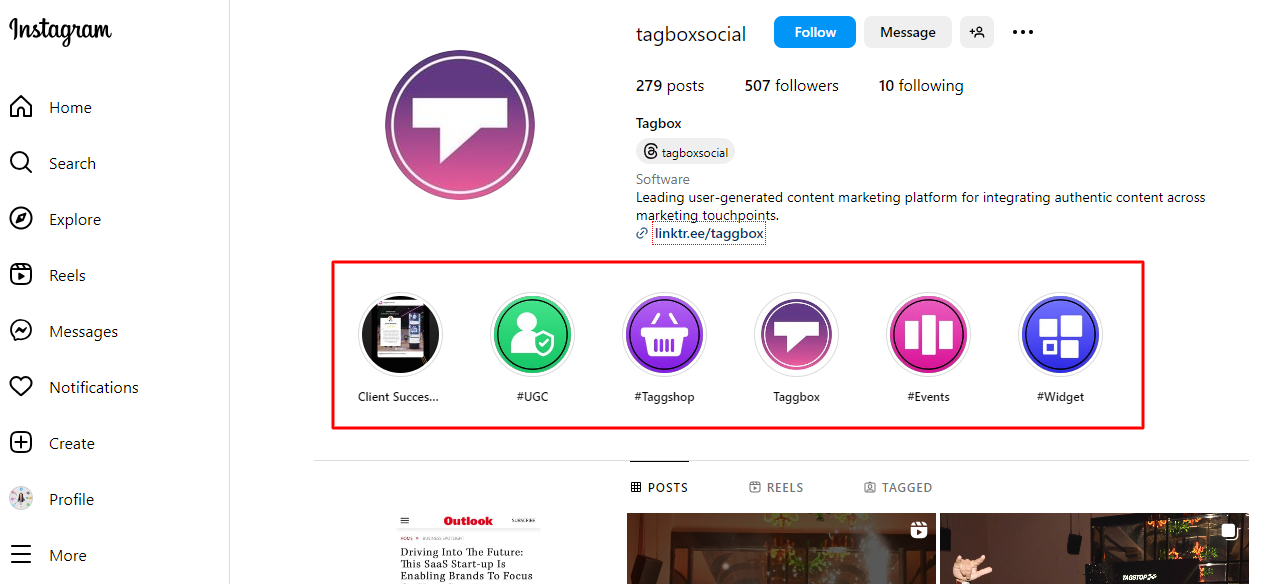
Le Storie in evidenza di Instagram sono raccolte curate di Storie che gli utenti possono visualizzare in modo permanente sul proprio profilo. Introdotte nel 2017, le Storie in evidenza offrono un modo per mostrare e organizzare le Storie oltre la durata predefinita di 24 ore. Queste Storie in evidenza appaiono direttamente sotto la sezione biografia, offrendo ai visitatori uno sguardo sulla personalità, gli interessi o l'identità del marchio dell'utente. Molti marchi riutilizzano anche queste storie in evidenza utilizzando un widget di incorporamento di Instagram per mostrare contenuti selezionati sui loro siti web.
Gli utenti possono selezionare le Storie dal proprio archivio e raggrupparle in Highlights per tema, evento o argomento di interesse. Ogni Highlight può essere personalizzata con un'immagine di copertina e un titolo, consentendo la personalizzazione e l'inserimento del marchio. Con gli Highlights di Instagram, gli utenti possono condividere contenuti sempre attuali e lasciare un'impressione duratura sui visitatori del proprio profilo.
Perché le Storie in evidenza di Instagram sono importanti per le aziende
I profili Instagram spesso ricevono visite da utenti che non sono pronti ad acquistare immediatamente. Potrebbero voler conoscere meglio il tuo brand, dare un'occhiata ai tuoi prodotti, confrontare le recensioni o leggere le esperienze di altri clienti prima di procedere all'acquisto.
Le funzionalità in evidenza aiutano le aziende a rispondere rapidamente a queste domande.
Ad esempio, un marchio di prodotti per la cura della pelle può creare sezioni in evidenza per recensioni, routine, ingredienti, risultati, domande frequenti e offerte. Un ristorante può creare sezioni in evidenza per menù, recensioni, eventi, posizione, offerte e storie dei clienti.
Come creare storie in evidenza su Instagram?
Creazione di un elemento in evidenza È un processo semplice, ed ecco una guida passo passo per aiutarti a iniziare:
- Assicurati di aver già pubblicato le Storie che vuoi includere nella tua Evidenziazione.
- Successivamente, accedi al tuo profilo Instagram toccando la tua immagine del profilo nell'angolo in basso a sinistra dello schermo.
- Sotto la sezione bio, vedrai una sezione denominata "In evidenza". Tocca il pulsante "+ Nuovo" accanto ad essa.
- Instagram ti mostrerà un elenco delle tue Storie archiviate. Scorri l'elenco e tocca quelle che desideri includere nelle tue Storie in evidenza. Puoi selezionare più Storie per una singola Storia in evidenza.
- Dopo aver selezionato le Storie, puoi personalizzare il tuo Highlight assegnandogli un nome e selezionando un'immagine di copertina. Scegli un nome che rifletta il contenuto del tuo Highlight e seleziona un'immagine di copertina accattivante che lo rappresenti bene.
- Una volta che sei soddisfatto delle tue selezioni e personalizzazioni, tocca "Aggiungi" o "Fine" per creare il tuo Highlight.
- Ecco, ora tu o chiunque visiti il tuo profilo Instagram potrete vedere facilmente i momenti salienti che avete caricato.
Come modificare o eliminare una storia in evidenza su Instagram
Le aziende dovrebbero aggiornare regolarmente la sezione "In evidenza" per evitare di mostrare offerte scadute, prodotti obsoleti, informazioni su eventi datati o contenuti irrilevanti.
Per modificare o eliminare un Highlight, Instagram dice agli utenti di toccare e tenere premuto l'Highlight qui sotto Modifica Profilo, quindi scegli l'opzione per modificarlo o eliminarlo.
Come puoi utilizzare le Storie in evidenza di Instagram a vantaggio della tua attività?
Instagram Stories e Highlights sono risorse inestimabili per le aziende che cercano di aumentare la propria presenza online e il coinvolgimento degli utenti. Ecco alcuni vantaggi interessanti che offrono alle aziende:
1. Visibilità estesa:
Mettendo in evidenza contenuti importanti nelle Storie in primo piano, le aziende possono estendere la durata delle proprie Storie di Instagram oltre le 24 ore predefinite. Questa visibilità prolungata garantisce che messaggi chiave, promozioni o annunci rimangano accessibili a follower e visitatori nel tempo.
2. Presentazione organizzata dei contenuti:
Instagram Story Highlight offre alle aziende una piattaforma per organizzare e categorizzare i propri contenuti in base a temi, prodotti o servizi. Questo facilita la navigazione dei follower verso aspetti specifici dell'attività, garantendo un'esperienza più coinvolgente e intuitiva.
3. Storytelling del marchio migliorato:
Le Storie in primo piano permettono alle aziende di raccontare la storia del proprio marchio in modo avvincente e visivamente accattivante. Selezionando Storie che mettono in risalto i valori o i prodotti del marchio, le aziende possono comunicare la propria narrativa e connettersi con il proprio pubblico.
4. Opportunità di promozione e marketing:
Le aziende possono sfruttare le Storie in evidenza per promuovere prodotti, servizi o eventi imminenti. Inserendo contenuti promozionali nelle Storie in evidenza, le aziende possono creare uno spazio dedicato in cui i follower possono scoprire di più sulle loro offerte.
5. Integrazione dei link:
Grazie alla possibilità di aggiungere link alle Storie, le aziende possono indirizzare il traffico verso il proprio sito web o i post del blog direttamente dagli Highlights. Sapendo come pubblicare un link nelle Storie di Instagram Apre nuove strade per il coinvolgimento e la conversione dei clienti. Questo, in definitiva, consente alle aziende di ottenere risultati misurabili dalla loro presenza su Instagram.
6. Coinvolgimento e interazione con il cliente:
Le Storie in evidenza offrono alle aziende una piattaforma per interagire con il proprio pubblico in modo significativo. Includere testimonianze o contenuti generati dagli utenti (UGC) nelle Storie in evidenza favorisce il senso di comunità tra i follower, aumentando la fidelizzazione.
7. Metti in mostra i contenuti generati dagli utenti (UGC):
I punti salienti offrono alle aziende l'opportunità di mettere in mostra contenuti generati dagli utenti (UGC) e testimonianze dei clienti. Presentando UGC in Highlights, le aziende possono amplificare le voci dei loro clienti, incoraggiare il coinvolgimento della comunità e costruire l'autenticità del marchio.
8. Analisi e approfondimenti:
Instagram fornisce alle aziende strumenti di analisi per le loro Storie in evidenza, consentendo loro di monitorare metriche di coinvolgimento come visualizzazioni, tocchi e interazioni. Questi dati permettono alle aziende di misurare l'efficacia delle loro Storie in evidenza e di ottimizzare di conseguenza la propria strategia di contenuti.
9. Conversioni di unità:
Integrando strategicamente pulsanti di invito all'azione, come "Acquista ora" o "Scopri di più", le aziende possono generare conversioni direttamente dalle loro Storie in evidenza. Che si tratti di promuovere un nuovo prodotto o di incoraggiare le iscrizioni, le Storie in evidenza si rivelano strumenti efficaci per stimolare azioni misurabili da parte dei follower.
10. Incorpora le Storie in evidenza di Instagram:
Instagram non ha ancora creato un'API che permetta agli utenti di incorporare le storie in evidenza nei propri siti web. Tuttavia, questa funzionalità è molto attesa dalle aziende, poiché consentirebbe loro di mostrare le storie in evidenza sui propri siti. Aggiungere le storie in evidenza a una pagina web la renderebbe visivamente più accattivante e metterebbe in risalto i migliori prodotti/servizi del marchio.
Gli utenti possono attualmente incorpora un feed di Instagram sul loro sito web, che offre anche una serie di vantaggi per i marchi. Tra questi, un maggiore coinvolgimento sui social media, un tempo di permanenza più lungo sulla pagina e contenuti web dinamici.
Come progettare copertine per i tuoi momenti salienti di Instagram
Creare copertine accattivanti per le Storie in evidenza di Instagram può migliorare l'aspetto visivo del tuo profilo e rendere le tue Storie in evidenza più invitanti. Ecco una guida passo passo per aiutarti a creare copertine accattivanti:
- Scegli un tema: Seleziona un tema o un'estetica coerente che sia in linea con l'identità del tuo marchio o con il contenuto dei tuoi contenuti in evidenza.
- Seleziona il software di progettazione: Utilizza software di progettazione come Canva, Adobe Spark o Over per creare le tue copertine. Queste piattaforme offrono una varietà di modelli e opzioni di personalizzazione.
- Crea grafica di copertinaProgetta la grafica di copertina utilizzando icone, illustrazioni o sovrapposizioni di testo. Assicurati che la grafica sia visivamente accattivante e pertinente al contenuto di ogni elemento in evidenza.
- Aggiungi elementi di brandingIntegra il tuo logo, i colori del tuo marchio e i tuoi caratteri per mantenere la coerenza del marchio in tutte le tue Storie in evidenza.
- Personalizza la dimensione della copertina: Adatta le dimensioni delle tue copertine per adattarle alla forma circolare di Instagram Highlights. La dimensione consigliata per le copertine Highlight è 1080 pixel per 1920 pixel.
- Carica su Instagram: Una volta pronte le tue copertine, caricale su Instagram selezionando "Modifica Highlight" sul tuo profilo. Scegli "Modifica copertina" per sostituire l'immagine di copertina predefinita con il tuo design personalizzato.
Come aggiungere copertine ai post in evidenza di Instagram?
I seguenti passaggi ti aiuteranno ad aggiungere una nuova immagine di copertina alle tue storie in evidenza di Instagram.
- Progetta o scegli immagini di copertina per i tuoi contenuti in evidenza su Instagram che rappresentino il contenuto o il tema di ogni categoria di contenuti in evidenza.
- Apri l'app di Instagram e tocca la tua immagine del profilo nell'angolo in basso a sinistra per accedere al tuo profilo.
- Tocca la sezione "In evidenza" situata sotto la tua biografia.
- Seleziona l'elemento evidenziato a cui vuoi aggiungere una copertina toccandolo e tenendolo premuto finché non compare un menu.
- Dal menu, seleziona "Modifica evidenziazione".
- Tocca "Modifica copertina" e poi seleziona "Cambia copertina".
- Scegli l'immagine di copertina: sfoglia il rullino fotografico o la galleria per selezionare l'immagine di copertina che vuoi usare. Regola il posizionamento e lo zoom come necessario.
- Una volta che sei soddisfatto dell'immagine di copertina, tocca "Fine" o "Salva" per salvare le modifiche.
- Ripetere il procedimento per ogni categoria Highlight, selezionando per ciascuna un'immagine di copertina univoca.
Suggerimenti per ottimizzare le copertine dei momenti salienti di Instagram in base al tuo profilo
Per sfruttare al meglio gli highlights di Instagram, è essenziale ottimizzare le copertine per allinearle alla tua brand identity. Ecco alcuni suggerimenti per aiutarti a fare proprio questo:
- Marchio coerenteMantieni un'estetica coerente su tutte le copertine di Highlight per rafforzare l'identità del tuo marchio. Utilizza colori, caratteri e elementi di design uniformi che riflettano la personalità e lo stile del tuo marchio.
- Evidenzia categorie: Identifica i temi chiave o le categorie che rappresentano il contenuto che vuoi mostrare sul tuo profilo. Crea copertine Highlight separate per ogni categoria per rendere più facile per i follower trovare il contenuto a cui sono interessati.
- Incorpora video di InstagramValuta la possibilità di incorporare video di Instagram nelle copertine delle tue Storie in evidenza per aggiungere contenuti dinamici e coinvolgenti. I video possono offrire un'anteprima del contenuto della Storia in evidenza e catturare efficacemente l'attenzione degli utenti.
- Grafica personalizzataProgettate grafiche per le copertine delle vostre Highlight che siano visivamente accattivanti e pertinenti al contenuto di ciascuna categoria. Utilizzate grafiche che catturino l'essenza del contenuto e invoglino gli utenti ad approfondirlo.
- Esempi di coinvolgimento del clienteMetti in risalto il coinvolgimento e l'interazione dei clienti nelle copertine delle tue Storie in evidenza per dimostrare il legame del tuo brand con il suo pubblico. Includi contenuti generati dagli utenti, testimonianze e recensioni positive per costruire fiducia e credibilità.
- Aggiorna regolarmente: Mantieni aggiornate le tue copertine Highlight aggiornandole regolarmente con nuovi contenuti. Sostituisci le copertine obsolete con nuove immagini o video per mantenere il tuo profilo attuale e pertinente.
- Esempi di recensioni positiveUtilizza le copertine in evidenza per mostrare recensioni positive e testimonianze dei clienti. Questo non solo rafforza la credibilità del tuo marchio, ma incoraggia anche i potenziali clienti a interagire con i tuoi contenuti.
Conclusione
Le Storie in evidenza di Instagram offrono agli utenti l'opportunità di mostrare i loro contenuti migliori, organizzare il proprio profilo e interagire con il pubblico. Curando le immagini di copertina delle Storie in evidenza e ottimizzandole in base al tema del profilo, è possibile creare un'esperienza visivamente accattivante.
L'integrazione di elementi come grafiche personalizzate ed esempi di interazione con i clienti può ulteriormente migliorare l'attrattiva e l'efficacia delle tue Storie in evidenza. Aggiornare e analizzare regolarmente le prestazioni delle copertine delle tue Storie in evidenza mantiene il tuo profilo sempre attuale, pertinente e coinvolgente. Sfruttando le Storie in evidenza di Instagram, puoi valorizzare il tuo profilo, rafforzare la presenza del tuo brand e creare connessioni significative.


 Rohan Singh
 di Shivam Rawat
 Jennet
 Akshita Jain
 Wagisha