Marketing vindt niet langer plaats op slechts één platform. Mensen ontdekken je niet op één platform en converteren daar vervolgens automatisch. Ze doen onderzoek, zorgen ervoor dat je merknaam op meerdere platforms verschijnt, van Instagram tot je website, tot je e-mails, en soms zelfs weer terug. Dit is de reis van ontdekking tot aankoop, waar de integratie van Mailchimp met Instagram een belangrijke rol speelt.
Instagram vergroot de naamsbekendheid. Mailchimp zet leads om in klanten. En wanneer je die twee combineert, hoef je niet langer te gissen waar je doelgroep zich bevindt; je begeleidt ze door een verbonden traject.
In plaats van Instagram en e-mail als aparte kanalen te beschouwen, creëren merken tegenwoordig een uniforme ervaring door:
- Iemand ontdekt je merk op Instagram.
- Abonnees komen in je e-mailfunnel terecht.
- Klanten worden via campagnes begeleid en aan zich gebonden.
- Ze worden later opnieuw getarget op Instagram
Deze continue cyclus is waar duurzame groei plaatsvindt.
Wat is de integratie van Mailchimp met Instagram?
De Instagram-integratie van Mailchimp Het verbindt je aanwezigheid op Instagram met je e-mailmarketing, zodat de twee samenwerken in plaats van met elkaar te concurreren om aandacht.
Zie het als een ecosysteem waarin content, publiek en campagnes tussen platformen stromen.
Deze integratie werkt op meerdere manieren:
1. Instagram-contentblokken (standaardfunctie van Mailchimp)
Met Mailchimp kun je Instagram-berichten rechtstreeks in je e-mails integreren dankzij ingebouwde contentblokken. Zo blijven je e-mails visueel aantrekkelijk zonder extra moeite.
2. Aangepaste doelgroepen op Instagram
Met tools zoals LeadsBridge kun je je Mailchimp-doelgroep synchroniseren met Instagram-advertenties. Zo kun je e-mailabonnees rechtstreeks opnieuw benaderen via Instagram.
3. Hulpmiddelen voor het insluiten van Instagram-profielen
Platforms zoals Taggbox uw toon je Instagram-profiel binnen e-mails of webervaringen, waardoor de groei van het aantal volgers toeneemt.
4. Automatiseringsworkflows
Tools zoals Pabbly Connect maken geautomatiseerde workflows mogelijk tussen Instagram en Mailchimp, zoals nieuwe volgers → e-maillijsten of campagnetriggers.
Kortom, de integratie van Instagram en Mailchimp draait minder om één enkele functie en meer om het volledig verbinden van je marketingfunnel.
Soorten Mailchimp + Instagram-integraties
Laten we eens bekijken hoe merken dit in de praktijk van marketing toepassen.
1. Instagram-contentblokken (standaardfunctie van Mailchimp)
Dit is de eenvoudigste manier om te beginnen. Met Mailchimp kun je:
- Instagram-berichten insluiten rechtstreeks in e-mails
- Toon één bericht of meerdere berichten in een raster.
- Link elk bericht terug naar Instagram
Volgens de officiële documentatie van Mailchimp werkt dit via een beveiligd autorisatieproces waarbij je Instagram-account verbinding maakt met de e-mailbuilder en de inhoud dynamisch synchroniseert.
Dit is perfect voor merken die al content op Instagram plaatsen en deze willen hergebruiken in nieuwsbrieven.
2. Instagramprofiel insluiten in e-mails
Je kunt niet alleen berichten plaatsen, maar je hele Instagram-account laten zien.
Dit helpt:
- Verwijs e-mailabonnees naar je Instagram-account.
- Verhoog het aantal volgers uit uw bestaande publiek
- Zorg voor merkconsistentie op alle kanalen.
Hoewel Mailchimp van nature geen ondersteuning biedt voor het insluiten van volledige profielen, bieden tools van derden zoals Taggbox Vul het gat op.
3. Synchronisatie van aangepaste doelgroepen op Instagram (geavanceerde marketing)
En nu wordt het interessant. Met integraties zoals LeadsBridge:
- Je Mailchimp-contacten synchroniseren met Instagram-advertenties
- Je kunt abonnees die niet tot een conversie zijn overgegaan opnieuw benaderen.
- Of creëer lookalike-doelgroepen voor schaalvergroting.
Dit maakt van je e-maillijst een krachtige tool voor gerichte advertenties. In plaats van een onbekend publiek, adverteer je nu bij mensen die je merk al kennen.
4. Integraties met automatiseringssystemen van derden
Tools zoals Pabbly Connect en LeadsBridge maken een diepere automatisering mogelijk.
Je kunt bijvoorbeeld:
- Activeer e-mailcampagnes vanuit Instagram-acties
- CRM-gegevens synchroniseren met advertentiecampagnes
- Bouw een volledig geautomatiseerd verkoopproces.
Bijvoorbeeld:
Iemand reageert op je Instagram → komt op je Mailchimp-lijst terecht → ontvangt een gepersonaliseerde e-mailreeks → wordt later opnieuw benaderd.
Dat is een complete groeicyclus.
Hoe verbind je Instagram met Mailchimp?
Laten we eens bekijken hoe je de Instagram Mailchimp-integratie daadwerkelijk kunt instellen.
Vereisten vóór de installatie:
Voordat u begint, moet u ervoor zorgen dat u het volgende heeft:
- An Instagram Zakelijk account
- Een Facebookpagina die gekoppeld is aan je Instagram.
- Een Mailchimp-account met de nieuwe e-mailbuilder.
Zonder deze onderdelen zal de integratie niet goed werken.
Integratie-instellingen (inhoudsblokken)
Zo koppel je Instagram met behulp van de ingebouwde functie van Mailchimp:
- Ga naar je Mailchimp-dashboard
- Open de tool voor het maken van e-mailcampagnes
- Sleep het "Instagram-contentblok" hierheen.
- Log in op je Instagram-account.
- Autoriseer machtigingen
- Selecteer de berichten die u wilt weergeven.
Na de verbinding importeert Mailchimp de geselecteerde gegevens. Instagram-berichten in je e-mailontwerp.
Dit is een van de eenvoudigste manieren om Mailchimp en Instagram te integreren zonder extra tools.
Hoe integreer je Instagram met Mailchimp via Taggbox
Om de Mailchimp Instagram-integratie in te stellen, kunt u gebruikmaken van Taggbox Om Instagram-content te verzamelen en toe te voegen aan je e-mailcampagnes of landingspagina's. Deze methode helpt je Instagram-berichten te hergebruiken en betrokkenheid om te zetten in conversies.
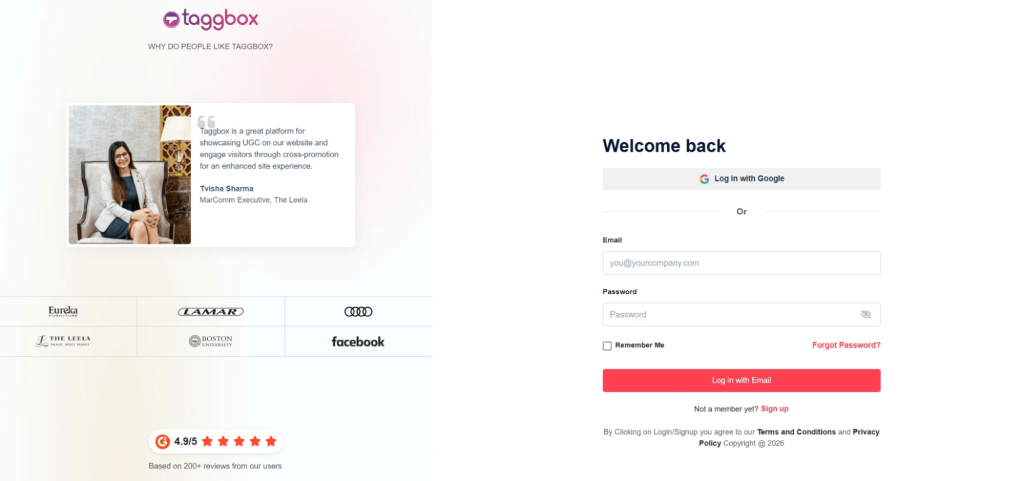
Stap 1: Maak uw Taggbox widget
Meld je aan Taggbox En maak een Instagram-widget aan door je bron te kiezen (gebruikersnaam, hashtag of vermeldingen). Zo wordt al je content in één feed verzameld.
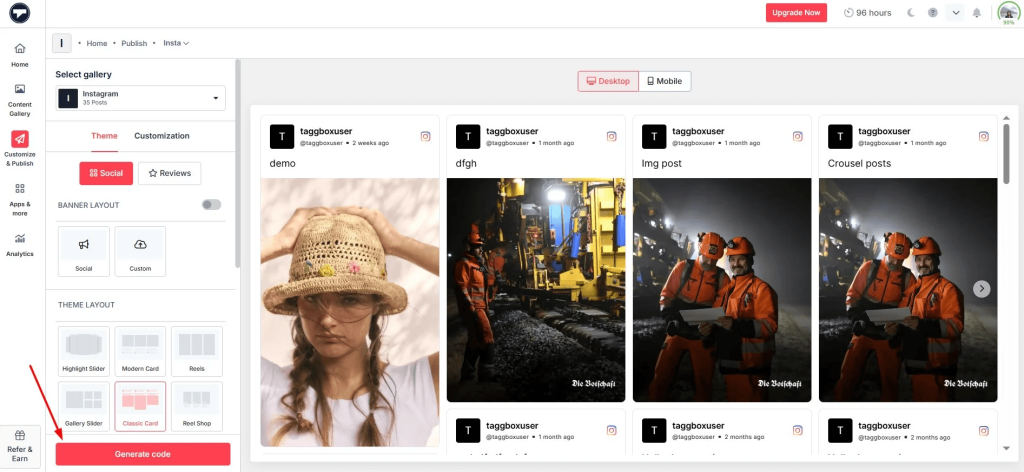
Stap 2: Pas uw Instagram-feed aan
Beheer en ontwerp je feed zodat deze bij je merk past. Je kunt kiezen uit verschillende lay-outs, zoals een raster of een Instagram-sliderwidget om je content aantrekkelijker te maken.
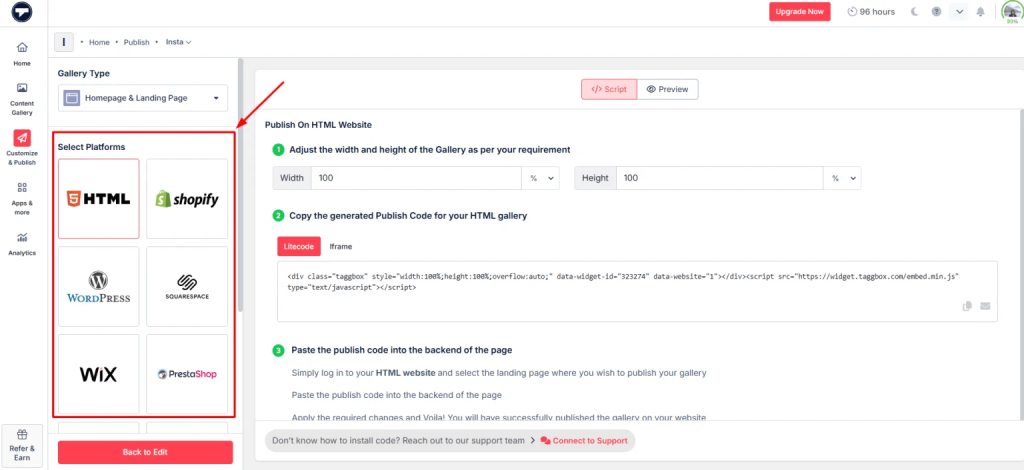
Stap 3: Embedcode genereren
Zodra je feed klaar is, kopieer je de embedcode. Hiermee kun je een Instagram-feed insluiten op een landingspagina of website die in je e-mail is gelinkt.
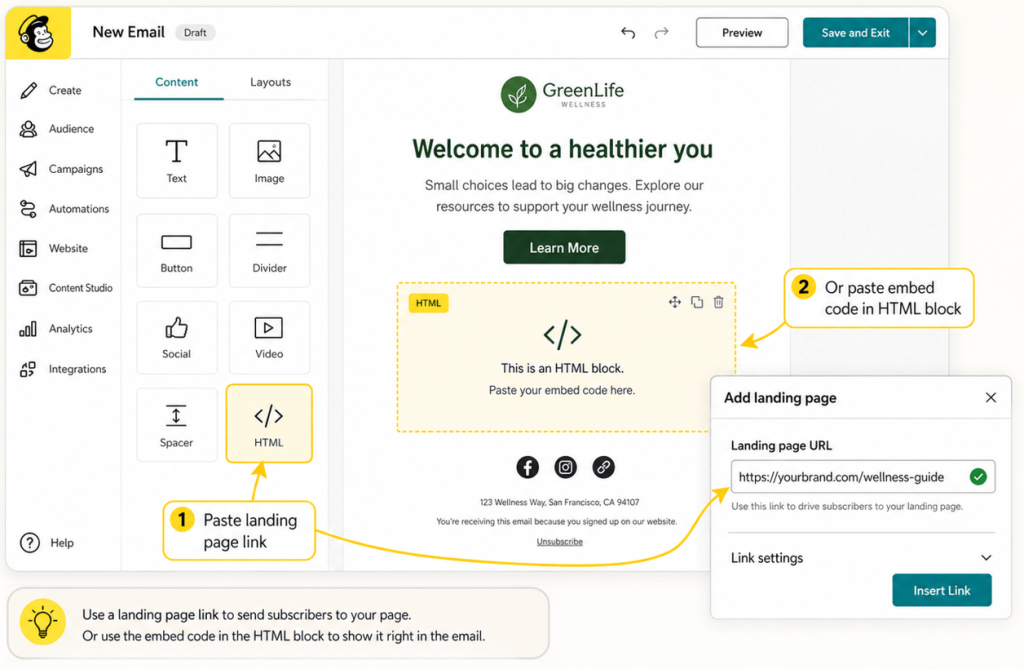
Stap 4: Voeg een feed toe aan je Mailchimp-campagne
Voeg in Mailchimp de landingspagina toe of gebruik de insluitcode in je e-mailtemplate (via een HTML-blok).
Stap 5: Publiceren en prestaties bijhouden
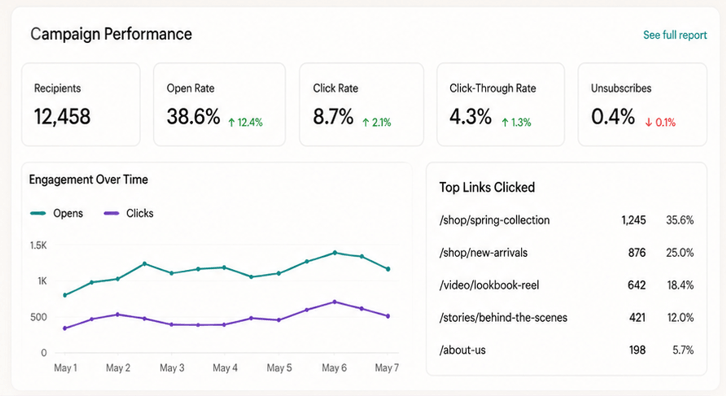
Verstuur je campagne en volg de resultaten. engagementVisuele content, zoals het integreren van Instagram Reels op websites, video's en stories, verbetert vaak de doorklikratio.
Een Instagram-account ontkoppelen of wijzigen
Er zijn een paar beperkingen waarmee rekening moet worden gehouden:
- Je kunt per Mailchimp-configuratie slechts één Instagram-account koppelen.
- Door de verbinding te verbreken, wordt alle ingesloten inhoud uit e-mails verwijderd.
- Je moet opnieuw verbinding maken als je van account wisselt.
Mailchimp hanteert ook een strikte autorisatieprocedure, waardoor toegang opnieuw moet worden goedgekeurd als de machtigingen wijzigen.
Hoe Mailchimp Instagram-content gebruikt
Eenmaal geïntegreerd, biedt Mailchimp meer mogelijkheden dan alleen het insluiten van berichten.
U kunt het volgende weergeven:
- Een enkel Instagram-bericht
- Een rij berichten
- Klikbare afbeeldingen die linken naar Instagram.
- Profielnaam en logo voor merkherkenning
Dit geeft e-mails meer visuele diepte, waardoor ze minder op reclame lijken en meer op belevingen.
En het werkt.
E-mails met visuele content hebben de neiging om:
- Behaal hogere doorklikpercentages.
- Houd gebruikers langer betrokken
- Zorg voor meer verkeer naar sociale kanalen.
Veelvoorkomende gebruiksscenario's voor de Mailchimp Instagram-integratie
Hieronder zie je hoe verschillende sectoren het in de praktijk gebruiken.
1. E-commercemerken
E-commerce merken floreren dankzij visuele content.
Met de integratie van Instagram en Mailchimp kunnen ze:
- Toon productafbeeldingen in realistische scenario's.
- Gebruik Instagram als een laag van sociaal bewijs.
- Genereer verkeer van e-mail → Instagram → website
In plaats van statische productfoto's laat je zien hoe producten er in het echt uitzien.
2. Influencer Marketing
Influencercontent presteert meestal beter dan merkcontent.
Merken kunnen:
- Integreer influencerberichten in e-mailcampagnes.
- Benadruk door gebruikers gegenereerde content (UGC)
- Bouw direct vertrouwen op.
Dit werkt met name goed in combinatie met tools waarmee je een Instagram-feed kunt integreren of content op grote schaal kunt samenstellen.
3. SaaS-bedrijven
Zelfs SaaS-merken profiteren van Instagram.
Ze kunnen:
- Deel productupdates op een visuele manier.
- Leg de kenmerken uit in korte teksten.
- Verhoog de betrokkenheid bij uw nieuwsbrief.
Door visuele fragmenten van Instagram toe te voegen, worden e-mails minder tekstrijk en aantrekkelijker. Lees dit artikel om te leren hoe je een Instagram-hashtagfeed op een website kunt integreren.
4. Lokale bedrijven
Voor lokale bedrijven is Instagram vaak het belangrijkste kanaal om ontdekt te worden.
Met de Mailchimp-integratie kunnen ze:
- Promoot evenementen met Instagram-berichten.
- Stuur visuele updates naar abonnees.
- Zorg voor een consistente branding
Dit werkt vooral goed in combinatie met een Instagram-widget voor HTML op hun website.
Beste werkwijzen bij het gebruik van de Mailchimp Instagram-integratie
Nu je zo ver bent gekomen, is het belangrijk om te onthouden dat integratie alleen niet genoeg is; je moet de Instagram Mailchimp-integratie slim gebruiken om de resultaten te maximaliseren.
1. Gebruik alleen content die goed presteert.
Niet elke Instagram-post hoort in je e-mail. Kies posts met veel interactie.
2. Stem de content op alle kanalen op elkaar af.
Je Instagram en e-mail moeten op elkaar aansluiten. Dezelfde toon, boodschap en campagne.
3. Segmenteer vóór het synchroniseren van advertenties
Als je gebruikmaakt van doelgroepsynchronisatie, segmenteer dan eerst je lijsten. Betere targeting leidt tot een hoger rendement op je investering.
4. Overlaad je e-mailinbox niet.
Te veel afbeeldingen kunnen de laadtijd vertragen en lezers overweldigen. Balans is essentieel.
5. A/B-test alles
Test:
- Verschillende berichtformaten
- Aantal afbeeldingen
- Plaatsing in e-mail
Kleine aanpassingen kunnen tot grote verbeteringen leiden.
Meer dan alleen e-mail: Instagram-content uitbreiden naar je website
Mailchimp beheert weliswaar de e-mailmarketing, maar conversies vinden vaak plaats op je website.
Dat is waar tools het leuk vinden Taggbox kom binnen.
In plaats van Instagram-content te beperken tot e-mails, kun je het volgende doen:
- Voeg een Instagram-feed in op je homepage
- Instagram Reels insluiten op de website voor dynamische inhoud
- Een Instagram-video insluiten voor productdemonstraties
- Instagram Stories insluiten voor realtime-updates
- Instagram-hashtagfeed insluiten op de website voor UGC-campagnes
Je kunt zelfs het volgende creëren:
- Een Instagram-sliderwidget voor interactief browsen
- Een complete Instagram-widget voor HTML die automatisch wordt bijgewerkt.
Dit zorgt voor consistentie tussen:
Instagram → E-mail → Website
Dat is precies wat moderne marketing nodig heeft.
Conclusie
De integratie van Mailchimp met Instagram gaat niet alleen over het embedden van berichten; het gaat over het opzetten van een complete marketingcyclus.
Instagram trekt de aandacht. Mailchimp zet die aandacht om in actie. Retargeting zorgt ervoor dat gebruikers terugkeren. Door deze kanalen te combineren, jaag je niet langer achter klanten aan; je begeleidt ze juist. En zo veranderen ze van potentiële klanten in kopers, of van bezoekers in kopers, precies wat je wilt voor je bedrijf.
Als je serieus bent over groei, behandel platforms dan niet als afzonderlijke entiteiten.
Zorg dat ze samenwerken.
Daar worden de echte resultaten behaald.

Rohan Singh is een senior content schrijver bij Taggbox Met 6 jaar ervaring in het creëren van content die merken positioneert als marktleiders. Zijn expertise omvat thought leadership, trendanalyse en strategische storytelling die vertrouwen wekken en de loyaliteit van het publiek bevorderen.
Meer van Rohan Singh
 Harshita Rajoria

 Yuvraj
 Jennett