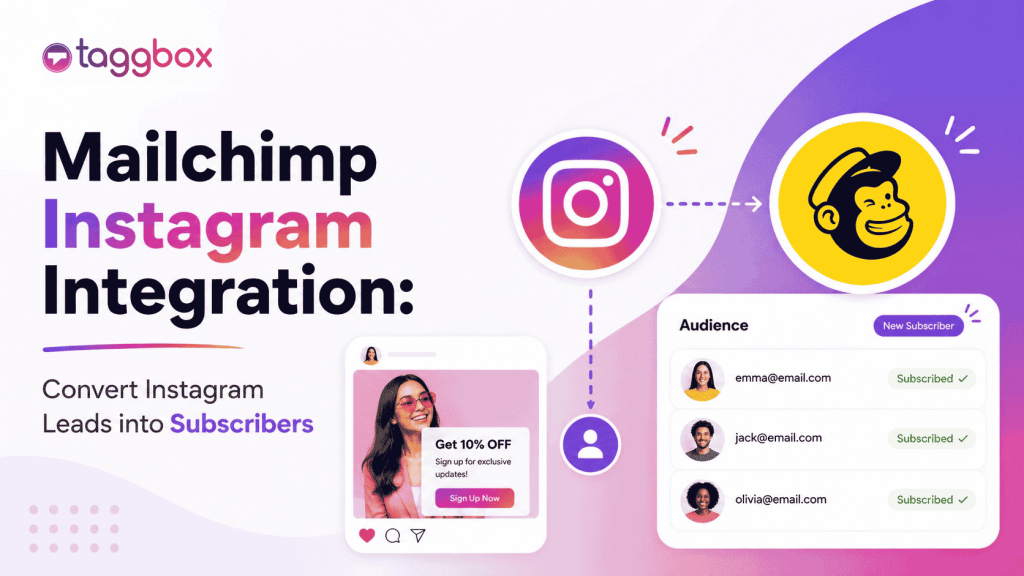
Il marketing non si limita più a una sola piattaforma. Le persone non ti scoprono su una piattaforma e si convertono magicamente lì. Fanno ricerche, si assicurano che il nome del tuo brand appaia su diverse piattaforme, da Instagram al tuo sito web, alle tue email, e a volte tornano indietro. Questo è il percorso che va dalla scoperta all'acquisto, ed è qui che l'integrazione di Mailchimp con Instagram gioca un ruolo fondamentale.
Instagram crea notorietà. Mailchimp converte i lead. E quando combini i due, non dovrai più indovinare dove si trova il tuo pubblico; lo guiderai attraverso un percorso connesso.
Anziché trattare Instagram ed email come canali separati, oggi i brand stanno creando un'esperienza unificata attraverso:
- Qualcuno scopre il tuo brand su Instagram
- Gli iscritti entrano nel tuo funnel di email
- I clienti vengono fidelizzati attraverso le campagne
- Successivamente vengono reindirizzati su Instagram
È in questo ciclo continuo che si realizza la crescita sostenibile.
Cos'è l'integrazione di Mailchimp con Instagram?
Integrazione di Mailchimp con Instagram Collega la tua presenza su Instagram con le tue attività di email marketing, in modo che le due strategie lavorino insieme anziché competere per l'attenzione del pubblico.
Pensatelo come un ecosistema in cui contenuti, pubblico e campagne fluiscono tra le piattaforme.
Esistono diversi modi in cui questa integrazione funziona:
1. Blocchi dei contenuti di Instagram (funzionalità nativa di Mailchimp)
Mailchimp ti permette di inserire i post di Instagram direttamente nelle tue email grazie a blocchi di contenuto integrati. In questo modo, le tue email rimarranno visivamente accattivanti senza alcuno sforzo aggiuntivo.
2. Pubblico personalizzato di Instagram
Utilizzando strumenti come LeadsBridge, puoi sincronizzare il tuo pubblico di Mailchimp con le inserzioni di Instagram. Questo ti permette di effettuare il retargeting degli iscritti alla tua newsletter direttamente su Instagram.
3. Strumenti per incorporare il profilo Instagram
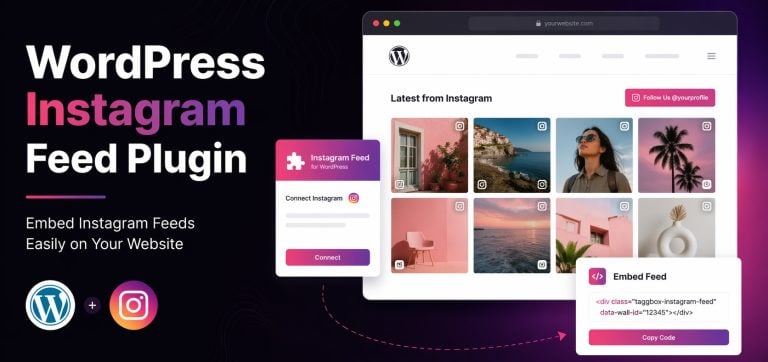
Piattaforme come Taggbox Aiuto mostra il tuo profilo Instagram all'interno di email o esperienze web, aumentando la crescita dei follower.
4. Flussi di lavoro di automazione
Strumenti come Pabbly Connect consentono flussi di lavoro automatizzati tra Instagram e Mailchimp, ad esempio nuovi follower → liste email o attivazione di campagne.
In sintesi, l'integrazione tra Instagram e Mailchimp non riguarda tanto una singola funzionalità, quanto piuttosto la connessione completa del tuo funnel di marketing.
Tipologie di integrazione tra Mailchimp e Instagram
Analizziamo nel dettaglio come i brand utilizzano concretamente questo strumento nel marketing reale.
1. Blocchi dei contenuti di Instagram (funzionalità nativa di Mailchimp)
Questo è il modo più semplice per iniziare. Mailchimp ti permette di:
- Incorpora post di Instagram direttamente nelle email
- Visualizza un singolo post o più post in una griglia
- Collega ogni post a Instagram
Secondo la documentazione ufficiale di Mailchimp, questo sistema funziona tramite un processo di autorizzazione sicuro in cui il tuo account Instagram si collega al generatore di email e sincronizza dinamicamente i contenuti.
Questa soluzione è perfetta per i brand che già creano contenuti su Instagram e desiderano riutilizzarli nelle newsletter.
2. Incorporare il profilo Instagram nelle email
Invece di pubblicare solo post, puoi mostrare tutta la tua presenza su Instagram.
Questo aiuta:
- Indirizza gli iscritti alla tua email al tuo profilo Instagram
- Aumenta i follower dal tuo pubblico attuale
- Garantire la coerenza del marchio su tutti i canali
Sebbene Mailchimp non supporti nativamente l'incorporamento di profili completi, strumenti di terze parti come Taggbox colma lo spazio vuoto.
3. Sincronizzazione del pubblico personalizzato di Instagram (Marketing avanzato)
È qui che le cose si fanno interessanti. Con integrazioni come LeadsBridge:
- I tuoi contatti Mailchimp si sincronizzano con Annunci Instagram
- È possibile effettuare il retargeting degli abbonati che non hanno effettuato una conversione.
- Oppure crea pubblici simili per scalare
In questo modo la tua lista email si trasforma in un potente strumento di targeting pubblicitario. Invece di rivolgerti a un pubblico freddo, pubblicizzerai i tuoi prodotti a persone che già conoscono il tuo marchio.
4. Integrazioni di automazione di terze parti
Strumenti come Pabbly Connect e LeadsBridge consentono un'automazione più approfondita.
È possibile
- Attiva campagne email dalle azioni di Instagram
- Sincronizza i dati CRM con le campagne pubblicitarie
- Creazione di automazione completa del funnel
Per esempio:
Qualcuno interagisce con il tuo profilo Instagram → si iscrive alla tua lista Mailchimp → riceve una sequenza di email personalizzate → viene contattato nuovamente per attività di retargeting in seguito.
Si tratta di un ciclo di crescita completo.
Come collegare Instagram a Mailchimp
Vediamo nel dettaglio come configurare l'integrazione tra Instagram e Mailchimp.
Requisiti prima dell'installazione:
Prima di iniziare, assicurati di avere:
- An Account aziendale Instagram
- Una pagina Facebook collegata al tuo profilo Instagram
- Un account Mailchimp con il nuovo strumento di creazione email
Senza questi elementi, l'integrazione non funzionerà correttamente.
Configurazione dell'integrazione (blocchi di contenuto)
Ecco come collegare Instagram utilizzando la funzionalità integrata di Mailchimp:
- Vai alla tua dashboard di Mailchimp
- Apri lo strumento di creazione delle campagne email
- Trascina e rilascia il "Blocco di contenuti Instagram".
- Accedi al tuo account Instagram
- Autorizzare le autorizzazioni
- Seleziona i post che desideri visualizzare
Una volta connesso, Mailchimp importa selezionato Post di Instagram nel design della tua email.
Questo è uno dei modi più semplici per iniziare l'integrazione di Mailchimp con Instagram senza bisogno di strumenti aggiuntivi.
Come integrare Instagram con Mailchimp tramite Taggbox
Per configurare l'integrazione di Mailchimp con Instagram, puoi utilizzare Taggbox Raccogli contenuti da Instagram e aggiungili alle tue campagne email o landing page. Questo metodo ti aiuta a riutilizzare i post di Instagram e a trasformare l'engagement in conversioni.
Passaggio 1: crea il tuo Taggbox widget
Registrati su Taggbox e crea un widget di Instagram scegliendo la tua fonte (nome utente, hashtag o menzioni). In questo modo i tuoi contenuti verranno raccolti in un unico feed.
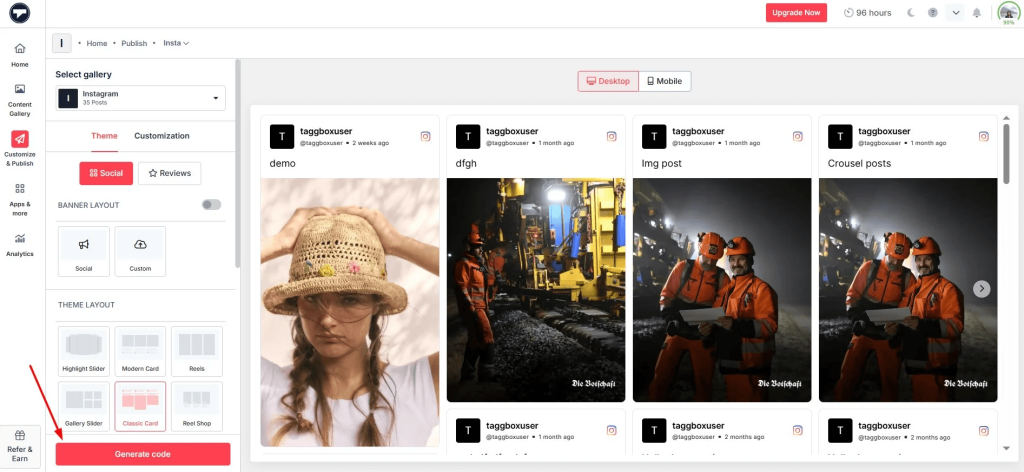
Passaggio 2: Personalizza il tuo feed di Instagram
Modera e progetta il tuo feed in modo che corrisponda al tuo marchio. Puoi scegliere layout come una griglia o un Widget cursore Instagram per rendere i tuoi contenuti più coinvolgenti.
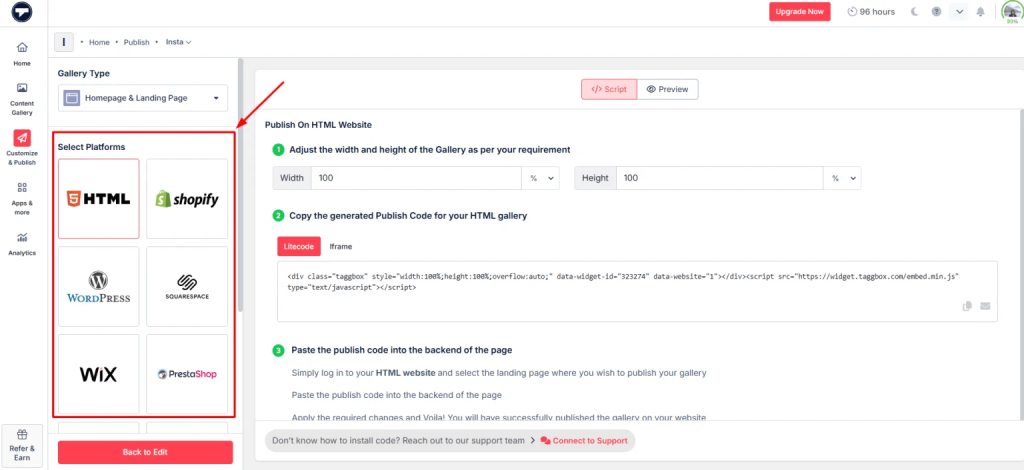
Passaggio 3: Genera codice incorporato
Una volta che il tuo feed è pronto, copia il codice di incorporamento. Questo ti permetterà di incorporare un feed di Instagram in una landing page o in un sito web collegato alla tua email.
Passaggio 4: Aggiungi il feed alla tua campagna Mailchimp
In Mailchimp, aggiungi la landing page oppure utilizza il codice di incorporamento nel tuo modello di email (tramite blocco HTML).
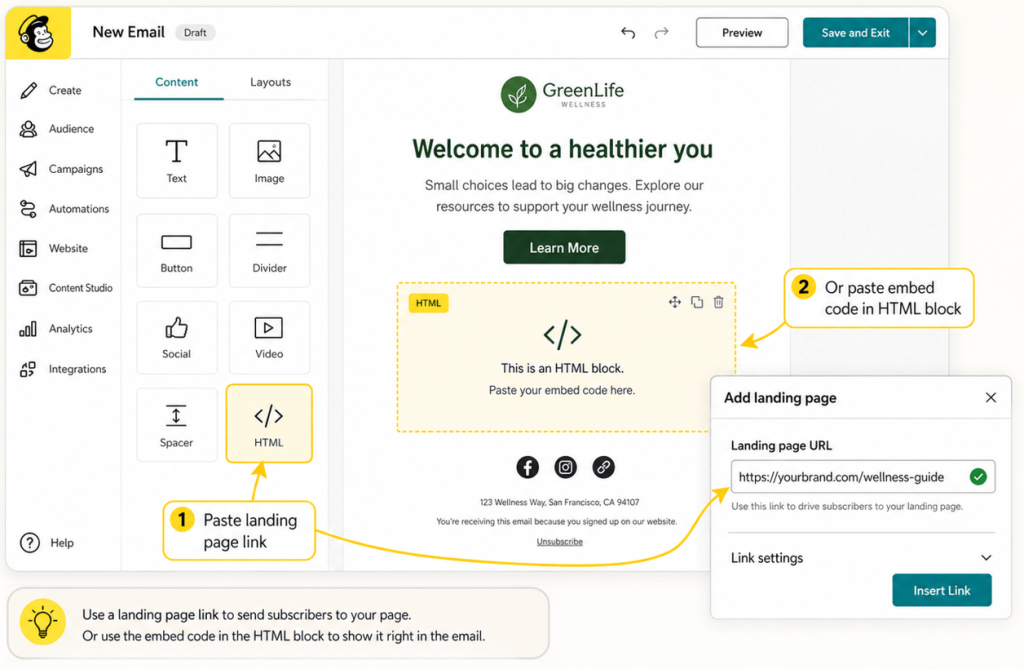
Passaggio 5: Pubblicazione e monitoraggio delle prestazioni
Invia la tua campagna e monitora FidanzamentoI contenuti visivi, come l'inserimento di reel di Instagram in siti web, video e storie, spesso migliorano il tasso di clic.
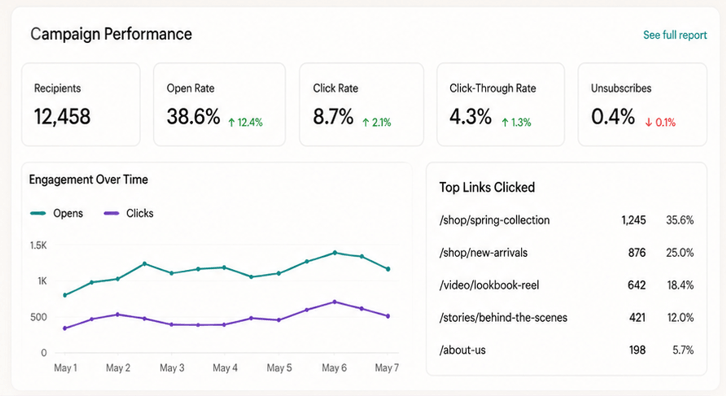
Disconnettere o modificare un account Instagram
Ci sono alcune limitazioni da tenere a mente:
- È possibile collegare un solo account Instagram per ogni configurazione di Mailchimp.
- La disconnessione rimuove tutti i contenuti incorporati dalle e-mail
- Dovrai riconnetterti se cambi account
Anche Mailchimp segue un flusso di autorizzazione rigoroso, quindi l'accesso deve essere riapprovato se le autorizzazioni cambiano.
Come Mailchimp utilizza i contenuti di Instagram
Una volta integrato, Mailchimp ti permette di fare molto di più che semplicemente incorporare post.
Puoi visualizzare:
- Un singolo post di Instagram
- Una fila di pali
- Immagini cliccabili che rimandano a Instagram
- Nome del profilo e logo per il riconoscimento del marchio
Questo aggiunge profondità visiva alle email, facendole percepire meno come semplici promozioni e più come vere e proprie esperienze.
E funziona.
Le email con contenuti visivi tendono a:
- Ottieni tassi di clic più elevati
- Mantieni gli utenti coinvolti più a lungo
- Attira più traffico sui canali social
Casi d'uso comuni dell'integrazione di Mailchimp con Instagram
Ecco come viene effettivamente utilizzato in diversi settori.
1. Marchi di e-commerce
I marchi di e-commerce prosperano grazie agli elementi visivi.
Grazie all'integrazione di Instagram con Mailchimp, possono:
- Mostra le immagini del prodotto in scenari di vita reale
- Utilizza Instagram come strumento di riprova sociale.
- Genera traffico da email → Instagram → sito web
Invece di immagini statiche dei prodotti, mostri come appaiono i prodotti nella vita reale.
2. Influencer Marketing
I contenuti creati dagli influencer ottengono risultati migliori rispetto ai contenuti di marca nella maggior parte dei casi.
I marchi possono:
- Integra i post degli influencer nelle campagne email
- Mettere in evidenza i contenuti generati dagli utenti (UGC)
- Instaurare fiducia all'istante
Questa soluzione funziona particolarmente bene se abbinata a strumenti che consentono di incorporare un feed di Instagram o di curare contenuti su larga scala.
3. Società SaaS
Anche i brand SaaS traggono vantaggio da Instagram.
Essi possono:
- Condividi gli aggiornamenti del prodotto in modo visivo
- Descrivi le caratteristiche in contenuti di breve formato.
- Aumentare il coinvolgimento tramite newsletter
Aggiungere elementi visivi da Instagram rende le email meno ricche di testo e più coinvolgenti. Leggi questo articolo per scoprire come incorporare un feed di hashtag di Instagram in un sito web.
4. Imprese locali
Per le attività commerciali locali, Instagram è spesso il principale canale di scoperta.
Grazie all'integrazione con Mailchimp, possono:
- Promuovi gli eventi tramite i post di Instagram
- Invia aggiornamenti visivi agli abbonati
- Mantenere la coerenza del marchio
Questo funziona particolarmente bene se combinato con un Widget Instagram per HTML sul loro sito web.
Procedure consigliate per l'integrazione di Mailchimp con Instagram
Ora che sei arrivato a questo punto, è importante ricordare che la semplice integrazione non basta; devi utilizzare l'integrazione tra Instagram e Mailchimp in modo intelligente per massimizzare i risultati.
1. Utilizzare solo contenuti ad alte prestazioni
Non tutti i post di Instagram sono adatti alla tua email. Scegli i post con un alto tasso di interazione.
2. Allineare i contenuti su tutti i canali
Il tuo profilo Instagram e le tue email dovrebbero essere coerenti. Stesso tono, stesso messaggio e stessa campagna.
3. Segmentare prima di sincronizzare gli annunci
Se utilizzi la sincronizzazione del pubblico, segmenta prima le tue liste. Un targeting migliore equivale a un ROI migliore.
4. Non sovraccaricare le email
Un numero eccessivo di elementi visivi può rallentare il caricamento della pagina e confondere i lettori. L'equilibrio è fondamentale.
5. Test A/B su tutto
Test:
- Diversi formati di post
- Numero di immagini
- Posizionamento nell'e-mail
Piccoli accorgimenti possono portare a grandi miglioramenti.
Oltre l'email: estendere i contenuti di Instagram al tuo sito web
Sebbene Mailchimp gestisca le email, è sul tuo sito web che spesso avvengono le conversioni.
Ecco dove gli strumenti piacciono Taggbox entra.
Invece di limitare i contenuti di Instagram alle email, puoi:
- Inserisci un feed di Instagram nella tua homepage
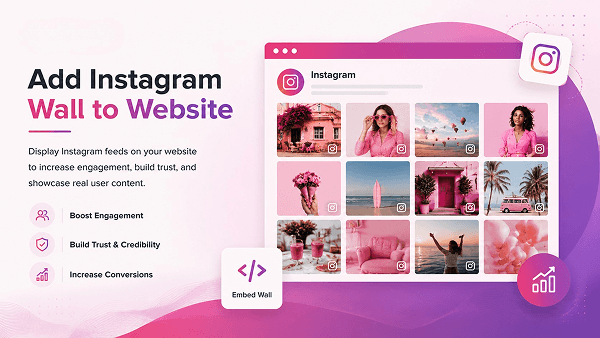
- Incorpora i reel di Instagram sul sito web per contenuti dinamici
- Incorpora un video di Instagram per dimostrazioni di prodotto
- Incorpora le storie di Instagram per aggiornamenti in tempo reale
- Incorpora il feed degli hashtag di Instagram sul sito web per le campagne UGC
Puoi anche creare:
- Un widget slider di Instagram per la navigazione interattiva.
- Un widget Instagram completo per HTML che si aggiorna automaticamente.
Ciò crea coerenza tra:
Instagram → Email → Sito web
Ed è proprio ciò di cui ha bisogno il marketing moderno.
Conclusione
L'integrazione di Mailchimp con Instagram non si limita all'inserimento di post; si tratta di costruire un ciclo di marketing completo.
Instagram attira l'attenzione. Mailchimp trasforma quell'attenzione in azioni. Il retargeting riporta gli utenti sul sito. Quando colleghi questi canali, non stai più inseguendo i clienti, ma li stai guidando. E in questo modo, passano dall'essere semplici potenziali clienti ad acquirenti, o da semplici visitatori ad acquirenti, che è esattamente ciò che desideri per la tua attività.
Se vuoi davvero crescere, non trattare le piattaforme separatamente.
Fate in modo che collaborino.
È lì che si vedono i veri risultati.

Rohan Singh è un redattore senior di contenuti presso Taggbox Con 6 anni di esperienza nella creazione di contenuti che posizionano i brand come leader del settore, la sua competenza include la leadership di pensiero, l'analisi delle tendenze e lo storytelling strategico che creano fiducia e promuovono la fedeltà del pubblico.
Altro da Rohan Singh
 Harshita Rajoria

 Yuvraj
 Jennet