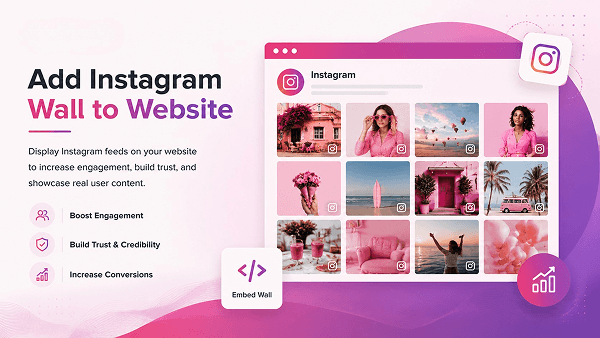
Per aggiungere una bacheca Instagram a un sito web, collega il tuo account Instagram a TaggboxScegli un layout di visualizzazione, personalizza il design in modo che corrisponda al tuo marchio e incolla il codice di incorporamento generato nel tuo sito: non è richiesta alcuna programmazione.
Una bacheca Instagram è una visualizzazione dinamica e ad aggiornamento automatico dei tuoi post, Reels, hashtag e contenuti dei clienti di Instagram, mostrata direttamente sul tuo sito web o sullo schermo del tuo evento. Invece di caricare manualmente le foto o lasciare che la tua homepage diventi obsoleta, la bacheca carica automaticamente nuovi contenuti ogni volta che pubblichi qualcosa, tagghi un cliente o avvii una campagna con hashtag.
In questa guida, imparerai passo dopo passo come aggiungere una bacheca Instagram a un sito web, le funzionalità da privilegiare in uno strumento per widget, i layout più popolari, esempi concreti in diversi settori e i punti migliori del tuo sito dove visualizzarla.
Cos’è un muro di Instagram?
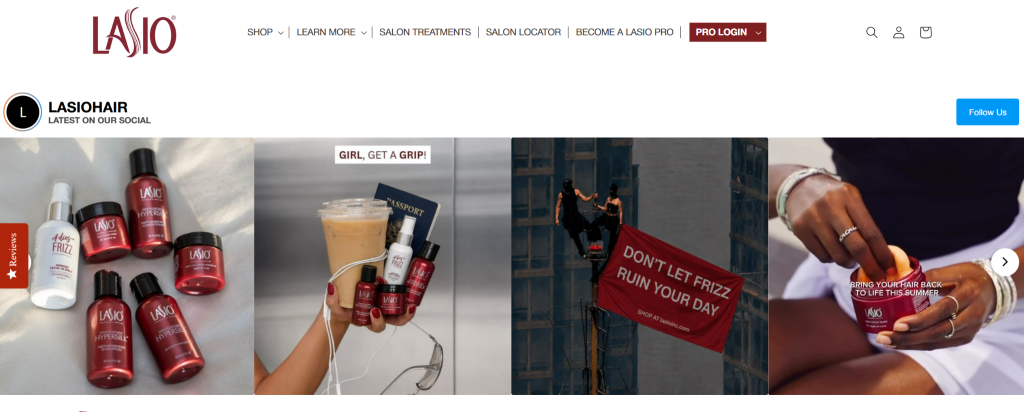
Un Instagram Wall è un widget che visualizza contenuti Instagram in tempo reale, post, Reels, hashtag e foto taggate, aggiornandosi automaticamente senza intervento manuale. Può essere incorporato in un sito web o visualizzato su un grande schermo durante eventi e luoghi dal vivo, rendendolo un popolare Muro Instagram per eventi con l'obiettivo di incrementare il coinvolgimento in tempo reale.
Invece di aggiungere manualmente le foto, la bacheca importa automaticamente i contenuti dalle fonti scelte e si aggiorna man mano che vengono pubblicati nuovi post, mantenendo i siti web sempre aggiornati e fornendo agli schermi degli eventi contenuti in tempo reale dei partecipanti. In entrambi i casi, aiuta le aziende a mostrare prova sociale e creare un'esperienza più interattiva.
A seconda dello strumento, una bacheca Instagram può includere:
- Post – Foto e video dal tuo profilo Instagram, ideali per mostrare prodotti, annunci e aggiornamenti del marchio.
- Reels – Contenuti video di breve formato che catturano l'attenzione e generano un maggiore coinvolgimento.
- Hashtags – Post pubblicati nell'ambito di una campagna specifica o con un hashtag di marca, perfetti per concorsi ed eventi.
- Messaggi taggati – Contenuti in cui gli utenti hanno taggato il tuo account, evidenziando interazioni reali con i clienti.
- Contenuti generati dagli utenti (UGC) – Foto, recensioni e testimonianze dei clienti che aggiungono autenticità e infondono fiducia
Caratteristiche importanti da tenere d'occhio sulla bacheca di Instagram
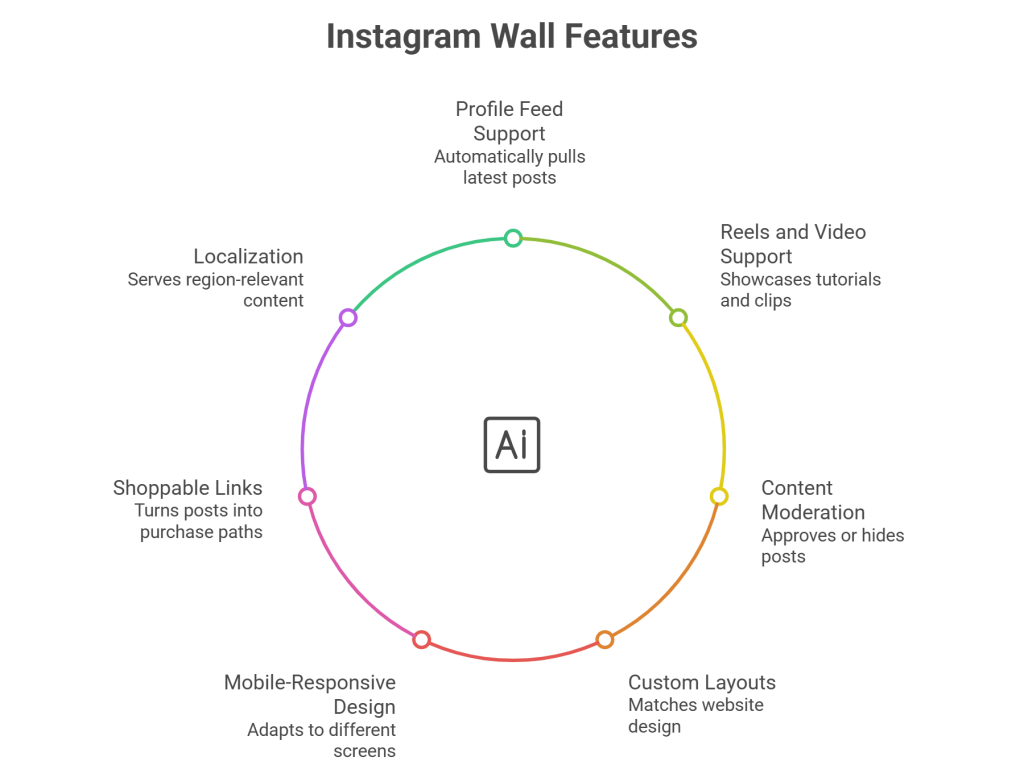
Non tutti gli strumenti per la bacheca di Instagram sono uguali. Prima di sceglierne uno, verifica che offra:
- supporto per i feed di profili – Scarica automaticamente i tuoi post più recenti, così la bacheca non diventa mai obsoleta
- Supporto per bobine e video – Ti permette di mostrare tutorial, dimostrazioni e filmati del dietro le quinte.
- Aggiornamenti automatici dei contenuti – Sincronizza i nuovi post in tempo reale, senza bisogno di aggiornamenti manuali.
- Moderazione e filtri dei contenuti – Approva, nascondi o rimuovi i post prima che vengano pubblicati, in modo che vengano visualizzati solo contenuti in linea con il marchio.
- Layout e branding personalizzati – Abbina colori, caratteri, spaziatura e stili delle carte al design del tuo sito web
- Design mobile-responsive – Si adatta perfettamente agli schermi di computer desktop, tablet e dispositivi mobili.
- Link e pulsanti CTA per l'acquisto – Trasforma i post in un feed Instagram acquistabile che offre ai visitatori un percorso diretto per l'acquisto di marchi di e-commerce.
- Localizzazione e Google Analytics – Fornire contenuti pertinenti alla regione e monitorare le prestazioni del muro
Utilizza i contenuti di Instagram come un feed dinamico che si aggiorna automaticamente su tutte le pagine del tuo sito web.
Inizia ora gratuitamentePerché aggiungere una bacheca Instagram al tuo sito web?
- Mantieni aggiornati i contenuti del sito web. – I nuovi post vengono visualizzati automaticamente, quindi il tuo sito non apparirà mai obsoleto
- Mostra contenuti autentici dei clienti – Foto e recensioni reali infondono maggiore fiducia rispetto a testi di marketing ben confezionati.
- Costruisci prove sociali – Un coinvolgimento visibile e interazioni reali rassicurano i nuovi visitatori prima dell'acquisto.
- Aumenta il coinvolgimento – I contenuti visivi e scorrevoli mantengono gli utenti sulla pagina più a lungo
- Promuovere campagne - Muri hashtag estendere la portata di concorsi, lanci ed eventi
- Crescere il tuo seguito – I visitatori che apprezzano i contenuti del tuo sito sono più propensi a seguirti su Instagram.
Come aggiungere una bacheca Instagram a un sito web
Aggiungere una bacheca Instagram con Taggbox Bastano pochi minuti e non è richiesta alcuna programmazione.
Passaggio 1: crea il tuo Taggbox Account
Scegli uno strumento come Taggbox che offre moderazione, personalizzazione, aggiornamenti automatici e analisi. Vai su taggbox and log in Se hai già un account, registrati. Altrimenti, registrati.
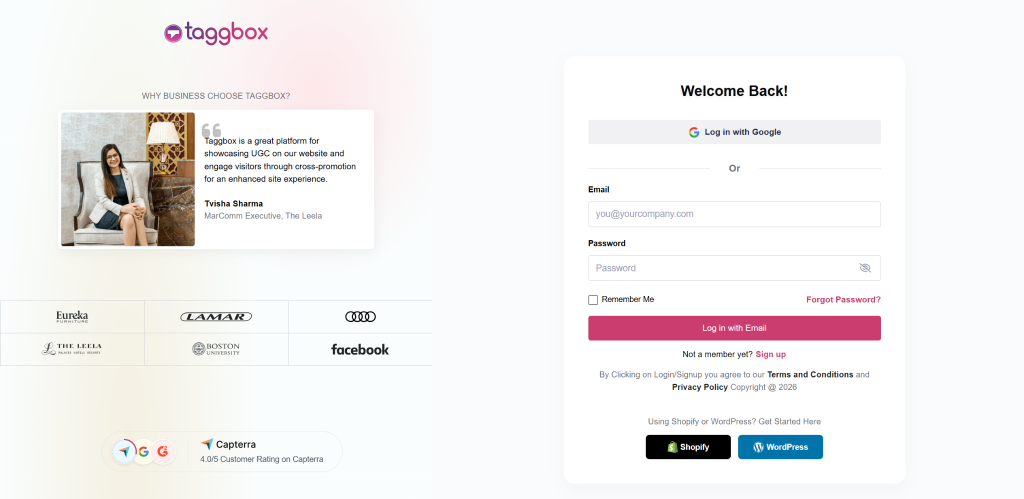
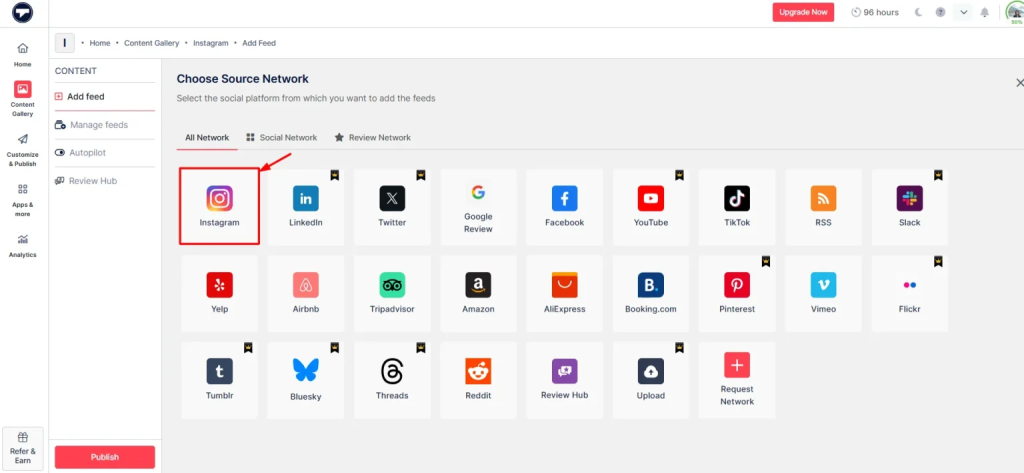
Passaggio 2: collega il tuo account Instagram
Seleziona Instagram come fonte dei contenuti. Quindi, puoi scegliere come vuoi estrarre i contenuti, ad esempio utilizzando hashtag, tag, handle, menzioni ecc. Quindi, fai clic su "Crea Feed".
Passaggio 3: Modera la tua bacheca di Instagram
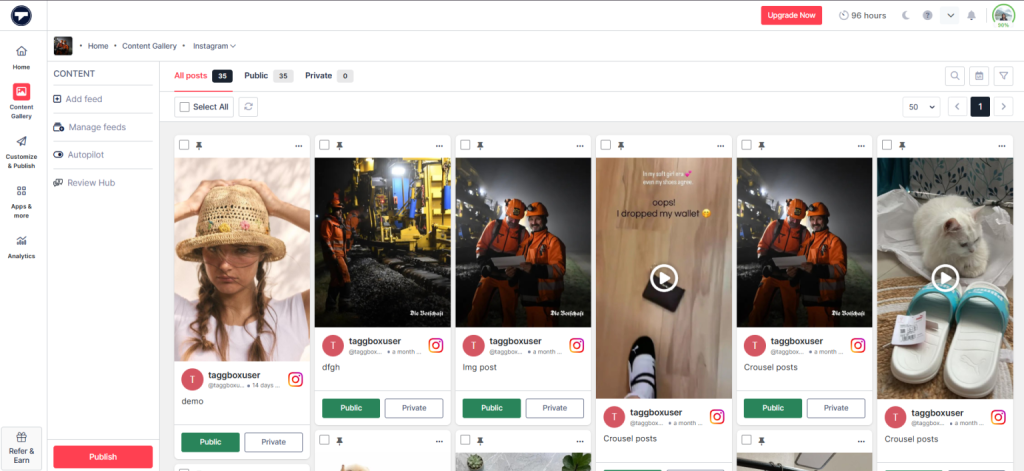
Ora vedrai la tua galleria di contenuti creata. Ora puoi moderare i contenuti che desideri rendere pubblici o privati e poi creare il tuo feed di conseguenza.
Passaggio 4: Personalizza la tua bacheca di Instagram
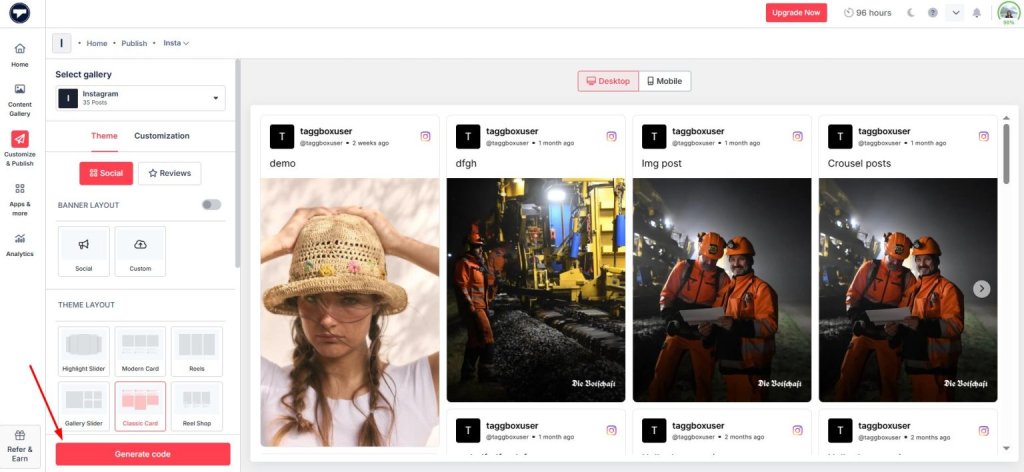
Clicca sul "Personalizza e pubblicaIl pulsante " sul lato sinistro. Scegli un layout adatto al design del tuo sito: Griglia, Muratura, Slider, Carosello, Collage o un formato Reels dedicato. Regola colori, caratteri, temi, spaziatura e stili delle schede per adattarli al tuo marchio.
Passaggio 5: Copia il codice di incorporamento
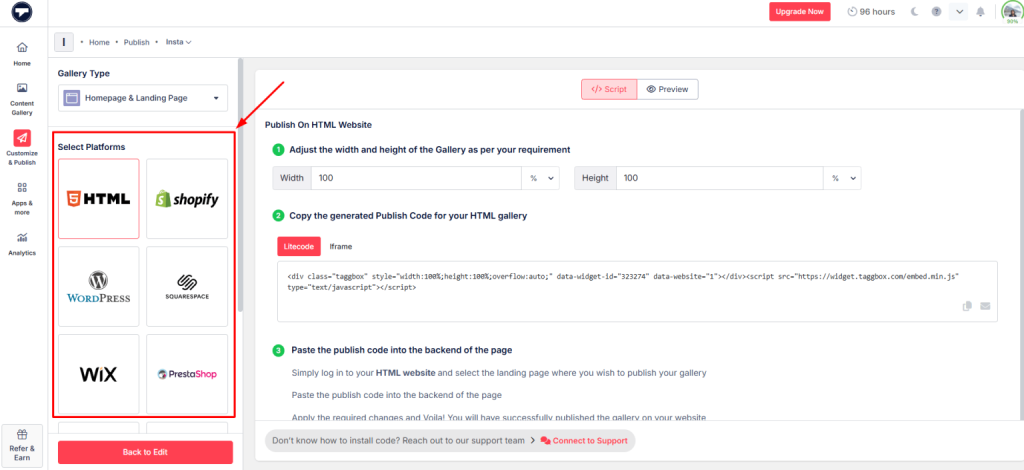
Una volta che il muro sembra giusto, fai clic su Genera codice Seleziona la piattaforma su cui è costruito il tuo sito (ad esempio, WordPress, Shopify) e copia il codice relativo a quella piattaforma.
Passaggio 6: Incolla il codice nel sito web
Successivamente, apri la pagina in cui desideri Widget di Instagram per apparire. Quindi, incolla il codice che hai appena copiato. Visualizzalo in anteprima su desktop e dispositivi mobili prima di pubblicarlo, poi pubblica la pagina.
Aggiungi facilmente Instagram Wall al tuo sito web e visualizza post, Reels e contenuti generati dagli utenti senza bisogno di programmazione.
Aggiungi il muro oraTipi popolari di bacheche Instagram
Le bacheche di Instagram sono disponibili in diversi layout, ognuno progettato per mostrare i contenuti in modo unico. Il formato più adatto dipende dagli obiettivi del tuo sito web, dallo stile dei contenuti e dall'esperienza che desideri offrire ai visitatori.
Parete a griglia classica di Instagram
Una griglia pulita e ben distanziata dei tuoi ultimi post.
Ideale per: Visualizzazione dei contenuti recenti di Instagram in modo curato e organizzato.
Muro di muratura su Instagram
Un layout dinamico che si adatta a foto, video e reel di diverse dimensioni senza imporre dimensioni uniformi.
Ideale per: Contenuti misti di immagini e video.
Muro degli hashtag di Instagram
Seleziona i post pubblicati con uno specifico hashtag.
Ideale per: campagne, concorsi ed eventi.
Parete di Reels di Instagram
Mette i video di breve formato in primo piano.
Ideale per: Contenuti video di breve formato e dimostrazioni di prodotti.
Bacheca UGC di Instagram
Focalizzato sui contenuti creati dai clienti: foto, recensioni e testimonianze.
Ideale per: Costruire fiducia attraverso esperienze reali dei clienti.
Parete Instagram interattiva per lo shopping
Aggiunge tag prodotto e pulsanti CTA ai post in modo che i visitatori possano acquistare direttamente.
Ideale per: Commercio elettronico e scoperta di prodotti.
Slider o carosello di Instagram
Un formato compatto e scorrevole che si adatta a sezioni di pagina più piccole.
Ideale per: spazi ristretti come barre laterali o piè di pagina.
Parete collage di Instagram
Una composizione di più post visivamente ricca e creativa.
Ideale per: pagine iniziali e portfolio creativi.
Esempi di bacheca Instagram su un sito web
HYUE — Bellezza ed e-commerce (griglia acquistabile)
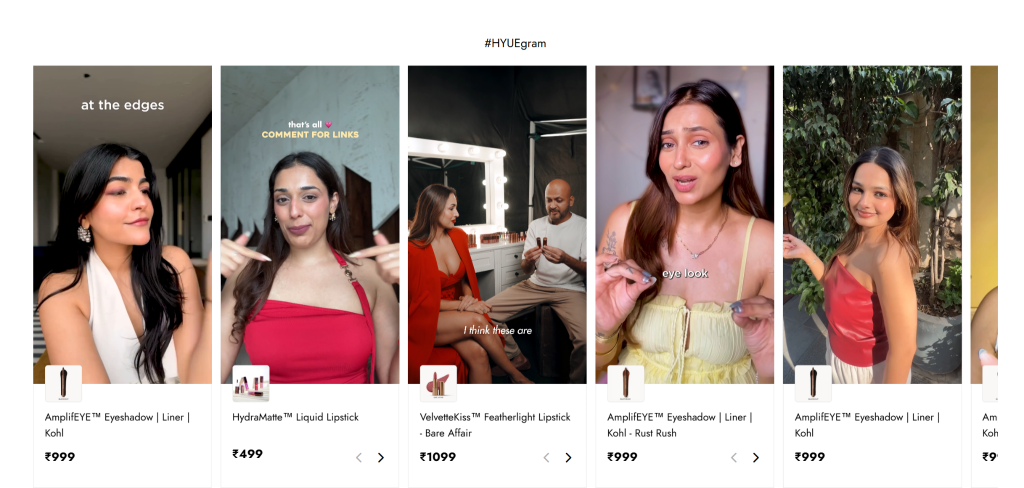
HYUE utilizzato Taggbox Integrare una galleria di contenuti generati dagli utenti (UGC) acquistabili nelle pagine dei prodotti, taggando contenuti reali dei clienti per incentivare gli acquisti. Il risultato: 17.2 visualizzazioni del widget, 29.3 clic e un tasso di clic del 171%.
Mossberg — Marchio di armi da fuoco (UGC Grid)
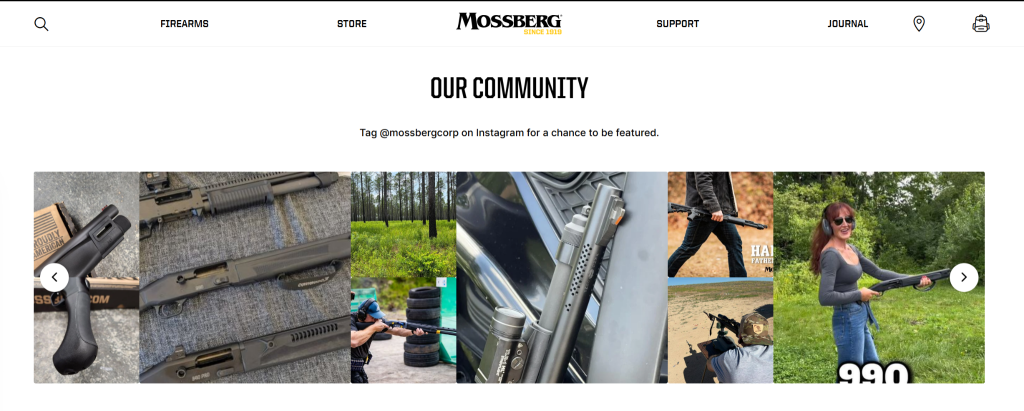
Sulla loro "Home Page", Mossberg utilizza un layout a griglia pulito e invita i clienti a "Taggare @mossbergcorp su Instagram per avere la possibilità di essere pubblicati", trasformando le foto dei clienti che ritraggono le loro armi in azione in contenuti di marca autentici e pronti all'uso.
Crescent Homes — Costruttore di case (Griglia feed Instagram)
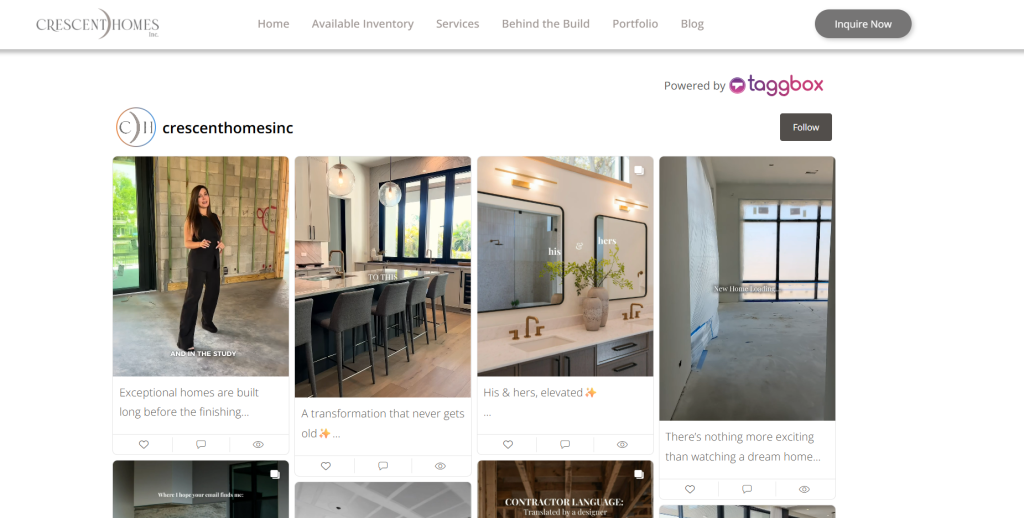
Crescent Homes integra una griglia Instagram in tempo reale direttamente sul suo sito, che raccoglie foto del dietro le quinte della costruzione, trasformazioni prima e dopo e momenti del team con relative didascalie, offrendo ai potenziali acquirenti una visione reale del processo di costruzione prima ancora di richiedere informazioni.
Grupo Libera (CAV 2026) — Evento/Conferenza (Carosello in stile narrativo)
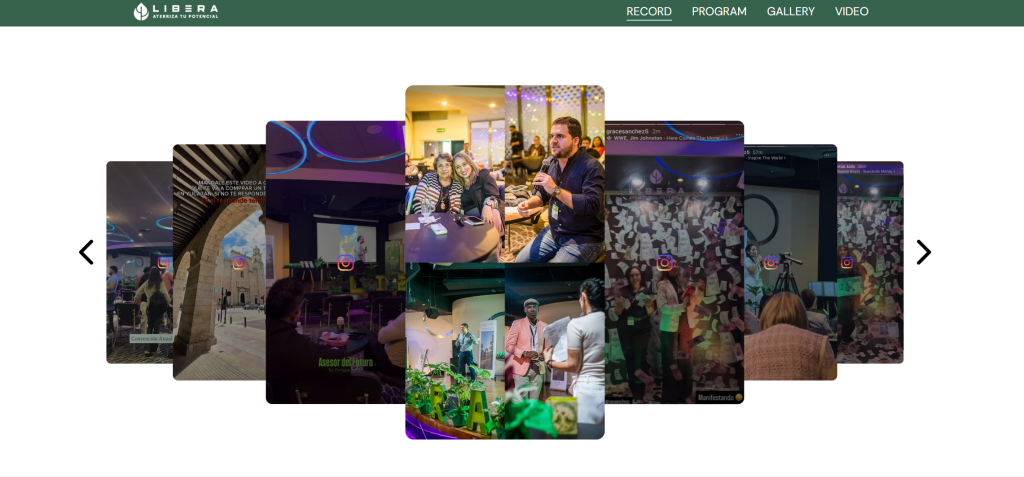
Per il suo convegno annuale, Grupo Libera utilizza un carosello a più livelli in stile "story" che imita le Storie di Instagram, mostrando i momenti salienti del convegno, le sessioni dei relatori e i momenti dei partecipanti in un formato scorrevole creato appositamente per le pagine degli eventi.
Playpoint Asia — Attrezzature per il tempo libero e i parchi giochi (Griglia a carte rotonde)
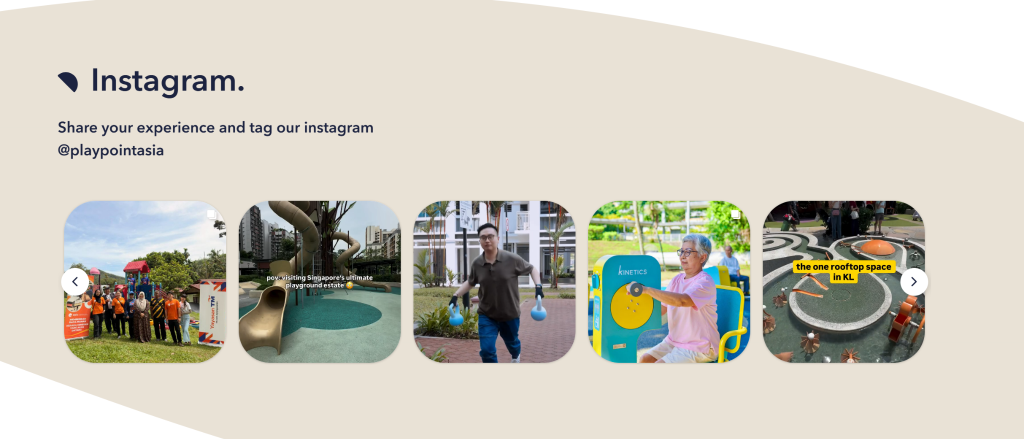
Playpoint Asia mostra una griglia Instagram con schede arrotondate e un invito diretto al tag ("Condividi la tua esperienza e tagga il nostro profilo Instagram @playpointasia"), che mette in mostra installazioni reali e visite dei clienti nei suoi progetti di parchi giochi: una solida prova sociale per un acquirente B2B/B2G.
In tutti e cinque gli esempi, il layout corrisponde al modello di business: griglie interattive per l'e-commerce, elementi generati dagli utenti per i brand orientati alla community, caroselli in stile narrativo per gli eventi e griglie in stile portfolio per i siti creativi e B2B.
Visualizza post, Reels e contenuti generati dagli utenti di Instagram direttamente sul tuo sito e mantienilo costantemente aggiornato.
Inizia ora gratuitamenteDove allestire una parete Instagram
- Pagina iniziale — crea una prima impressione forte e coinvolgente
- Pagine del prodotto — Le foto di clienti reali accanto al prodotto infondono fiducia nell'acquisto
- Landing pagine — rafforzare i messaggi della campagna con contenuti autentici
- Galleria UGC — una sezione dedicata alle foto dei clienti e ai post taggati
- Pagina dell'evento — mostra i contenuti in diretta dei partecipanti prima, durante e dopo un evento
- Chi siamo pagina — aggiunge personalità attraverso momenti di squadra e contenuti dietro le quinte
- Piè di pagina del sito web — un modo discreto e sempre visibile per mantenere i contenuti social in vista su ogni pagina
Conclusione
Una bacheca Instagram trasforma un sito web statico in una vetrina vivente e in costante aggiornamento della presenza social del tuo brand. Che tu voglia costruire fiducia con foto reali dei clienti, promuovere una campagna con hashtag o semplicemente mantenere la tua homepage sempre aggiornata senza lavoro manuale, è uno degli aggiornamenti più semplici che puoi fare. Con TaggboxPuoi collegare il tuo account Instagram, scegliere un layout, personalizzare il design e pubblicare, il tutto senza scrivere una sola riga di codice. Inizia a creare la tua bacheca Instagram oggi stesso e trasforma i visitatori occasionali in follower e clienti interessati.
Domande frequenti
È possibile aggiungere una bacheca Instagram senza programmazione?
Sì. La maggior parte degli strumenti della bacheca di Instagram, come TaggboxOffrono un processo di configurazione senza codice. È sufficiente collegare il proprio account Instagram, generare un codice di incorporamento e incollarlo nel proprio sito web.
La bacheca di Instagram si aggiorna automaticamente?
Sì. La maggior parte delle moderne soluzioni per le bacheche di Instagram si sincronizzano automaticamente con Instagram e mostrano i nuovi post non appena vengono pubblicati, contribuendo a mantenere aggiornati i contenuti del tuo sito web senza bisogno di aggiornamenti manuali.
I post con hashtag possono apparire sulla bacheca di Instagram?
Sì. Molti strumenti per la bacheca di Instagram consentono di raccogliere e visualizzare contenuti provenienti da hashtag specifici, risultando ideali per campagne, concorsi, eventi e iniziative di brand basate su hashtag.
È possibile visualizzare i Reels di Instagram su un sito web?
Sì. Gli Instagram Reels possono essere visualizzati tramite una bacheca Instagram, consentendo alle aziende di incorporare instagram reel pubblicano contenuti e presentano brevi video direttamente sui loro siti web.
Dove si può allestire una bacheca Instagram?
Le bacheche di Instagram possono essere aggiunte alle homepage, alle pagine dei prodotti, alle landing page, alle pagine degli eventi, alle pagine Chi siamo, gallerie di contenuti generati dagli utentie persino i piè di pagina del sito web, a seconda dei tuoi obiettivi.
È possibile utilizzare una bacheca Instagram su WordPress e Shopify?
Sì. Le bacheche Instagram sono compatibili con le piattaforme web più diffuse come WordPress, Shopify, Wix, Squarespace, Webflow e molti altri sistemi di gestione dei contenuti.

Harshita Rajoria è una specialista di contenuti presso Taggbox Con oltre 8 anni di esperienza nella creazione di contenuti coinvolgenti, perspicaci e fruibili, è un'esperta di contenuti generati dagli utenti, strategie di content marketing e coinvolgimento sui social media, aiutando i brand a costruire connessioni autentiche con il loro pubblico.
Altri contenuti di Harshita Rajoria

 Upendra
 Rohan Singh


 Wagisha