
Para adicionar um mural do Instagram a um site, conecte sua conta do Instagram a TaggboxEscolha um layout de exibição, personalize o design para combinar com a sua marca e cole o código de incorporação gerado no seu site — sem necessidade de programação.
Um mural do Instagram é uma exibição ao vivo e com atualização automática das suas publicações, Reels, hashtags e conteúdo de clientes do Instagram, diretamente no seu site ou na tela do seu evento. Em vez de fazer upload manual de fotos ou deixar sua página inicial desatualizada, o mural exibe conteúdo novo automaticamente sempre que você publica, marca um cliente ou realiza uma campanha com hashtag.
Neste guia, você aprenderá exatamente como adicionar um mural do Instagram a um site, passo a passo, os recursos que vale a pena priorizar em uma ferramenta de widget, os layouts de mural mais populares, exemplos reais em diversos setores e os melhores lugares do seu site para exibi-lo.
O que é um mural do Instagram?
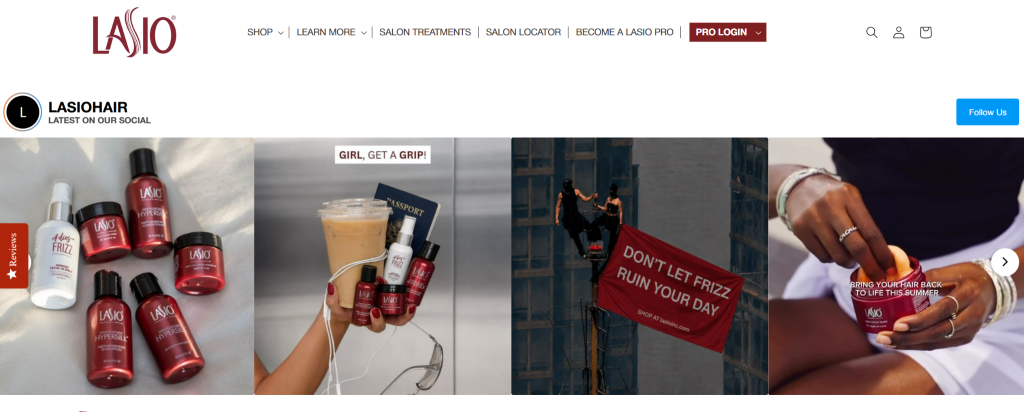
Um mural do Instagram é um widget que exibe conteúdo ao vivo do Instagram, incluindo posts, Reels, hashtags e fotos marcadas, atualizando-se automaticamente sem intervenção manual. Ele pode ser incorporado a um site ou exibido em um telão em eventos e locais ao vivo, tornando-se uma opção popular. Mural do Instagram para eventos Buscando aumentar o engajamento em tempo real.
Em vez de adicionar fotos manualmente, o mural automaticamente importa conteúdo das fontes escolhidas e se atualiza conforme novas publicações são feitas, mantendo os sites atualizados e exibindo conteúdo em tempo real dos participantes nos telões do evento. De qualquer forma, isso ajuda as empresas a se destacarem. prova social e criar uma experiência mais interativa.
Dependendo da ferramenta, um mural do Instagram pode atrair:
- POSTAGENS – Fotos e vídeos do seu próprio perfil do Instagram, ideais para apresentar produtos, anúncios e atualizações da marca.
- Rolos – Conteúdo em vídeo de formato curto que chama a atenção e gera maior engajamento.
- Hashtags – Publicações feitas sob uma campanha específica ou hashtag da marca, perfeitas para concursos e eventos.
- Postagens marcadas – Conteúdo em que os usuários marcaram sua conta, destacando interações reais com clientes.
- Conteúdo gerado pelo usuário (UGC) – Fotos, avaliações e depoimentos de clientes que agregam autenticidade e geram confiança.
Características importantes do mural do Instagram para observar
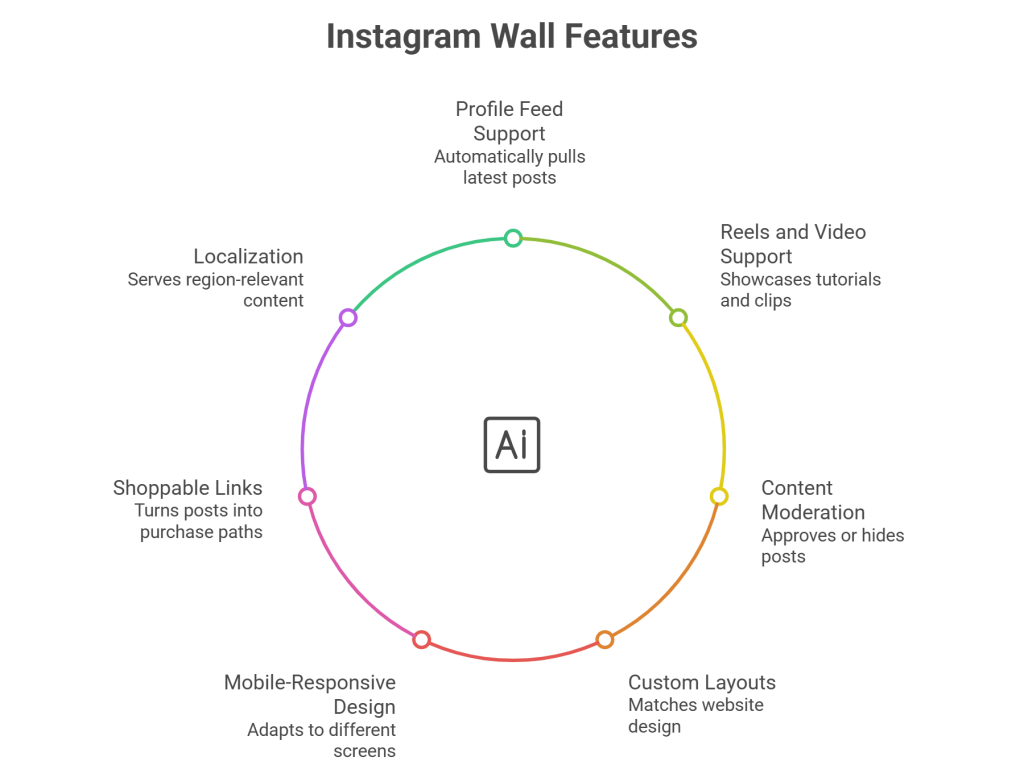
Nem todas as ferramentas para o mural do Instagram são iguais. Antes de escolher uma, verifique se ela oferece:
- Suporte para feed de perfil – Exibe automaticamente suas postagens mais recentes para que o mural nunca fique desatualizado.
- Reels e suporte a vídeo – Permite exibir tutoriais, demonstrações e vídeos de bastidores.
- Atualizações automáticas de conteúdo – Sincroniza novas publicações em tempo real, sem necessidade de atualização manual.
- Moderação de conteúdo e filtros – Aprovar, ocultar ou remover publicações antes que sejam publicadas, para que apenas conteúdo alinhado à marca seja exibido.
- Layouts e identidade visual personalizados – Combine cores, fontes, espaçamento e estilos de cartão com o design do seu site.
- Design responsivo para dispositivos móveis – Adapta-se perfeitamente a telas de computadores, tablets e celulares.
- Links de compra e botões de chamada para ação – Transformar publicações em um feed do Instagram comprável Isso proporciona aos visitantes um caminho direto para a compra para marcas de comércio eletrônico.
- Localização e Google Analytics – Exibir conteúdo relevante para a região e monitorar o desempenho do mural.
Utilize o conteúdo do Instagram como um feed dinâmico que se atualiza automaticamente em todas as páginas do seu site.
Comece gratuitamente agoraPor que adicionar um mural do Instagram ao seu site?
- Mantenha o conteúdo do site atualizado. – Novas publicações aparecem automaticamente, para que seu site nunca pareça desatualizado.
- Exibir conteúdo autêntico do cliente – Fotos e avaliações reais geram mais confiança do que textos de marketing impecáveis.
- Construa prova social – O envolvimento visível e as interações reais tranquilizam os novos visitantes antes da compra.
- Aumentar o envolvimento – Conteúdo visual e com rolagem mantém as pessoas na página por mais tempo.
- Promover campanhas - Paredes de hashtags Ampliar o alcance de concursos, lançamentos e eventos.
- Cresça seus seguidores Visitantes que gostam do que veem no seu site têm maior probabilidade de segui-lo no Instagram.
Como adicionar um mural do Instagram a um site
Adicionando um mural do Instagram com Taggbox Leva apenas alguns minutos e não requer nenhum conhecimento de programação.
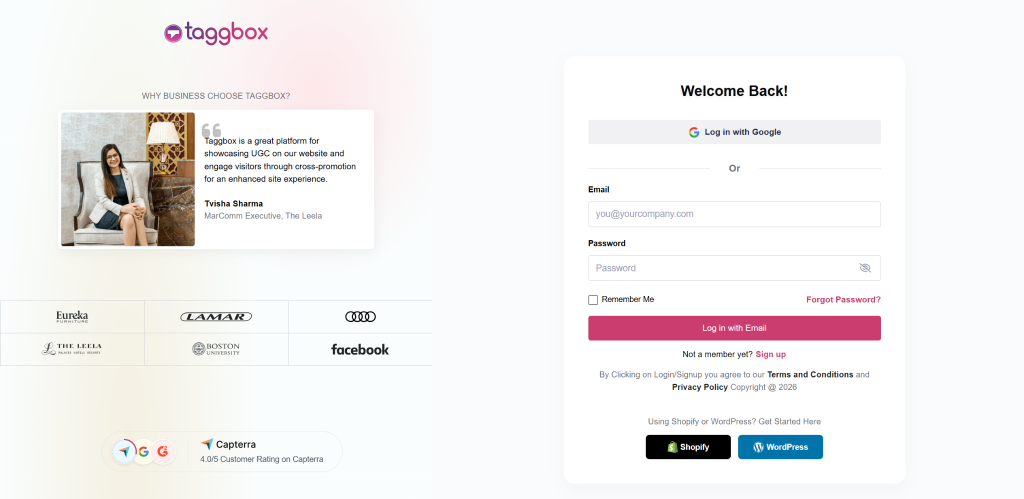
Etapa 1: Crie seu Taggbox de Corretora
Escolha uma ferramenta como Taggbox que oferece moderação, personalização, atualizações automáticas e análises. Acesse taggbox e login na sua conta MXNUMX Se você já possui uma conta. Caso contrário, cadastre-se.
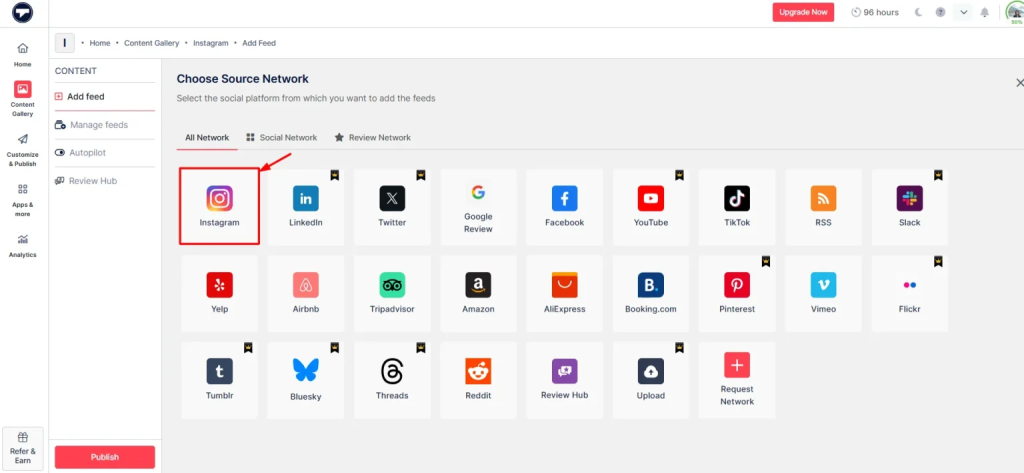
Passo 2: Conecte sua conta do Instagram
Selecione o Instagram como sua fonte de conteúdo. Em seguida, você pode escolher como deseja extrair o conteúdo, como por meio de hashtags, marcações, nomes de usuário, menções etc. Depois, clique em “Criar Feed".
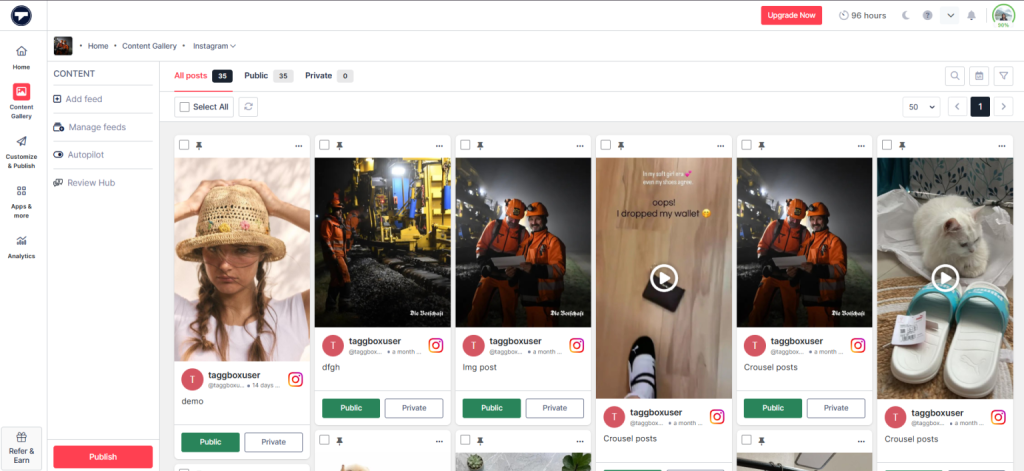
Passo 3: Modere seu mural do Instagram
Agora, você verá sua galeria de conteúdo criada. Em seguida, modere o conteúdo que deseja tornar público ou privado e crie seu feed de acordo.
Passo 4: Personalize seu mural do Instagram
Clique no "Personalizar e publicarClique no botão “Selecionar layout” no lado esquerdo. Escolha um layout que se adapte ao design do seu site: Grade, Alvenaria, Deslizador, Carrossel, Colagem ou um formato Reels específico. Ajuste cores, fontes, temas, espaçamento e estilos de cards para combinar com a sua identidade visual.
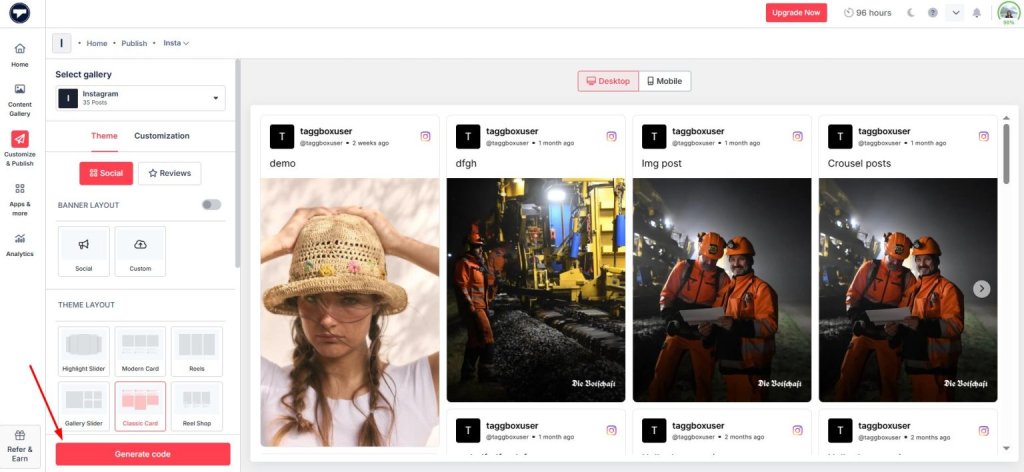
Passo 5: Copie o código de incorporação
Assim que a parede estiver com a aparência correta, clique em Gerar Código Selecione a plataforma em que seu site foi construído (por exemplo, WordPress, Shopify) e copie o código correspondente.
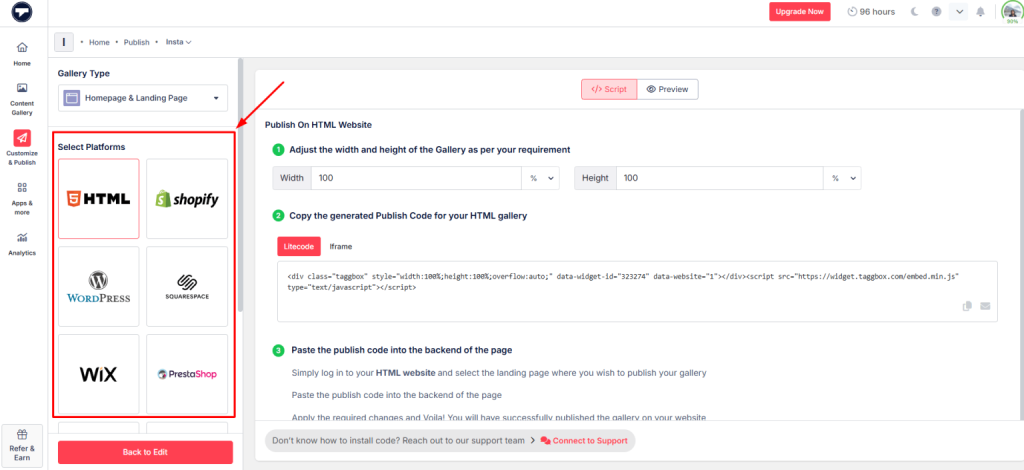
Passo 6: Cole o código no site
Em seguida, abra a página onde você deseja que seu Widget do Instagram Para que apareça, cole o código que você acabou de copiar. Visualize-o no computador e no celular antes de publicar e, em seguida, publique a página.
Adicione facilmente um mural do Instagram ao seu site e exiba publicações, Reels e conteúdo gerado pelo usuário sem precisar programar.
Adicionar Parede AgoraTipos populares de murais do Instagram
Os murais do Instagram vêm em diferentes layouts, cada um projetado para exibir conteúdo de uma maneira única. O formato ideal depende dos objetivos do seu site, do estilo do conteúdo e da experiência que você deseja criar para os visitantes.
Grade clássica do Instagram
Uma grade organizada e com espaçamento uniforme das suas postagens mais recentes.
Ideal para: Exibir conteúdo recente do Instagram de forma organizada e elegante.
Parede de alvenaria do Instagram
Um layout dinâmico que se adapta a fotos, vídeos e Reels de diferentes tamanhos sem impor dimensões uniformes.
Ideal para: Conteúdo misto de imagens e vídeos.
Mural de hashtags do Instagram
Exibe publicações feitas com uma hashtag específica.
Ideal para: campanhas, concursos e eventos.
Mural de Reels do Instagram
Coloca o vídeo de formato curto em primeiro plano.
Ideal para: Conteúdo em vídeo de formato curto e demonstrações de produtos.
Mural de conteúdo gerado pelo usuário do Instagram
Com foco em conteúdo criado pelo cliente — fotos, avaliações e depoimentos.
Ideal para: Construindo confiança através de experiências reais do cliente.
Mural do Instagram interativo para compras
Adiciona etiquetas de produtos e botões de chamada à ação (CTA) às publicações para que os visitantes possam comprar diretamente.
Ideal para: Comércio eletrônico e descoberta de produtos.
Slider ou carrossel do Instagram
Um formato compacto e com rolagem que se adapta a seções de página menores.
Ideal para: Espaços apertados, como barras laterais ou rodapés.
Parede de colagens do Instagram
Uma composição visualmente rica e criativa de múltiplas postagens.
Ideal para: Páginas iniciais e portfólios criativos.
Exemplos de mural do Instagram em sites
HYUE — Beleza e Comércio Eletrônico (Grade de Compras)
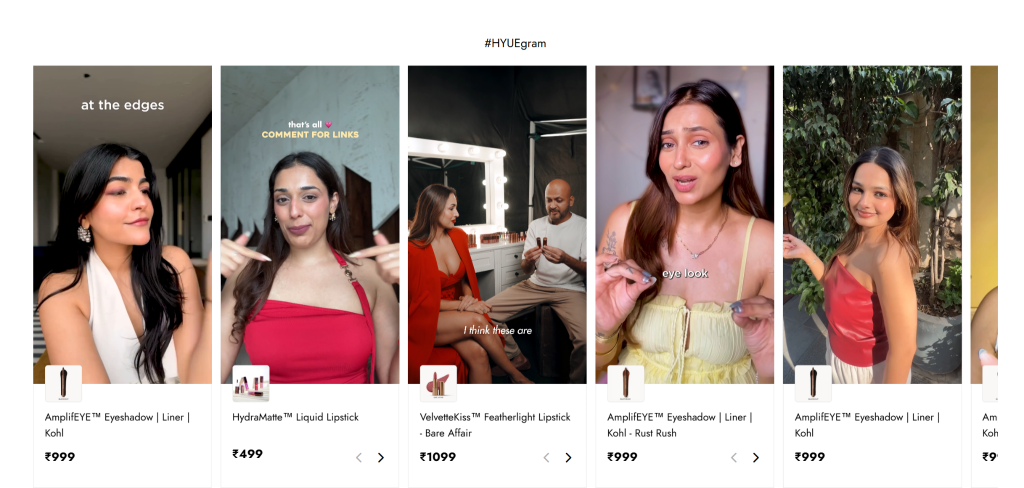
HYUE usava Taggbox Incorporar uma galeria de conteúdo gerado pelo usuário (UGC) com possibilidade de compra nas páginas de produtos, marcando conteúdo real de clientes para impulsionar as vendas. O resultado: 17.2 mil visualizações do widget, 29.3 mil cliques e uma taxa de cliques (CTR) de 171%.
Mossberg — Marca de Armas de Fogo (UGC Grid)
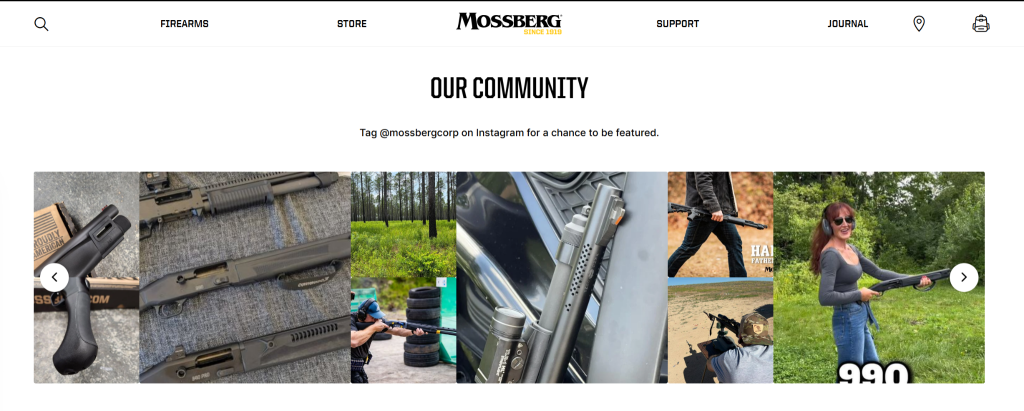
Em sua “Página Inicial”, a Mossberg utiliza um layout em grade limpo e convida os clientes a “Marcar @mossbergcorp no Instagram para ter a chance de aparecer em destaque” — transformando fotos de clientes com suas armas de fogo em ação em conteúdo de marca autêntico e pronto para uso.
Crescent Homes — Construtora de Casas (Feed do Instagram em formato de grade)
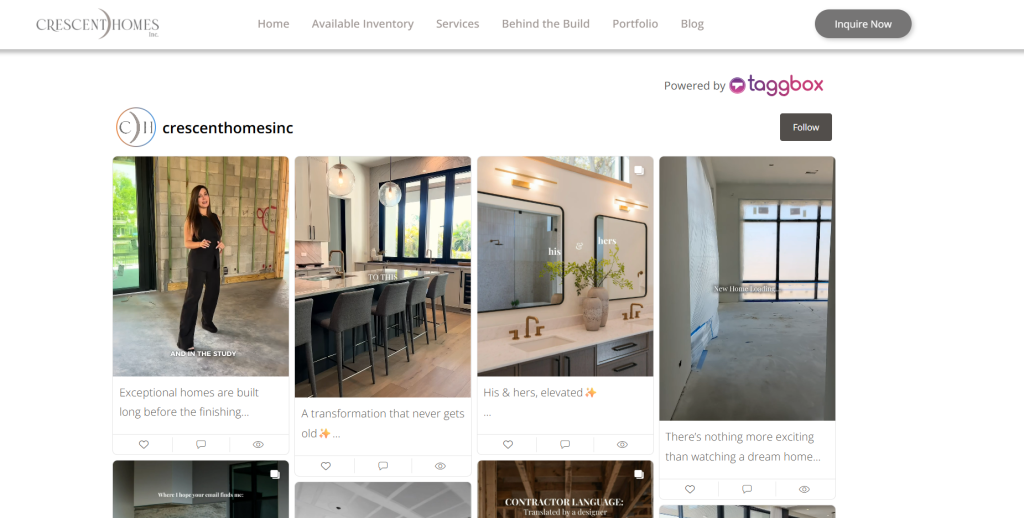
A Crescent Homes incorpora um feed do Instagram ao vivo diretamente em seu site, exibindo fotos dos bastidores da construção, transformações de antes e depois e momentos da equipe com legendas intactas — oferecendo aos potenciais compradores uma visão real do processo de construção antes mesmo de entrarem em contato.
Grupo Libera (CAV 2026) — Evento/Conferência (Carrossel em formato de história)
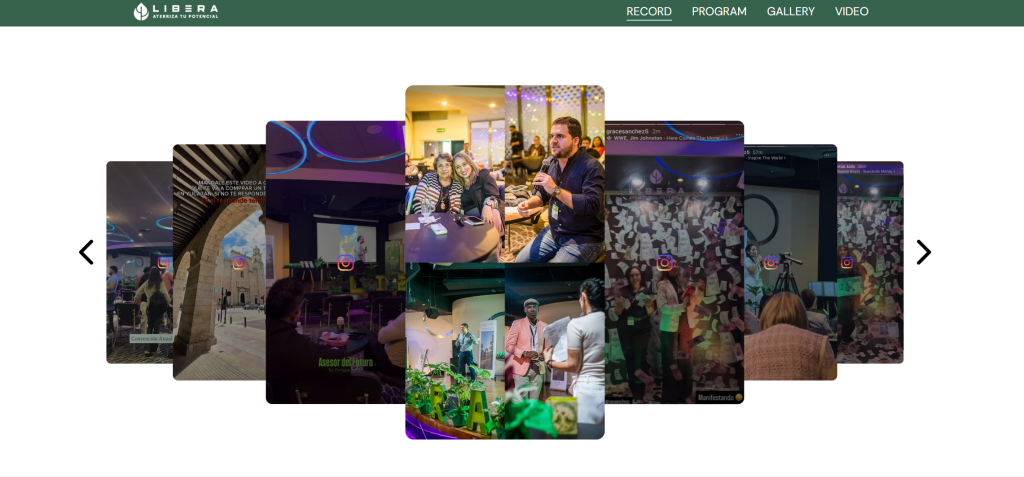
Para sua convenção anual, o Grupo Libera utiliza um carrossel empilhado, no estilo de histórias, que imita os Stories do Instagram – exibindo os destaques da convenção, as sessões dos palestrantes e os momentos dos participantes em um formato de rolagem criado especificamente para páginas de eventos.
Playpoint Asia — Equipamentos de Recreação e Parques Infantis (Grade de Cartões Arredondada)
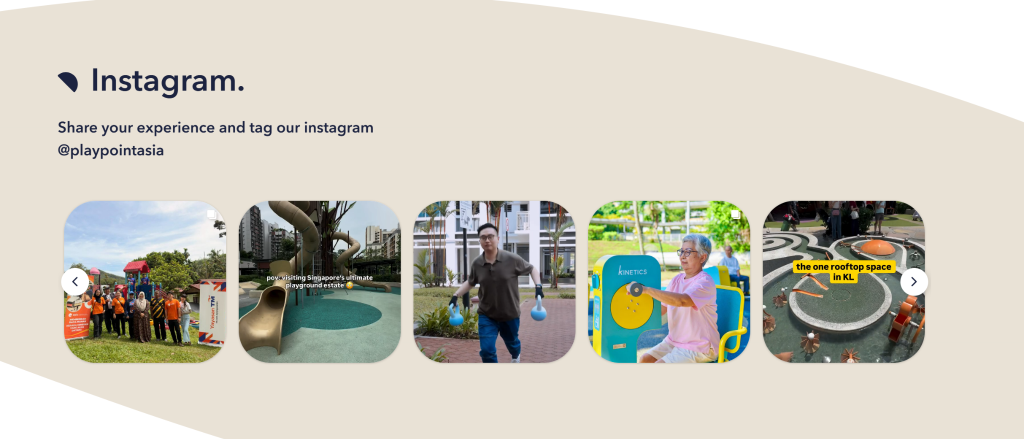
A Playpoint Asia exibe um feed do Instagram com um cartão arredondado e um convite direto para marcação ("Compartilhe sua experiência e marque nosso Instagram @playpointasia"), mostrando instalações reais e visitas de clientes em seus projetos de playgrounds – uma forte prova social para um comprador B2B/B2G.
Em todos os cinco exemplos, o layout corresponde ao modelo de negócios: grades interativas para comércio eletrônico, solicitações de conteúdo gerado pelo usuário para marcas voltadas para a comunidade, carrosséis em formato de história para eventos e grades em formato de portfólio para sites criativos e B2B.
Exiba posts do Instagram, Reels e conteúdo gerado pelo usuário diretamente no seu site e mantenha-o sempre atualizado.
Comece gratuitamente agoraOnde exibir um mural do Instagram
- Página inicial — cria uma primeira impressão forte e envolvente
- Páginas do produto — Fotos reais de clientes ao lado do produto aumentam a confiança do comprador
- As páginas de destino — reforçar a mensagem da campanha com conteúdo autêntico
- Galeria UGC — um espaço dedicado para fotos de clientes e publicações marcadas
- Página do evento — Exibe conteúdo ao vivo dos participantes antes, durante e depois de um evento.
- Página sobre nós — adiciona personalidade por meio de momentos em equipe e conteúdo de bastidores
- Rodapé do site — uma forma sutil e sempre visível de manter o conteúdo social em destaque em todas as páginas.
Conclusão
Um mural do Instagram transforma um site estático em uma vitrine viva e em constante atualização da presença da sua marca nas redes sociais. Seja para construir confiança com fotos reais de clientes, promover uma campanha com hashtag ou simplesmente manter sua página inicial atualizada sem trabalho manual, é uma das melhorias mais fáceis que você pode fazer. TaggboxCom o Instagram, você pode conectar sua conta, escolher um layout, personalizar o design e publicar — tudo sem precisar escrever uma única linha de código. Comece a construir seu mural do Instagram hoje mesmo e transforme visitantes casuais em seguidores e clientes engajados.
Perguntas frequentes
É possível adicionar um mural do Instagram sem usar código?
Sim. A maioria das ferramentas do Instagram Wall, como TaggboxOferecemos um processo de configuração sem código. Basta conectar sua conta do Instagram, gerar um código de incorporação e colá-lo em seu site.
O mural do Instagram atualiza automaticamente?
Sim. A maioria das soluções modernas para o mural do Instagram sincroniza automaticamente com o Instagram e exibe novas publicações assim que são publicadas, ajudando a manter o conteúdo do seu site atualizado sem necessidade de atualizações manuais.
É possível que as publicações com hashtags apareçam no mural do Instagram?
Sim. Muitas ferramentas para o mural do Instagram permitem coletar e exibir conteúdo de hashtags específicas, sendo ideais para campanhas, concursos, eventos e iniciativas de hashtags de marcas.
É possível exibir Reels do Instagram em um site?
Sim. Os Reels do Instagram podem ser exibidos em um Mural do Instagram, permitindo que as empresas... incorporar reel do Instagram Conteúdo e exibição de vídeos curtos diretamente em seus sites.
Onde posso exibir um mural do Instagram?
Os murais do Instagram podem ser adicionados a páginas iniciais, páginas de produtos, páginas de destino, páginas de eventos e páginas "Sobre nós". galerias de conteúdo gerado pelo usuárioe até mesmo rodapés de sites, dependendo dos seus objetivos.
É possível criar um mural do Instagram no WordPress e no Shopify?
Sim. Os murais do Instagram são compatíveis com plataformas populares de sites, como WordPress, Shopify, Wix, Squarespace, Webflow e muitos outros sistemas de gerenciamento de conteúdo.

Harshita Rajoria é Especialista em Conteúdo na Taggbox Com mais de 8 anos de experiência na criação de conteúdo envolvente, perspicaz e prático, ela é especialista em conteúdo gerado pelo usuário, estratégia de marketing de conteúdo e engajamento em mídias sociais, ajudando marcas a construir conexões autênticas com seu público.
Mais de Harshita Rajoria

 Upendra
 Rohan Singh



 Wagisha