O marketing não se limita mais a uma única plataforma. As pessoas não descobrem você em uma única plataforma e se convertem magicamente ali. Elas pesquisam, garantem que o nome da sua marca apareça em diversas plataformas, do Instagram ao seu site, passando por e-mails e, às vezes, até mesmo em outras. Essa é a jornada da descoberta à compra, e é aí que a integração do Mailchimp com o Instagram desempenha um papel fundamental.
O Instagram gera reconhecimento de marca. O Mailchimp converte leads. E quando você combina os dois, você não está mais tentando adivinhar onde seu público está; você está guiando-o por uma jornada conectada.
Em vez de tratar o Instagram e o e-mail como canais separados, as marcas hoje estão criando uma experiência unificada por meio de:
- Alguém descobre sua marca no Instagram.
- Os assinantes entram no seu funil de e-mail.
- Os clientes são fidelizados por meio de campanhas.
- Eles são redirecionados no Instagram mais tarde
É nesse ciclo contínuo que ocorre o crescimento sustentável.
O que é a integração do Mailchimp com o Instagram?
Integração do Mailchimp com o Instagram Conecta sua presença no Instagram com seus esforços de marketing por e-mail, para que os dois trabalhem juntos em vez de competirem pela atenção.
Pense nisso como um ecossistema onde conteúdo, público e campanhas fluem entre plataformas.
Existem várias maneiras pelas quais essa integração funciona:
1. Blocos de conteúdo do Instagram (Recurso nativo do Mailchimp)
O Mailchimp permite que você incorpore publicações do Instagram diretamente em seus e-mails com blocos de conteúdo integrados. Isso mantém seus e-mails visualmente atraentes sem esforço extra.
2. Públicos personalizados do Instagram
Usando ferramentas como o LeadsBridge, você pode sincronizar seu público do Mailchimp com anúncios do Instagram. Isso ajuda você a impactar novamente seus assinantes de e-mail diretamente no Instagram.
3. Ferramentas para incorporar perfis do Instagram
Plataformas como Taggbox ajudar Exiba seu perfil do Instagram em e-mails ou experiências na web, aumentando o número de seguidores.
4. Fluxos de trabalho de automação
Ferramentas como o Pabbly Connect permitem fluxos de trabalho automatizados entre o Instagram e o Mailchimp, como novos seguidores → listas de e-mail ou gatilhos de campanha.
Resumindo, a integração do Instagram com o Mailchimp não se resume a uma única funcionalidade, mas sim a conectar todo o seu funil de marketing.
Tipos de integrações do Mailchimp com o Instagram
Vamos analisar como as marcas realmente usam isso no marketing do mundo real.
1. Blocos de conteúdo do Instagram (Recurso nativo do Mailchimp)
Esta é a maneira mais simples de começar. O Mailchimp permite que você:
- Incorporar publicações do Instagram diretamente nos e-mails
- Exibir uma única publicação ou várias publicações em uma grade
- Inclua um link para cada postagem no Instagram.
De acordo com a documentação oficial do Mailchimp, isso funciona por meio de um processo de autorização seguro, no qual sua conta do Instagram se conecta ao editor de e-mail e sincroniza o conteúdo dinamicamente.
Isso é perfeito para marcas que já criam conteúdo no Instagram e desejam reutilizá-lo em newsletters.
2. Incorporação de perfil do Instagram em e-mails
Em vez de apenas postagens, você pode exibir toda a sua presença no Instagram.
Isso ajuda:
- Direcione seus assinantes de e-mail para o seu Instagram.
- Aumentar seguidores do seu público atual
- Estabeleça consistência de marca em todos os canais.
Embora o Mailchimp não ofereça suporte nativo a incorporações de perfil completo, ferramentas de terceiros como Taggbox Preencha a lacuna.
3. Sincronização de Públicos Personalizados do Instagram (Marketing Avançado)
É aqui que as coisas ficam interessantes. Com integrações como o LeadsBridge:
- Seus contatos do Mailchimp são sincronizados com Anúncios no Instagram
- Você pode redirecionar anúncios para assinantes que não converteram.
- Ou crie públicos semelhantes para escalar.
Isso transforma sua lista de e-mails em um poderoso mecanismo de segmentação de anúncios. Em vez de atingir públicos frios, você estará anunciando para pessoas que já conhecem sua marca.
4. Integrações de Automação de Terceiros
Ferramentas como Pabbly Connect e LeadsBridge permitem uma automação mais profunda.
Você pode:
- Acione campanhas de e-mail a partir de ações do Instagram.
- Sincronize os dados do CRM com as campanhas publicitárias.
- Crie automação de funil completo
Por exemplo:
Alguém interage com seu Instagram → entra para sua lista do Mailchimp → recebe uma sequência de e-mails personalizada → é impactado novamente por anúncios posteriormente.
Isso é um ciclo de crescimento completo.
Como conectar o Instagram ao Mailchimp
Vamos ver passo a passo como configurar a integração do Instagram com o Mailchimp.
Requisitos antes da instalação:
Antes de começar, certifique-se de ter:
- An Conta do Instagram
- Uma página do Facebook conectada ao seu Instagram.
- Uma conta do Mailchimp com o novo editor de e-mails.
Sem esses elementos, a integração não funcionará corretamente.
Configuração de integração (blocos de conteúdo)
Veja como conectar o Instagram usando o recurso integrado do Mailchimp:
- Acesse o painel de controle do Mailchimp.
- Abra o criador de campanhas de e-mail.
- Arraste e solte o “Bloco de Conteúdo do Instagram”.
- Faça login na sua conta do Instagram
- Autorizar permissões
- Selecione as postagens que deseja exibir.
Uma vez conectado, o Mailchimp importa os selecionados. Postagens do Instagram no design do seu e-mail.
Esta é uma das maneiras mais fáceis de começar a integração do Mailchimp com o Instagram sem ferramentas adicionais.
Como integrar o Instagram com o Mailchimp via Taggbox
Para configurar a integração do Mailchimp com o Instagram, você pode usar Taggbox Para coletar conteúdo do Instagram e adicioná-lo às suas campanhas de e-mail ou páginas de destino, você pode reutilizar publicações do Instagram e transformar engajamento em conversões.
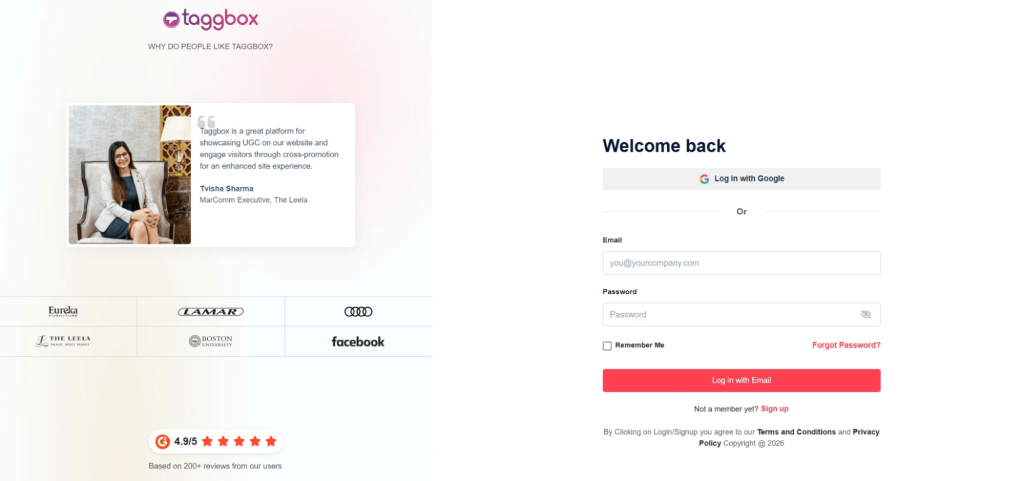
Etapa 1: Crie seu Taggbox widget
Inscreva-se em Taggbox Crie um widget do Instagram escolhendo sua fonte (nome de usuário, hashtag ou menções). Isso reúne todo o seu conteúdo em um único feed.
Passo 2: Personalize seu feed do Instagram
Modere e personalize seu feed para que ele combine com a sua marca. Você pode escolher layouts como grade ou... Widget de controle deslizante do Instagram Para tornar seu conteúdo mais envolvente.
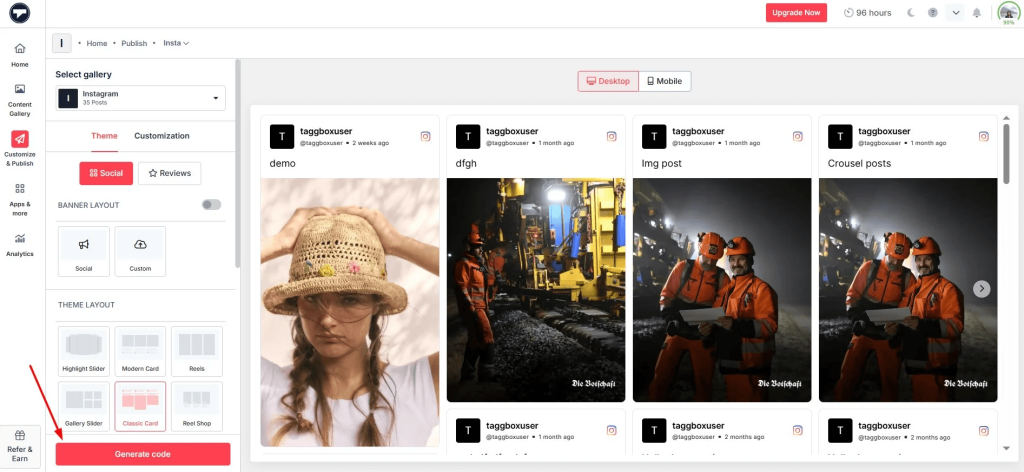
Etapa 3: Gerar código de incorporação
Assim que seu feed estiver pronto, copie o código de incorporação. Isso permitirá que você incorpore um feed do Instagram em uma landing page ou site com link no seu e-mail.
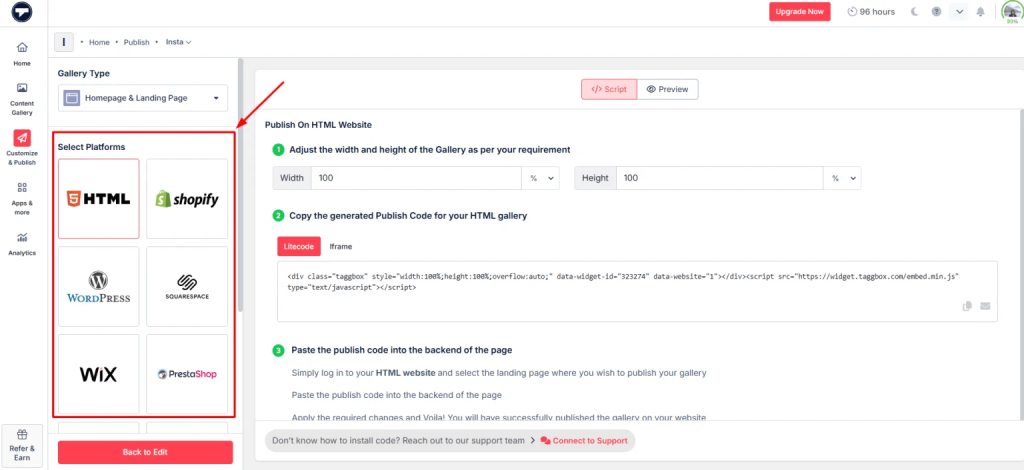
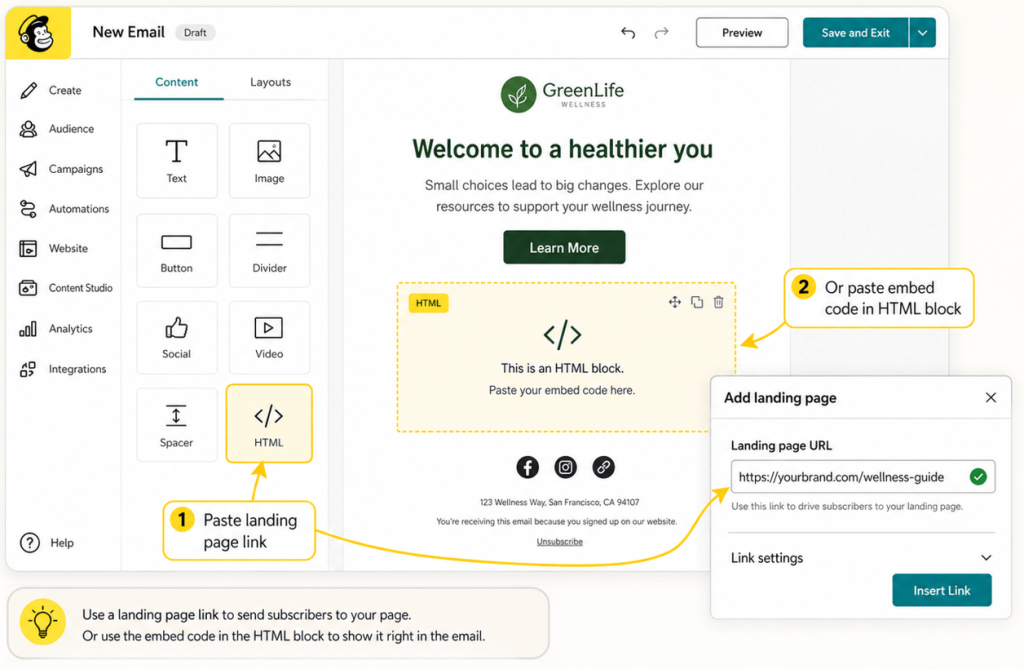
Passo 4: Adicione o feed à sua campanha do Mailchimp
No Mailchimp, adicione a página de destino ou use o código de incorporação no seu modelo de e-mail (via bloco HTML).
Etapa 5: Publicar e acompanhar o desempenho
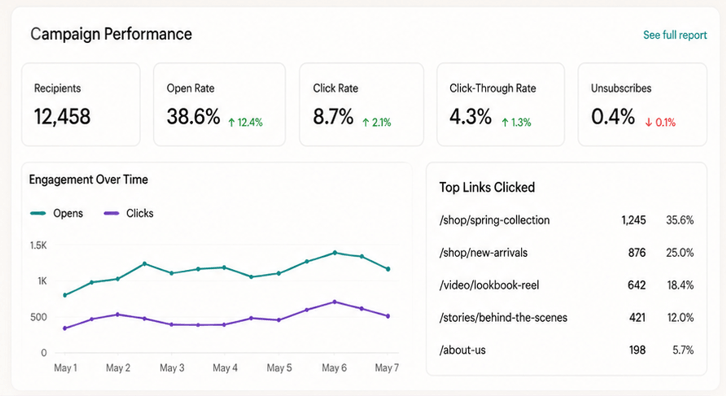
Envie sua campanha e monitore. COMPROMETIMENTOConteúdo visual, como a incorporação de Reels do Instagram em sites, vídeos e Stories, geralmente melhora as taxas de cliques.
Desconectar ou alterar uma conta do Instagram
Há algumas limitações a serem consideradas:
- Você só pode conectar uma conta do Instagram por configuração do Mailchimp.
- Desconectar remove todo o conteúdo incorporado dos e-mails.
- Você precisará se reconectar se trocar de conta.
O Mailchimp também segue um fluxo de autorização rigoroso, portanto, o acesso deve ser aprovado novamente se as permissões forem alteradas.
Como o Mailchimp usa o conteúdo do Instagram
Uma vez integrado, o Mailchimp permite que você faça muito mais do que apenas incorporar publicações.
Você pode exibir:
- Uma única publicação no Instagram
- Uma fileira de postes
- Imagens clicáveis com links para o Instagram
- Nome do perfil e logotipo para reconhecimento da marca
Isso adiciona profundidade visual aos e-mails, fazendo com que pareçam menos promoções e mais experiências.
E funciona.
E-mails com conteúdo visual tendem a:
- Obtenha taxas de cliques mais altas
- Mantenha os usuários engajados por mais tempo
- Direcione mais tráfego de volta para os canais sociais.
Casos de uso comuns da integração do Mailchimp com o Instagram
Veja como diferentes setores da indústria o utilizam na prática.
1. Marcas de comércio eletrônico
As marcas de comércio eletrônico prosperam com recursos visuais.
Com a integração do Instagram com o Mailchimp, eles podem:
- Apresente imagens de produtos em cenários da vida real.
- Use o Instagram como uma camada de prova social.
- Direcione tráfego de e-mail → Instagram → site
Em vez de fotos estáticas dos produtos, você está mostrando como eles são na vida real.
2. Marketing de Influenciadores
O conteúdo de influenciadores geralmente tem um desempenho melhor do que o conteúdo de marcas.
As marcas podem:
- Incorpore publicações de influenciadores em campanhas de e-mail.
- Destaque o conteúdo gerado pelo usuário (UGC)
- Crie confiança instantaneamente
Isso funciona especialmente bem quando combinado com ferramentas que permitem incorporar um feed do Instagram ou selecionar conteúdo em grande escala.
3. Empresas SaaS
Até mesmo as marcas de SaaS se beneficiam do Instagram.
Eles podem:
- Compartilhe atualizações de produtos visualmente
- Detalhar funcionalidades em conteúdo de formato curto
- Aumente o engajamento na newsletter
Adicionar trechos visuais do Instagram torna os e-mails menos carregados de texto e mais envolventes. Leia este artigo para aprender como incorporar um feed de hashtags do Instagram em um site.
4. Negócios locais
Para empresas locais, o Instagram costuma ser o principal canal de descoberta.
Com a integração do Mailchimp, eles podem:
- Promova eventos usando publicações do Instagram
- Envie atualizações visuais aos assinantes.
- Mantenha a marca consistente
Isso funciona especialmente bem quando combinado com um Widget do Instagram para HTML Seu site online.
Melhores práticas ao usar a integração do Mailchimp com o Instagram
Agora que você chegou até aqui, é importante lembrar que a simples integração não basta; você precisa usar a integração do Instagram com o Mailchimp de forma inteligente para maximizar os resultados.
1. Utilize apenas conteúdo de alto desempenho
Nem todas as publicações do Instagram devem ser enviadas por e-mail. Selecione as publicações com alto engajamento.
2. Alinhar o conteúdo em todos os canais
Suas publicações no Instagram e por e-mail devem transmitir uma sensação de conexão. Mesmo tom, mesma mensagem e mesma campanha.
3. Segmentar antes de sincronizar anúncios
Se você usa a sincronização de público-alvo, segmente suas listas primeiro. Melhor segmentação = melhor retorno sobre o investimento (ROI).
4. Não sobrecarregue sua caixa de entrada com e-mails.
O excesso de elementos visuais pode tornar o carregamento mais lento e sobrecarregar os leitores. O equilíbrio é fundamental.
5. Teste A / B de tudo
Teste:
- Diferentes formatos de postagem
- Número de imagens
- Inserção no e-mail
Pequenos ajustes podem levar a grandes melhorias.
Além do e-mail: como estender o conteúdo do Instagram para o seu site
Embora o Mailchimp lide com os e-mails, é no seu site que as conversões geralmente acontecem.
É onde ferramentas como Taggbox entre.
Em vez de limitar o conteúdo do Instagram a e-mails, você pode:
- Incorpore um feed do Instagram na sua página inicial.
- Incorporar Reels do Instagram no site para conteúdo dinâmico
- Incorporar um vídeo do Instagram para demonstrações de produtos
- Incorpore stories do Instagram para atualizações em tempo real
- Incorporar feed de hashtags do Instagram no site para campanhas de conteúdo gerado pelo usuário
Você pode até criar:
- Um widget de apresentação de slides do Instagram para navegação interativa.
- Um widget completo do Instagram para HTML que se atualiza automaticamente.
Isso cria consistência entre:
Instagram → E-mail → Site
Que é exatamente o que o marketing moderno precisa.
Conclusão
A integração do Mailchimp com o Instagram não se resume apenas a incorporar publicações; trata-se de construir um ciclo de marketing completo.
O Instagram chama a atenção. O Mailchimp converte essa atenção em ação. O remarketing traz os usuários de volta. Ao conectar esses canais, você não está mais correndo atrás dos clientes; você está, na verdade, guiando-os. E, nessa sequência de eventos, eles acabam se tornando compradores, ou visitantes, que é exatamente o que você deseja para o seu negócio.
Se você leva o crescimento a sério, não trate as plataformas separadamente.
Faça com que trabalhem juntos.
É aí que se encontram os resultados reais.

Rohan Singh é redator de conteúdo sênior na [nome da empresa/organização]. Taggbox Com 6 anos de experiência na criação de conteúdo que posiciona marcas como líderes do setor, sua expertise inclui liderança de pensamento, análise de tendências e storytelling estratégico que constrói confiança e fideliza o público.
Mais de Rohan Singh
 Harshita Rajoria

 Yuvraj
 Jennet