
Sie können TripAdvisor-Bewertungen mithilfe der offiziellen TripAdvisor-Widgets oder eines Bewertungs-Widgets eines Drittanbieters wie beispielsweise [Name des Drittanbieters] in Ihre Website einbetten. TaggboxMithilfe dieser Tools können Sie Bewertungen, Auszüge aus Rezensionen und Kundenerfahrungen direkt auf Ihren Seiten anzeigen, ohne dass die Besucher Ihre Website verlassen müssen.
Das Hinzufügen von TripAdvisor-Bewertungen stärkt das Vertrauen, unterstützt Buchungsentscheidungen und liefert Hotels, Restaurants, Reiseveranstaltern und Reiseunternehmen sichtbare soziale Beweise. Dieser Leitfaden erklärt, wie Sie ein TripAdvisor-Widget in Ihre Website einbinden, vergleicht die verfügbaren Methoden und zeigt, wo Sie Bewertungen am besten platzieren, um die größtmögliche Wirkung zu erzielen.
Was ist ein TripAdvisor-Bewertungs-Widget?
A TripAdvisor-Bewertungs-Widget ist ein Tool, mit dem Unternehmen ihre TripAdvisor-Bewertungen direkt auf ihrer Website anzeigen können. Es zeigt die TripAdvisor-Bewertung des Unternehmens, Auszüge aus aktuellen Bewertungen und weitere Details zum Eintrag an.
Der Feed ruft automatisch Informationen aus Ihrem TripAdvisor-Profil ab und präsentiert sie ansprechend. Dazu gehören Sternebewertungen, schriftliche Rezensionen, Namen der Rezensenten, Rezensionsdaten und allgemeine Kundenerfahrungen, die von früheren Gästen oder Kunden geteilt wurden. Ob Sie ein Hotel, ein Restaurant, ein Reisebüro oder einen Reiseveranstalter betreiben – ein TripAdvisor-Widget hilft Ihnen, positive Bewertungen in attraktive Gästebewertungen umzuwandeln. Social Proof die Besucher sofort sehen können.
Warum sollten Sie TripAdvisor-Bewertungen auf Ihrer Website einbetten?

Von der Stärkung der Glaubwürdigkeit bis zur Verbesserung des Engagements können authentische Bewertungen einen positiven Einfluss darauf haben, wie Menschen online mit Ihrem Unternehmen interagieren.
Schafft Vertrauen bei Besuchern
Vertrauen ist einer der wichtigsten Faktoren bei Online-Kaufentscheidungen. Wenn Besucher authentische TripAdvisor-Bewertungen und Feedback von früheren Kunden sehen, wirkt Ihr Unternehmen transparenter und vertrauenswürdiger. Die Einbindung von TripAdvisor-Bewertungen auf Ihren Webseiten trägt dazu bei, Unsicherheiten abzubauen und das Vertrauen potenzieller Kunden zu stärken.
Hilft dabei, Buchungen und Anfragen zu steigern
Positive Bewertungen können den entscheidenden Anstoß für Besucher geben, aktiv zu werden. Ob Hotelbuchung, Tischreservierung oder Informationsanfrage – authentische Kundenbewertungen fördern die Konversionsrate. Ein gut platziertes TripAdvisor-Widget kann die Anzahl der Buchungen und Anfragen deutlich steigern.
Hält Besucher auf Ihrer Website
Ohne eingebettete Bewertungen verlassen Nutzer möglicherweise Ihre Website, um Ihr TripAdvisor-Profil separat zu besuchen. Indem Sie Bewertungen direkt auf Ihrer Website anzeigen, bieten Sie Besuchern die gesuchten Informationen, ohne deren Navigation zu unterbrechen. So bleiben sie auf Ihrer Website aktiv und können Ihr Angebot weiter erkunden.
Zeigt echte Kundenerlebnisse
TripAdvisor-Bewertungen präsentieren authentische Erfahrungsberichte von Nutzern Ihrer Dienstleistungen. Sie bieten praktische Einblicke, die herkömmliche Marketingbotschaften oft nicht vermitteln können. Durch die Einbindung von TripAdvisor-Bewertungen ermöglichen Sie potenziellen Kunden, von realen Erfahrungen zu lernen und fundierte Entscheidungen zu treffen.
Verbessert die Website-Interaktion
Widgets überprüfen Ergänzen Sie Ihre Website um dynamische und interaktive Inhalte. Besucher verbringen tendenziell mehr Zeit damit, Kundenbewertungen zu lesen, Rezensionen anzusehen und Erfahrungen zu vergleichen. Diese verstärkte Interaktion kann die Nutzerbindung auf Ihrer Website insgesamt verbessern und mehr Möglichkeiten schaffen, interessierte Besucher in Kunden zu verwandeln.
Fügen Sie Tripadvisor-Bewertungen zu Ihrer Website hinzu und helfen Sie Besuchern, vertrauensvoll zu buchen.
Versuchen Taggbox FreiSo betten Sie TripAdvisor-Bewertungen auf Ihrer Website ein
Durch das Hinzufügen von TripAdvisor-Bewertungen zu Ihrer Website können Sie mehr Vertrauen aufbauen und Buchungen fördern. Und so geht's:
Die Verwendung von Taggbox
Wenn Sie nach einer einfachen Möglichkeit suchen, TripAdvisor-Bewertungen auf der Website einbinden Seiten ohne Programmierung, Taggbox Der Prozess wird dadurch vereinfacht. In nur wenigen Schritten können Sie TripAdvisor-Bewertungen sammeln, anpassen und anzeigen, die Vertrauen schaffen und zu mehr Buchungen anregen.
Schritt 1: Wählen Sie TripAdvisor als Bewertungsquelle aus
Registrieren Sie sich oder melden Sie sich an TaggboxGehen Sie zum Bereich „Bewertungs-Widget“ und erstellen Sie eine neue Galerie. Wählen Sie anschließend TripAdvisor als Bewertungsquelle aus, um Bewertungen aus Ihrem Unternehmensprofil zu sammeln.
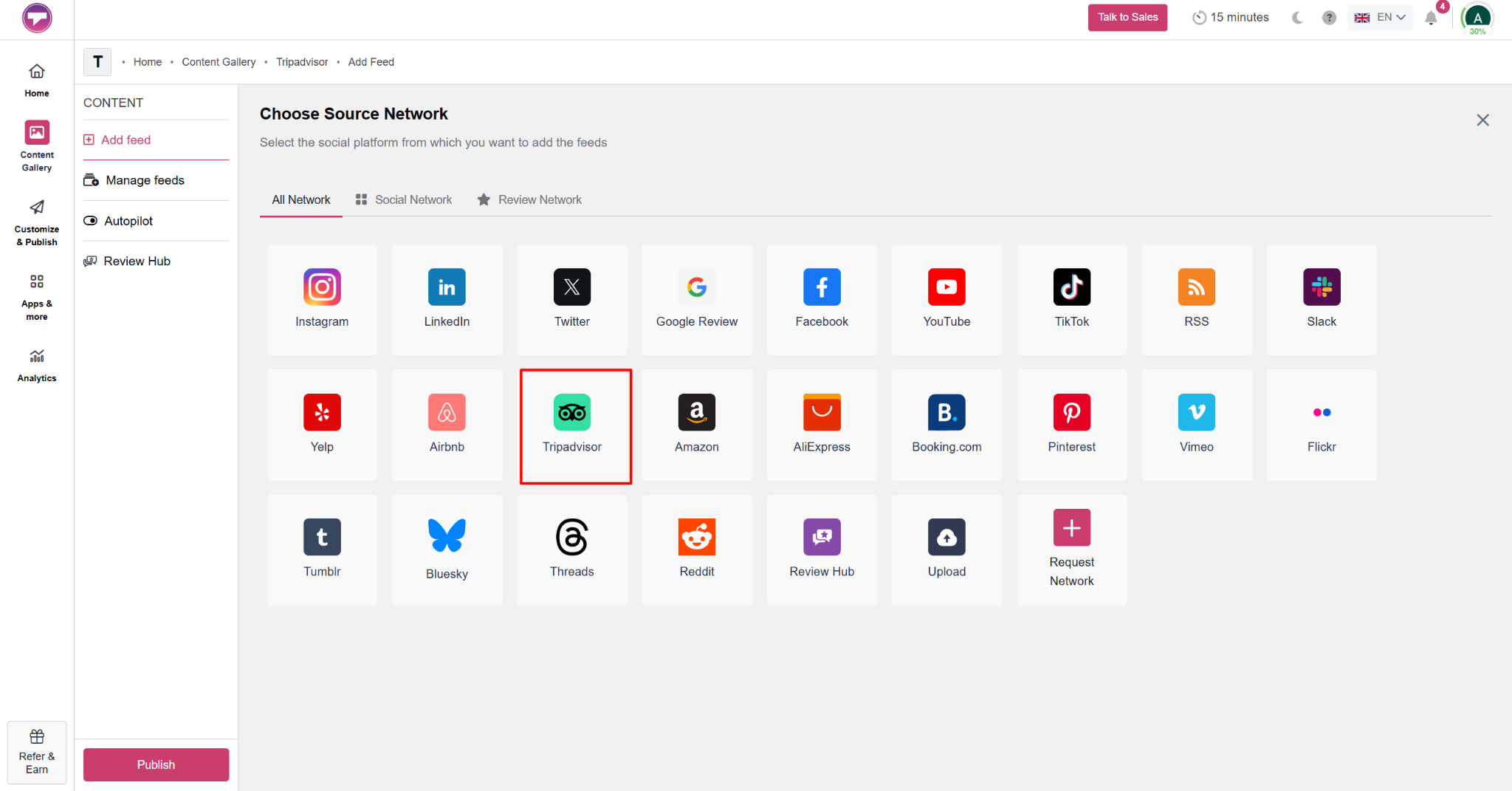
Schritt 2: TripAdvisor-Bewertungen sammeln
Geben Sie Ihre TripAdvisor-Unternehmens-URL ein und klicken Sie auf Feed erstellen. Taggbox sammelt automatisch Bewertungen aus Ihrem TripAdvisor-Profil, einschließlich Bewertungen, Namen der Rezensenten, Inhalt der Rezension und anderer Details, um einen vollständigen Bewertungsfeed für Ihre Website zu erstellen.
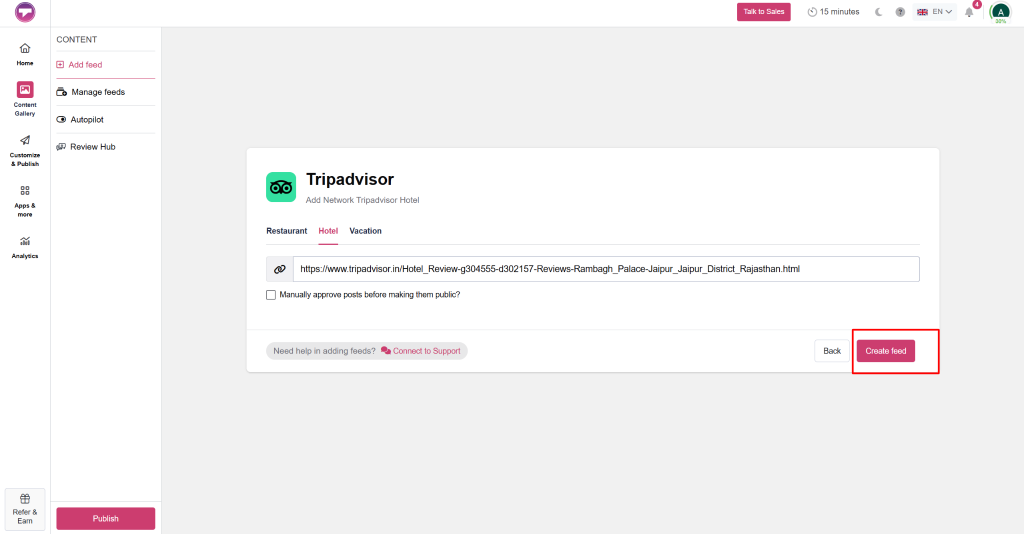
Schritt 3: Bewertungen moderieren und filtern
Arbeiten jederzeit weiterbearbeiten können. Jede Präsentation und jeder KI-Avatar, den Sie von Grund auf neu erstellen oder hochladen, TaggboxDie Moderationsfunktionen von [Name der Plattform/des Tools] ermöglichen es Ihnen, zu steuern, welche Bewertungen auf Ihrer Website angezeigt werden. Sie können irrelevante Inhalte herausfiltern und Bewertungen hervorheben, die Ihre Marke am besten repräsentieren. Klicken Sie anschließend auf „Veröffentlichen“.
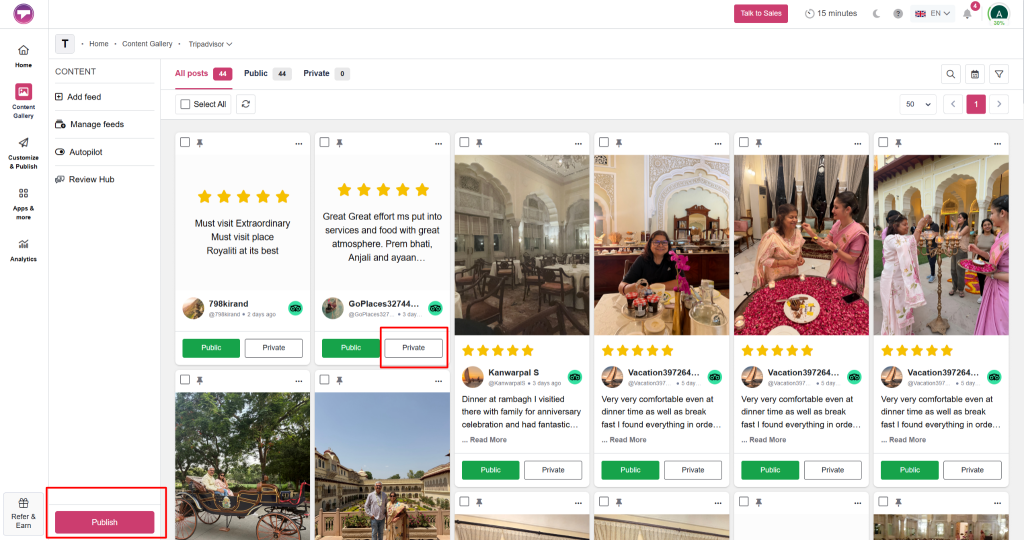
Schritt 4: Passen Sie Ihr TripAdvisor-Widget an.
Wählen Sie ein Layout, das zu Ihrem Webseitendesign passt. Taggbox ermöglicht es Ihnen, Designs, Farben, Schriftarten, Kartenstile und Anzeigeeinstellungen anzupassen und so ein Tripadvisor-Einbettungs-Widget zu erstellen, das sich wie eine natürliche Erweiterung Ihrer Website anfühlt.
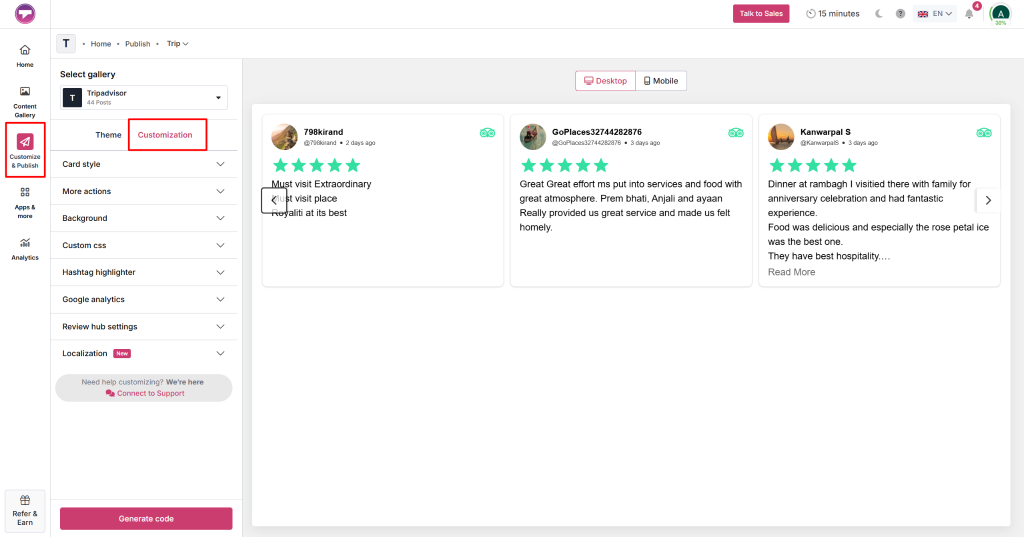
Schritt 5: Tripadvisor-Einbettungscode generieren
Sobald Sie mit dem Design und den Einstellungen Ihres Widgets zufrieden sind, klicken Sie auf „Code generieren“ von der Taggbox Dashboard. Kopieren Sie den bereitgestellten Einbettungscode, der verwendet wird, um Ihre TripAdvisor-Bewertungen auf Ihrer Website anzuzeigen.
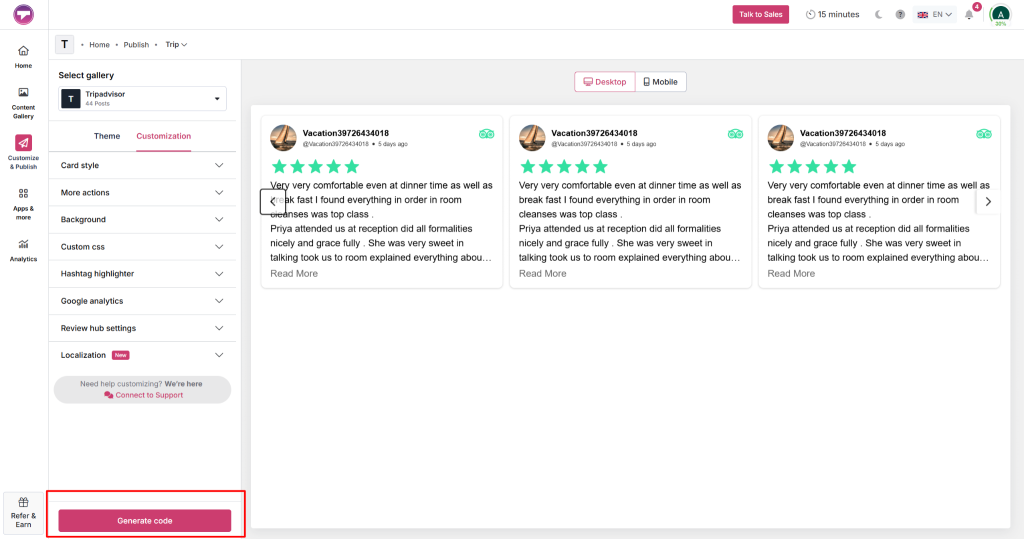
Schritt 6: Widget einbetten und veröffentlichen
Fügen Sie den kopierten Einbettungscode in den Bereich Ihrer Website ein, in dem die Bewertungen erscheinen sollen. Speichern und veröffentlichen Sie die Seite anschließend.
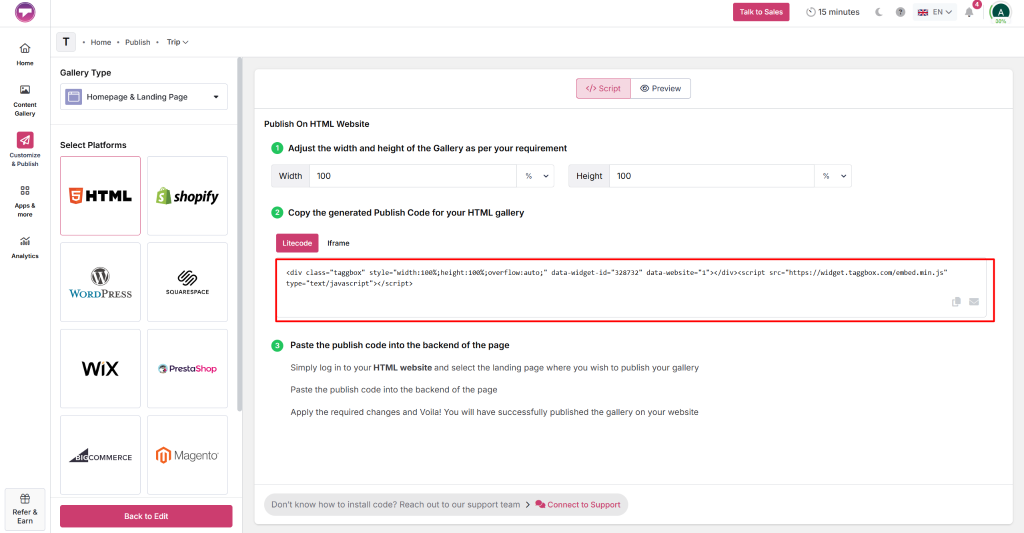
Überprüfen Sie das Widget sowohl auf Desktop- als auch auf Mobilgeräten, um sicherzustellen, dass es korrekt angezeigt wird und Besuchern einen einfachen Zugriff auf Ihre TripAdvisor-Bewertungen ermöglicht.
Kein Programmieren, keine Komplexität – einfach sammeln, anpassen und veröffentlichen.
Widget jetzt erstellenVerwendung der offiziellen TripAdvisor-Widgets
Um TripAdvisor-Bewertungen auf Ihrer Website anzuzeigen, können Sie die offiziellen TripAdvisor-Widgets verwenden. Diese Widgets sind kostenlos und enthalten einen Einbettungscode, den Sie in Ihre Website einfügen können.
Befolgen Sie diese einfachen Schritte:
- Besuchen Sie die Tripadvisor-Widgets-Seite und suchen Sie nach Ihrem Unternehmenseintrag.
- Wählen Sie Ihr Unternehmensprofil aus den Suchergebnissen aus.
- Wählen Sie den Widget-Stil, der am besten zu Ihrer Website passt. Zu den Optionen gehören beispielsweise Rezensionsausschnitte, Bewertungsabzeichen und andere Darstellungsformate für Rezensionen.
- Passen Sie die Widget-Einstellungen, wie z. B. Größe oder Aussehen, an, sofern Anpassungsoptionen verfügbar sind.
- TripAdvisor generiert einen Einbettungscode für das ausgewählte Widget.
- Kopieren Sie den Einbettungscode und fügen Sie ihn in den HTML-Bereich der Webseite ein, wo die TripAdvisor-Bewertungen erscheinen sollen.
Diese Methode ermöglicht das schnelle und einfache Hinzufügen von TripAdvisor-Bewertungen zu Ihrer Website. Allerdings bietet sie nur begrenzte Anpassungs- und Moderationsmöglichkeiten.
Traditionelle Methode vs. Taggbox TripAdvisor-Bewertungs-Widget
Beide Methoden helfen zwar dabei, Kundenfeedback auf Ihrer Website anzuzeigen, unterscheiden sich aber deutlich hinsichtlich Komfort, Flexibilität und Wartungsaufwand. Hier ein kurzer Vergleich:
| Funktion | Traditionelle Methode | Taggbox TripAdvisor-Bewertungs-Widget |
| Aktualisierungen überprüfen | Erfordert manuelle Updates | Aktualisiert automatisch |
| Setup-Prozess | Zeitaufwendig | Schnell und ohne Programmierung |
| Individuelle Anpassungsoptionen | Begrenzt | Mehrere Layout- und Gestaltungsoptionen |
| Bewertungsmoderation | Nicht verfügbar | Angezeigte Bewertungen filtern und verwalten |
| Website-Integration | Grundlegende HTML-Implementierung | Nahtlose Integration über Plattformen hinweg |
| Skalierbarkeit | Schwierig zu verwalten | Bewältigt problemlos wachsende Rezensionsmengen |
| Benutzererfahrung | Statische Anzeige | Interaktiv und visuell ansprechend |
| Am besten geeignet für | Gelegentliche Aktualisierungen der Rezensionen | Unternehmen, die fortlaufenden Social Proof suchen |
Warum verwenden Taggbox TripAdvisor-Bewertungen hinzufügen?
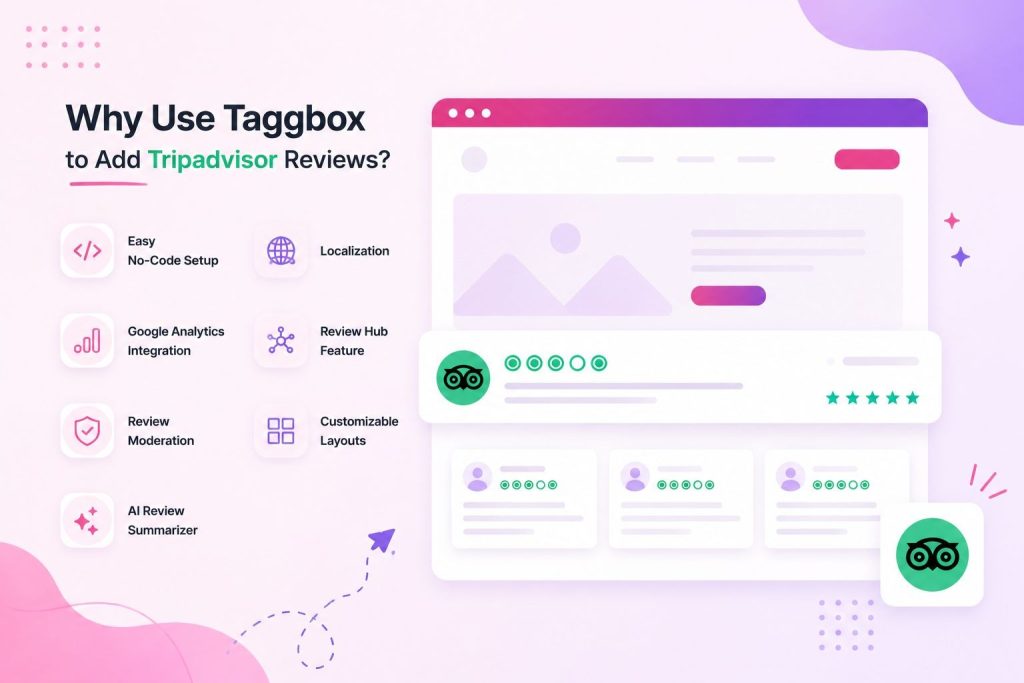
Es gibt verschiedene Möglichkeiten TripAdvisor-Bewertungen auf der Website einbinden Seiten, Taggbox bietet Funktionen, die den gesamten Prozess vereinfachen. Von der Sammlung von Bewertungen bis hin zur Analyse ihrer Leistung hilft es Unternehmen, ein effektiveres Bewertungserlebnis zu schaffen.
Einfache Einrichtung ohne Code
Taggbox Es ist für Nutzer ohne technische Vorkenntnisse konzipiert. Sie können TripAdvisor-Bewertungen über ein einfaches Dashboard sammeln, anpassen und veröffentlichen, ohne eine einzige Zeile Code schreiben zu müssen. Die Implementierung ist dadurch schnell und unkompliziert.
Lokalisierung
Wenn sich Ihr Unternehmen an ein internationales Publikum richtet, können Lokalisierungsfunktionen das Benutzererlebnis verbessern. Taggbox ermöglicht es Ihnen, Bewertungs-Widgets in verschiedenen Sprachen und Formaten anzuzeigen, sodass Besucher mit Inhalten interagieren können, die für sie relevant sind.
Google Analytics-Integration
Taggbox Die Integration mit Google Analytics ermöglicht es Ihnen, die Interaktion von Besuchern mit Ihrem Bewertungs-Widget zu verfolgen. Sie erhalten Einblicke in das Nutzerverhalten, können das Engagement messen und verstehen, wie Bewertungen zu Conversions und Buchungsentscheidungen beitragen.
Bewertungs-Hub-Funktion
Das Bewertungs-Hub Diese Funktion hilft Unternehmen, Kundenbewertungen über eine spezielle Bewertungsseite zu sammeln. Dadurch wird das Reputationsmanagement vereinfacht, da ein zentraler Bereich geschaffen wird, in dem Kunden ihre Erfahrungen und ihr Feedback teilen können.
Bewertungsmoderation
Nicht jede Rezension passt zu den Zielen Ihrer Website. Taggbox unterstützt Mäßigung Tools, mit denen Sie Inhalte filtern, irrelevante Bewertungen entfernen und Feedback präsentieren können, das Ihr Markenimage am besten widerspiegelt.
Anpassbare Layouts
Jede Website hat ihren eigenen Stil, und Ihr Bewertungs-Widget sollte dazu passen. Taggbox bietet mehrere Anpassung Layoutoptionen, Designs und Einstellungen ermöglichen es Ihnen, eine Bewertungsanzeige zu erstellen, die sich nahtlos in Ihre Website einfügt.
Zusammenfassung der KI-Rezensionen
Das Lesen zahlreicher Bewertungen kann für Besucher überwältigend sein. Der KI-Bewertungssuffixer fasst wiederkehrende Themen und wichtige Erkenntnisse in prägnanten Zusammenfassungen zusammen und hilft potenziellen Kunden so, schnell zu verstehen, was frühere Gäste an Ihrem Unternehmen besonders schätzen.
Von der Moderation bis zu KI-Zusammenfassungen – Rezensionen einfach verwalten.
Funktionen erkundenWo können Sie TripAdvisor-Bewertungen auf Ihrer Website anzeigen?
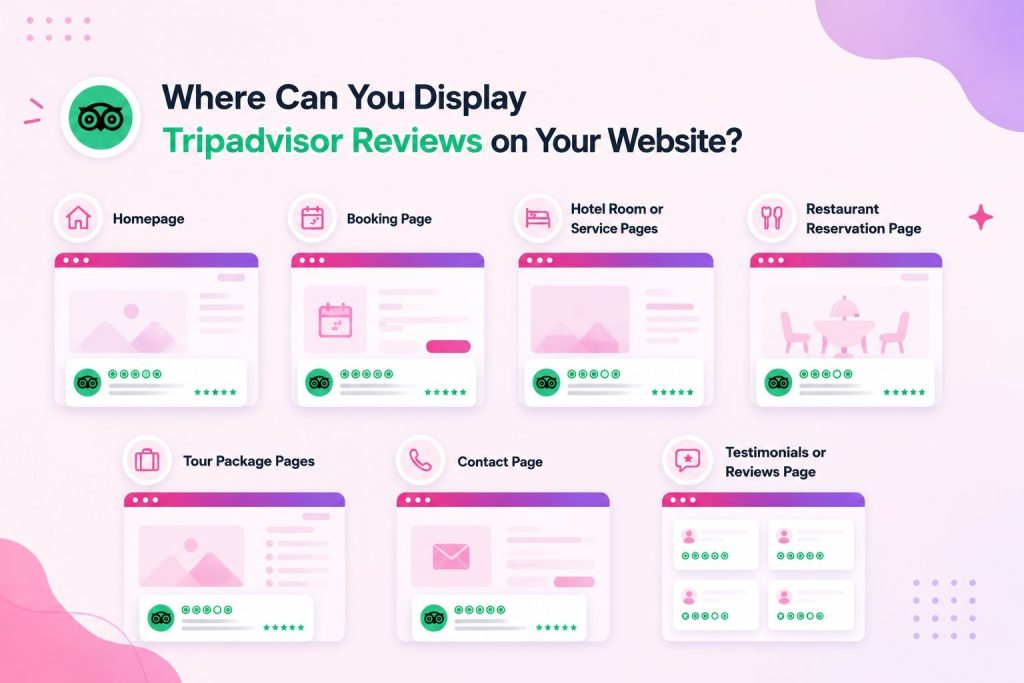
Richtig platziert, kann ein TripAdvisor-Bewertungs-Widget Wunder für Ihre Marke und Website bewirken. Hier sind einige Stellen, an denen Sie das TripAdvisor-Bewertungs-Widget optimal einsetzen können.
Startseite
Präsentieren Sie TripAdvisor-Bewertungen auf Ihrer Homepage, um Glaubwürdigkeit aufzubauen und einen starken ersten Eindruck zu hinterlassen.
Buchungsseite
Um Besuchern Sicherheit zu geben und sie zu ermutigen, Reservierungen vertrauensvoll abzuschließen, sollten Bewertungen in der Nähe der Buchungsformulare angezeigt werden.
Hotelzimmer- oder Serviceseiten
Zeigen Sie relevantes Kundenfeedback auf den Service-Seiten an, um Besuchern eine effektive Bewertung der jeweiligen Angebote zu ermöglichen.
Restaurantreservierungsseite
Heben Sie kulinarische Erlebnisse und die Zufriedenheit der Gäste hervor, um potenzielle Kunden zur Tischreservierung zu motivieren.
Seiten zu Reisepaketen
Ergänzen Sie die Tourdetails mit TripAdvisor-Bewertungen, um die unvergesslichen Erlebnisse früherer Reisender hervorzuheben.
Kontaktseite
Platzieren Sie Bewertungen auf den Kontaktseiten, um das Vertrauen zu stärken, bevor Besucher Anfragen oder Wünsche äußern.
Seite mit Erfahrungsberichten oder Rezensionen
Erstellen Sie einen eigenen Bewertungsbereich, der authentisches TripAdvisor-Feedback an einem Ort zusammenfasst.
Fazit
TripAdvisor-Bewertungen sind für Reisende zu einem wichtigen Bestandteil der Bewertung von Hotels, Restaurants, Reiseveranstaltern und anderen Gastronomiebetrieben geworden. Durch die Einbindung von TripAdvisor-Bewertungen auf Ihren Webseiten integrieren Sie authentische Kundenbewertungen direkt in den Entscheidungsprozess Ihrer Besucher. Dies stärkt nicht nur das Vertrauen, sondern verbessert auch die Interaktion, verlängert die Verweildauer auf Ihrer Website und kann zu mehr Buchungen und Anfragen führen.
Authentisches Kundenfeedback in Vertrauen, Engagement und mehr Buchungen umwandeln.
Startet kostenlosHäufig gestellte Fragen
Welche anderen Widgets für Bewertungsplattformen sind verfügbar bei Taggbox?
Zusätzlich zu TripAdvisor, Taggbox unterstützt Bewertungs-Widgets von Plattformen wie Google Bewertungen, Facebook Bewertungen, Yelp Bewertungen, Airbnb Bewertungen, AliExpress Bewertungenund vieles mehr. Dadurch können Unternehmen Kundenfeedback aus mehreren vertrauenswürdigen Quellen an einem Ort präsentieren.
Was ist ein TripAdvisor-Bewertungs-Widget?
Ein TripAdvisor-Bewertungs-Widget ist ein Tool, das TripAdvisor-Bewertungen, Kundenrezensionen, Namen der Rezensenten und Feedback direkt auf Ihrer Website anzeigt. Es hilft Unternehmen, Social Proof zu präsentieren, ohne dass Besucher die Website verlassen müssen.
Kann ich TripAdvisor-Bewertungen in WordPress einbinden?
Ja, Sie können TripAdvisor-Bewertungen ganz einfach in WordPress einbinden. Plattformen wie Taggbox Es wird ein Einbettungscode bereitgestellt, der ohne Vorkenntnisse in WordPress-Seiten, -Beiträge oder -Widget-Bereiche eingefügt werden kann.
Kann ich TripAdvisor-Bewertungen auf meiner Website anpassen?
Ja. Je nach der verwendeten Lösung können Sie Layouts, Designs, Farben, Schriftarten, Bewertungsstile und Anzeigeeinstellungen anpassen, um sicherzustellen, dass das Bewertungs-Widget zum Branding Ihrer Website passt.
Ist Programmierkenntnisse erforderlich, um TripAdvisor-Bewertungen auf einer Website einzufügen?
Nein. Die meisten Bewertungs-Widget-Plattformen bieten Lösungen ohne Programmieraufwand, die einen sofort einsatzbereiten Einbettungscode generieren. Sie kopieren den Code einfach und fügen ihn in Ihre Website ein, um die Bewertungen zu veröffentlichen.
Wo soll ich die TripAdvisor-Bewertungen auf meiner Website platzieren?
TripAdvisor-Bewertungen funktionieren am besten auf Seiten mit hoher Interaktionsrate, wie z. B. der Startseite, der Buchungsseite, den Serviceseiten, den Restaurantreservierungsseiten, den Seiten für Reisepakete, der Kontaktseite und den speziell dafür vorgesehenen Erfahrungsberichten.
Können TripAdvisor-Bewertungen zu mehr Buchungen führen?
Ja. Positive TripAdvisor-Bewertungen liefern einen sozialen Beweis, der Kaufentscheidungen beeinflussen kann. Indem Unternehmen authentische Kundenerlebnisse präsentieren, können sie Vertrauen aufbauen und mehr Besucher zu zahlenden Kunden machen.

 Harshita Rajoria
 Rohan Singh



 Wagisha