Higher education keeps shifting in this digital world, and student generated content (SGC) has really taken center stage lately. Students these days create all sorts of things, from casual snaps of everyday campus moments to detailed video assignments and group blogs. This content goes far beyond passive classroom learning.
SGC ramps up involvement, gets peers teaching each other, and gives schools solid, trustworthy branding. This guide digs into what SGC means, the upsides, varieties, rollout ideas, platforms, tracking methods, and much more. Read it to the end; it covers everything you need to know about student-generated content.
What is Student Generated Content?
Student generated content, usually called SGC for short, means pretty much anything that comes straight from the students themselves. That could be everyday homework pushed out wider, bigger stuff like full presentations or quick social snaps about what’s happening on campus, even reels and personal write-ups.
The big switch here lies in direction. Old-school or teacher-made material flows down from instructors or the institution. Think slides, recorded talks, printed guides, straight to the group. SGC runs bottom-up instead: student craft it, often for buddies or anyone online, so it lands closer to home and hits different.
Day-to-day versions show up as:
- Homework gone public, say papers or graphics shared beyond class.
- Team stuff, joint slides, photos and stories from dorm hangs or big events.
- Fun shorts, quick how-tos or day-in-the-life clips in their own style.
Why Student Generated Content Matters in Education?
Student generated content shakes up the usual classroom routine by putting students in the driver’s seat. It turns passive listeners into active makers, sparking real connections and fresh ideas across campuses.
a.) Engagement & Collaboration Benefits
SGC gets students hooked because they own what they create, leading to lively group chats and joint projects that stick. Take online collaborative setups data shows they ramp up involvement, push deeper thinking, and even shift attitudes for the better. One study found 55% of college kids struggle to stay tuned in without tech boosts, but SGC flips that by encouraging shares and feedback loops. Universities see up to 50% higher clicks on UGC campaigns, making events buzz and teams tighter. For instance, tools like Peerwise let kids build and critique questions, turning solo study into shared wins. Moreover, tools like Taggbox helps them to showcase their content on college website.
b.) Peer-to-Peer Learning Impact
When students swap ideas through their own stuff, it builds skills faster than straight lectures. Stats reveal peer-led spots boost motivation, grasp of topics, and even test jumps think 14% higher scores from creating content. In flipped classes with student videos, folks show stronger thinking and stay more plugged in. Peer tutors make learning flexible and hit home, with one setup seeing big gains in programming enjoyment and know-how. It levels the field too, letting diverse voices shine and cut gaps in understanding.
c.) Branding & Social Proof for Schools or Universities
SGC acts like free promo, showing real campus vibes through student eyes to pull in prospects. Numbers say 74% of kids lean on social for choices, and UGC hikes trust with raw stories over slick ads. Universities rocking student-led posts see engagement spikes 16% up on Twitter alone and stronger loyalty. It’s key for Gen Z, turning testimonials into magnets for sign-ups. Top schools use it for storytelling that resonates, building distinct identities and community ties.
Get the Perfect UGC Solution for Your Brand
Types of Student-Generated Content
SGC shows up in all kinds of everyday ways on campus. These forms let students share experiences, explain ideas, and team up naturally, fitting right into classes or casual hangs.
1. Social Media Posts & Campaigns
Quick snaps, stories, reels, or hashtag drives about dorm life, events, club meets, or study tips. Students grab moments on phones and push them out fast, pulling friends in and spreading the word wide. It keeps things buzzing with real-time updates and easy shares. Perfect for building quick connections or running fun challenges across the school. Groups posting campus vibes straight to feeds.
2. Video Projects & Tutorials
Short clips, vlogs, how-to guides, or full assignments filmed by students themselves. They break down tough topics in simple words, show off experiments, or capture day-in-the-life stuff. Hands-on filming builds tech skills while making concepts stick better for viewers. Great for flipping classes or sharing knowledge outside walls. Crews shooting and editing together in sessions.
3. Blog Posts / Articles
Personal write-ups, reflections on classes, opinion pieces, or deep dives into subjects typed up and shared. Students lay out thoughts clearly, back ideas with examples, and open doors for comments. In many academic settings, maintaining a consistent student signature across shared content and communications can also help establish identity, credibility, and a more professional presence when publishing work publicly. It sharpens writing chops and lets voices stand out longer than quick posts. Fits well for ongoing journals or public portfolios.
4. Group Projects / Collaborative Content
Joint slides, shared docs, podcasts, wikis, or big displays built by teams. Everyone chips in ideas, splits tasks, and polishes the final piece together. It mirrors real-world teamwork, mixes different views, and creates stronger outputs. Ideal for big assignments or cross-class efforts.
How to Implement a Student-Generated Content Strategy
Rolling out SGC takes some planning, but breaking it down step by step keeps things straightforward. Start small, test what works, and build from there.
- Identify target student audience: Figure out who fits best—freshmen adjusting to campus, seniors wrapping up projects, clubs full of energy, or online learners far away. Look at majors, year levels, or interests to match the prompts correctly. Narrowing this down helps ideas click and gets more folks jumping in.
- Encourage submissions & participation: Kick things off with easy calls like hashtag drives, class tie-ins, or fun contests. Share examples, run workshops on quick tools, or tie it to grades lightly. Keep pushing through emails, posters, or takeovers to build buzz and make sharing feel natural.
- Set content guidelines & approval workflows: Lay out clear rules early stuff on tone, branding, privacy, and what’s off-limits. Build a simple check process, maybe forms for consent or quick reviews, to catch issues fast while keeping voices real.
- Curate, moderate, and schedule content: Pick the strongest pieces that fit goals, weed out anything sketchy, and line them up for steady release. Tools help spot gems and time posts across channels without overwhelming anyone.
- Reward participation (badges, recognition, features): Provide shoutouts such as spotlights in main feeds, digital badges, small prizes, or event features. Public thanks or stage moments make contributors feel valued and spark others to join in.
- Measure engagement and learning outcomes: track likes, shares, and comments, plus how many people join in and what they say in feedback. Check if understanding deepens through surveys or follow-ups to tweak the approach in the next round.
Handling a volume of student posts, videos, and shares requires solid setups that pull everything together, clean it up, and push it out effectively. These options make the job smoother for schools juggling campus buzz.
- Content aggregation platforms: These platforms collect student content from across social channels, sort it, and let teams share it on sites, screens, or at events. They handle hashtags, mentions, and direct feeds to keep content fresh without manual searches each time.
- Taggbox: Pulls in posts from many sources, adds smart filters, and builds customizable walls or embeds, perfect for campus sites and live displays. Handy for education crowds needing quick curation and rights checks.
- Walls.io: Merges feeds from multiple networks into one platform, ideal for event walls or ongoing hubs that seamlessly mix student shares.
- Tagembed: Focuses on no-fuss embeds with strong moderation to keep school feeds clean and on-brand.
- Social media monitoring and analytics: These track mentions, trends, and conversations around the school, spotting hot topics or issues quickly while digging into what resonates with audiences.
- Hootsuite: Tracks talks across platforms, sets alerts for spikes, and breaks down reach to guide better posts for university teams.
- Sprout Social: Monitors sentiment, handles inbox replies, and generates reports on community sentiment, ideal for keeping student connections strong.
- Brand24: Catches mentions everywhere, gauges mood, and flags shifts quick for schools staying ahead of campus chatter.
Best Practices & Guidelines
Running a strong SGC program means keeping things real while protecting everyone involved. These tips help schools get the most out of student-generated content without headaches or legal mess.
a- Keep content authentic & student-centered
Let students speak in their own voice – that’s the whole point. When SGC feels forced or overly polished, it loses the magic that earns people’s trust. Even when AI tools assist with drafting, focusing on authentic AI content helps preserve a student’s natural voice. Encourage raw, honest takes on campus life, classes, or events instead of scripting everything. Provide loose guidelines, such as “share what surprised you this week,” rather than tight rules that read like marketing copy. Authentic content spreads faster because peers recognize authenticity instantly. When students see their friends posting naturally, they jump in too. Tools like Taggbox or Social Walls let you display genuine content without extensive editing, so the tone stays true to the campus community. The goal is to showcase real student experiences, not a staged version.
b- Ensure brand alignment for institutions
Schools still need to protect their image, so set basic boundaries without killing creativity. Create simple guardrails like approved hashtags, color palettes, or tone (positive, respectful) that students can follow easily. Show examples of what fits – a fun dorm tour, yes, anything offensive no. Use moderation tools to ensure nothing slips through that could harm the school’s reputation. When students understand the “why” behind the guidelines (e.g., building a welcoming community), they usually comply. The sweet spot is giving enough freedom to real voices while ensuring everything reflects the school’s values. When done right, SGC strengthens the brand by demonstrating the institution’s trust in its students.
c- Legal & copyright compliance
This is non-negotiable – always get clear permission before using any student work. Have participants sign simple release forms (digital is fine) saying the school can display their content on websites, screens, or social channels. Explain exactly where and how it might appear. For music, images, or clips in their videos, remind students to use royalty-free sources or get rights. Teach the basics quickly: Creative Commons for photos and royalty-free libraries for audio. If someone appears in a post, make sure they consent to it too. Platforms like Taggbox have built-in rights management features that automatically request and track permissions. Staying on top of this keeps everything safe and builds trust with students and parents.
Do’s and Don’ts A Quick Review
| Do’s | Don’ts |
| Encourage natural, unfiltered voices | Over-edit or script student content |
| Provide clear, simple guidelines | Make rules so strict it feels controlling |
| Get written consent for every piece | Use content without explicit permission |
| Use royalty-free or approved assets | Let students use copyrighted music/images |
| Highlight diverse student perspectives | Feature only the “perfect” submissions |
| Reward participation with shout-outs | Force or pressure anyone to contribute |
These habits keep SGC powerful, safe, and true to what makes it special real student voices.
- Leveraging Student Generated Content with Taggbox for Multi-Platform Growth
Most guides talk about why student generated content is great and what kinds exist, but they stop short of showing how to actually turn it into a real, ongoing growth engine for your school. That’s where Taggbox changes the game. It doesn’t just collect SGC – it lets you aggregate, repurpose, and spread it across multiple channels so the content keeps working long after the assignment or event ends.
- How SGC can be aggregated and repurposed across websites, social media, and marketing campaigns
Taggbox pulls student posts, photos, videos, reels, and stories from Instagram, TikTok, X, Facebook, and more using hashtags, mentions, or direct uploads. Once it’s in, you can curate the best pieces, add branded frames or overlays, and push them everywhere: embed live walls on your college website homepage, feature them in newsletters, turn top posts into paid social ads, or display them on campus digital signage. A single video project can become a website spotlight, a TikTok Reel repost, an Instagram Story highlight, and even part of a recruitment brochure. This repurposing stretches one piece of SGC across platforms without starting from scratch every time, keeping the momentum alive and giving prospective students a consistent look at real campus life.
- Driving brand awareness and student engagement simultaneously
When students see their own content (or their friends’) featured on the official website, social channels, or big screens around campus, it creates instant pride and belonging. That ownership boosts engagement – they share more, tag the school, and encourage others to join in. At the same time, the authentic UGC acts as powerful social proof for future students. A high school senior browsing your site sees real faces, real moments, real stories – not staged photos. Taggbox makes it seamless: moderation keeps everything positive and on-brand, while analytics show which posts get the most shares and views. You end up with higher application interest from prospects and stronger loyalty from current students – two wins from the same content.
- Using Taggbox analytics to optimize campaigns and measure ROI
Taggbox gives you clear numbers so you know exactly what’s working. Track impressions, engagement (likes, comments, shares), UGC volume, top-performing hashtags, and even website clicks from embedded walls. See which student posts drive the most traffic or which campaigns spark the biggest participation spike. Use that data to tweak future prompts (“last time video got 3x more shares – let’s encourage more clips”), adjust moderation filters, or double down on high-engagement topics. You can tie it to bigger goals too: more applications from the site, higher event attendance, or better alumni involvement. Suddenly SGC isn’t just nice-to-have – it’s a measurable part of your marketing and community strategy.
Most articles explain what SGC is and list the benefits, but they rarely go beyond “post more student stuff.” Taggbox shows the full picture: how to collect it safely, repurpose it endlessly, display it across websites/social/signage, track real performance, and turn it into a long-term growth asset. It’s not a one-off campaign idea – it’s a repeatable system that builds brand awareness, student pride, and enrollment numbers year after year. Competitors talk theory; Taggbox delivers the practical cross-platform playbook schools actually need.
Real Life Examples
Schools and universities are already seeing big wins with student generated content when they use the right tools to collect, curate, and showcase it. Here are three real examples of institutions putting SGC front and center using Taggbox. They’re getting great traction, making their websites look more alive, and building stronger connections with current and future students.
1.) UTSW (University of Texas Southwestern Medical Center)
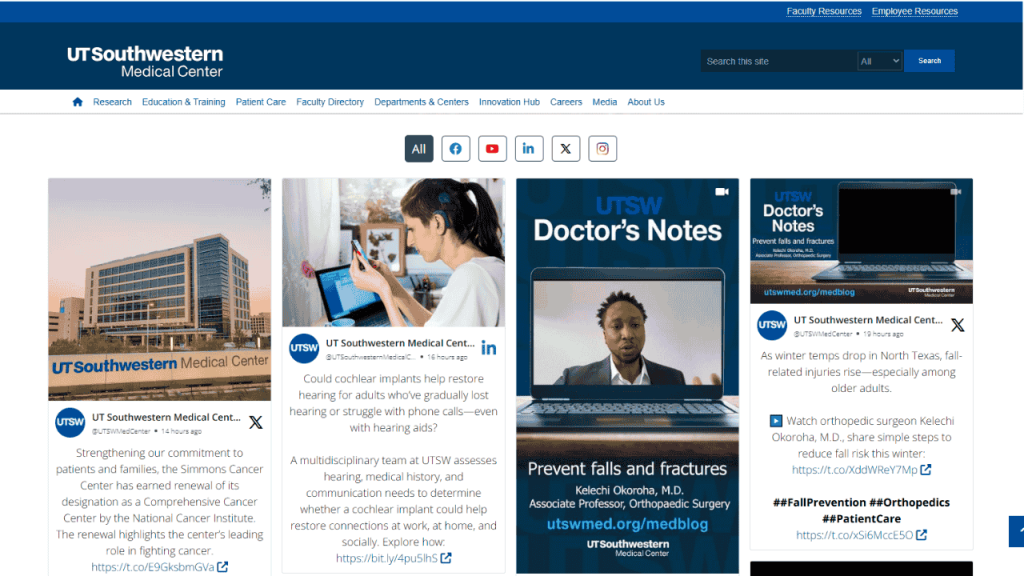
UT Southwestern Medical Center has been smart about turning student moments into powerful website features. They use Taggbox to pull in real-time student posts, photos, and stories from social media (especially Instagram and TikTok) with specific hashtags tied to campus life, research highlights, and events. The live social wall on their homepage shows authentic glimpses of med students in labs, at study groups, or celebrating milestones. This makes the site feel dynamic and current instead of static. They’re seeing higher time-on-page, more shares from visitors, and better engagement from prospective students who say the content feels “real” compared to polished brochures. The look and feel of the website has improved dramatically – it now reflects the energy of the campus and builds trust fast.
2.) Boston University
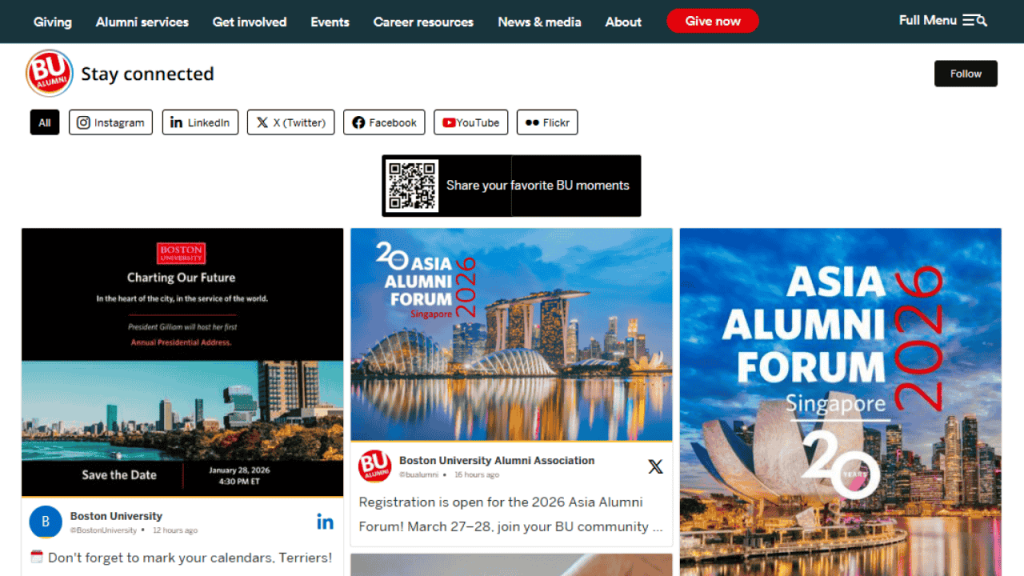
Boston University has leaned into Taggbox to showcase student life across their digital channels. They aggregate UGC from various campus hashtags and student clubs, then embed live walls on department pages, admissions sites, and event microsites. Photos of dorm life, club meetings, game days, and study sessions appear in real time, giving a true sense of what BU feels like. The result? Their website looks vibrant and welcoming, with visitors spending more time browsing and coming back more often. Admissions teams report that prospects connect more emotionally with the school because they see actual students in action. The improved look and feel has helped boost inquiries and applications by making BU stand out as a lively, student-focused community.
3.) Stanford University
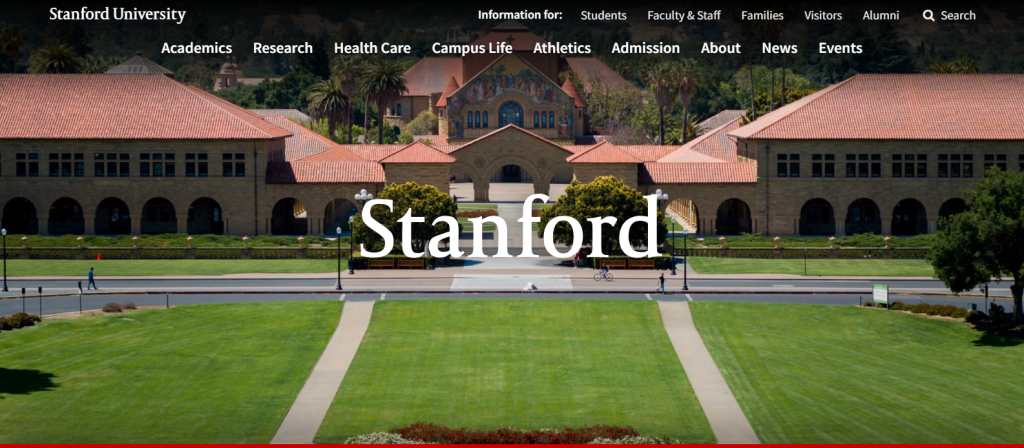
Stanford university takes student generated content to another level with Taggbox. They pull in posts from student-run accounts, research updates, and campus events, displaying them as live social walls on their main site and various department pages. Visitors get an unfiltered view of student life – everything from late-night study sessions to groundbreaking projects and fun traditions. This approach has made the website feel more human and current, with better dwell time and higher social shares from alumni and prospects. The clean, moderated feeds keep everything on-brand while letting Stanford’s diverse voices shine. They’re seeing great traction in terms of engagement, website traffic, and a stronger sense of community pride.
These examples show how Taggbox helps schools turn everyday student content into a powerful, long-term asset. The websites look better, feel more authentic, and connect deeper with audiences – exactly what SGC is supposed to do.
Conclusion
Student generated content flips the script on traditional campus communication. It hands the mic to students, letting their real stories drive connection, learning, and school pride. From casual social snaps to thoughtful group projects, SGC builds tighter communities and shows the world what life on campus truly feels like.