Learning how to repost on Instagram is easier now because Instagram has introduced a native repost feature for public feed posts and Reels. You can repost eligible public content, add a short note, and Instagram automatically credits the original creator. Meta says reposts can appear in followers’ feeds and also show in a separate Reposts tab on your profile.
But for brands, reposting still needs care. Sharing someone’s content inside Instagram is one thing. Reusing customer posts, influencer content, or UGC on websites, ads, emails, product pages, or digital screens is different. In those cases, permission and content rights matter.
This guide explains how to repost safely on Instagram, how the new repost feature works, how to repost Stories and Reels, and how brands can use reposted content without creating copyright or trust issues.
What Does Reposting on Instagram Mean?
Reposting on Instagram means sharing someone else’s content again from your own account or profile space. This can include reposting a public feed post, reposting a Reel, sharing a post to your Story, resharing a Story you are mentioned in, or using customer content as part of a brand campaign.For personal users, reposting is usually about sharing content they like. For brands, reposting is often about building community, showing customer experiences, promoting user-generated content, and adding social proof to marketing campaigns.
Why the New Instagram Repost Feature is a Big Deal
Instagram’s new repost button has changed the way we share content. Before, you had to use third-party apps or take screenshots; now, it’s just one tap.
For creators and brands, it means faster content sharing, more engagement, and an easy way to post even on busy days. For everyday users, it’s a fun way to share posts, Reels, and memes without extra effort.
It’s quick, clean, and gives full credit to the original creator — so everyone wins. This also complements tools like instagram widgets, helping brands showcase reposted content seamlessly across platforms.
How to Repost a Post on Instagram

1. Find a Post or Reel You Want to Repost
Tap to open a public feed post or Reel you’d like to share, this only works with public content.
2. Tap the Repost Icon
Look for the repost icon (two arrows forming a circle or square) beneath the post or Reel.
3. Add Your Personal Note (Optional)
If you’d like, tap the thought bubble or text field near your profile picture to type a short comment or message to include with the repost.
4. Publish Your Repost
Tap Repost will also appear in a separate section to share it to your followers’ feeds. It will also appear in a separate “Reposts” tab on your profile.
5. Where to Find It Later Your reposted content is archived in a dedicated “Reposts” tab on your profile grid, sitting right alongside your standard grid posts and Reels tabs.
Note: Reposting is only available for content from public accounts. Private content cannot be reshared.
How to Repost a Feed Post to Your Instagram Story
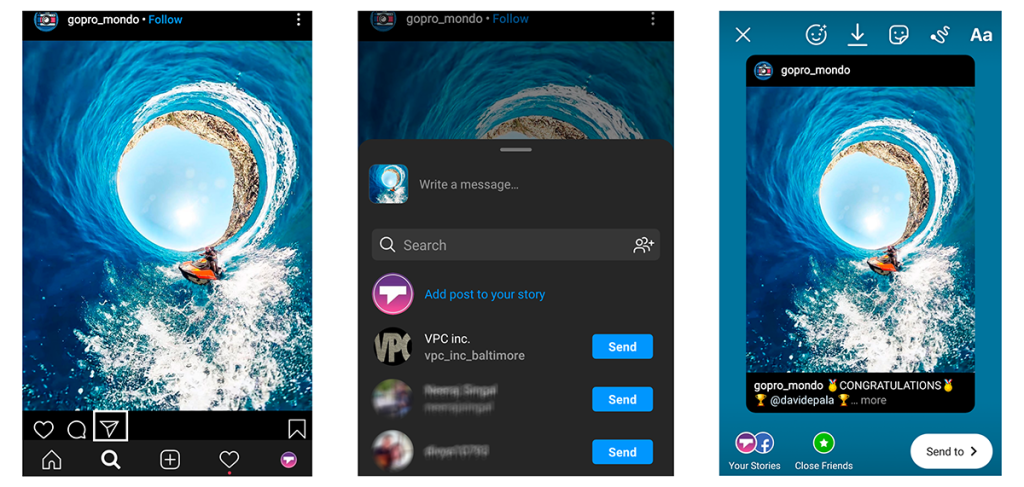
You can also share someone’s feed post to your Instagram Story when sharing is available. Users can tap the share option below a feed photo or video and choose Add to story.
This method works well when a customer tags your product, an influencer posts about your brand, or a partner shares campaign content. Instead of uploading a screenshot, you can share the post to your Story and let viewers tap through to the original post.For better results, add your own context before sharing. If you are struggling with what to publish alongside your shares, exploring creative Instagram story ideas for business like a “Customer of the Week” feature or “Loved this customer review” bubble makes the repost significantly more meaningful.
How to Repost Reels on Instagram
Reels can be reposted through Instagram’s native repost feature when they are public and eligible. This is useful because Reels are often used for product demos, reviews, tutorials, creator collaborations, and event content.
Brands can repost Reels when creators mention them, customers show their products, influencers publish campaign videos, or community members create useful content around a brand.
How to Repost a Story You Are Tagged In
When someone mentions your account in their Instagram Story, Instagram allows that Story to be reshared to your own Story, depending on the creator’s settings. Instagram Help confirms that when you mention someone in your Story, they can reshare it to their own Story, and users can manage whether others can reshare their Stories.
This is one of the most common ways brands repost customer content. For example, if a customer posts a Story using your product and tags your brand, you can reshare it to your Story, thank them, and even choose to embed Instagram stories on your website directly to capture that real-time social proof for your web visitors.
How to Repost a Story on Instagram that You’re Not Tagged in?
Reposting an Instagram story that you’re not tagged in directly from the app can be a bit tricky as Instagram doesn’t offer a built-in feature for this. However, there are a few methods you can explore to achieve this:
1. Ask for Direct Sharing:
Reach out to the person who posted the story and politely ask them if they could share it with you directly. Instagram allows users to send their stories to specific individuals or groups. They can send you the story via direct message, enabling you to repost it.
2. Screen Recording:
Use the screen recording feature on your mobile device to capture the story. This method involves recording the story while viewing it on your device. Once recorded, you can repost the video as you would with any other content, ensuring credit to the original creator.
3. Third-Party Apps:
Consider using third-party apps designed for downloading or reposting Instagram stories. Some apps allow users to download stories even if they’re not tagged in them. Apps like “Repost Story for Instagram” or “Story Saver” might let you save and repost stories.
4. Take a Screenshot:
Capture screenshots of individual frames from the story. Though not the most elegant method, it allows you to capture images from the story. You can compile these images into a carousel post or create a new story with those screenshots, ensuring credit to the original creator.
5. Request for Sharing Permission:
Politely ask the person who posted the story if they’re comfortable with you reposting it. You can do this through direct messaging or by commenting on one of their posts. If they permit you, you can save and repost the story while giving credit.
Remember, it is essential to respect the original creator’s content and seek their permission before reposting their stories. Additionally, always credit the creator when reposting content, whether it’s a story or a post, to maintain ethical practices and foster positive relationships within the Instagram community.
Is It Legal to Repost on Instagram?
Reposting can be allowed inside Instagram when you use Instagram’s built-in features and the content is eligible. But legal and copyright concerns become more important when you manually download, edit, upload, or reuse someone else’s content for business purposes.
Instagram’s copyright guidance says the best way to avoid copyright issues is to post content you created yourself. That is why brands should be careful with user-generated content, influencer posts, music, images, videos, and customer Stories. To insulate your business against liabilities, establishing a robust system for UGC rights management is essential for legally utilizing customer media.
A safe way to think about it is simple: native reposting inside Instagram is for sharing; commercial reuse needs permission.
Types Of Content That Can Be Reposted On Instagram
1. User-Generated Content (UGC)
Photos, videos, or stories created by your followers or customers that feature your brand, products, or services, as long as you credit and/or get permission from the original creator.
2. Public Account Posts
Content from public profiles can be shared to your story using Instagram’s native “Share to Story” option. For feed reposts, it’s still best practice to credit the source.
3. Brand Partnerships & Collaborations
If you’ve partnered with a creator or influencer, you can repost their content (often part of the agreement). Use Instagram’s Collab feature to post jointly.
4. Trending or Viral Content
Memes, challenges, or viral videos that are already widely shared, but be careful with copyrighted material and always give credit.
5. Your Own Old Content
You can repost your past reels, posts, or stories to keep them relevant or introduce them to new followers.
6. Licensed Content
Photos or videos you’ve purchased rights to use from stock platforms or photographers can be reposted freely within the agreed terms.
How Taggbox Helps With Instagram Reposting and UGC Rights
Taggbox helps brands manage Instagram UGC more professionally. Instead of manually tracking every post, screenshot, or creator message, brands can collect Instagram content from hashtags, mentions, tagged content, and campaigns.
With Taggbox, brands can easily legally use user-generated content by streamlining the developer-approved rights request workflow directly with creators. Once approved, you can organize and display it across websites, ecommerce pages, event screens, social walls, emails, and digital displays.
This is especially useful when reposting is part of a larger campaign. A brand can encourage customers to post with a hashtag, collect the best content through Taggbox, request permission, and then use approved UGC as social proof across multiple marketing channels.
The goal is not just to repost more content. The goal is to repost the right content with permission, credit, and a clear business purpose.
Creative Reposting Options: Beyond the Basics
While screenshots and basic reposts are effective, Instagram offers creative options to elevate your UGC (User-Generated Content) strategy. Here’s how you can go beyond the ordinary:
Remixing Reels and Videos
Instagram’s Remix feature allows you to create a side-by-side collaboration with the original UGC. You can add your own commentary, reactions, or creative elements to the original content. This adds a fun and interactive twist to your repost, potentially sparking further engagement.
Here’s how to Remix a Reel
- Open the desired Reel and tap the three dots (…) below the creator’s username.
- Select “Remix this Reel.”
- You’ll see the original Reel on the left side of your screen. Use the editing tools to record your video response or add creative elements.
- Edit your Remix with captions, stickers, or music to enhance your response.
- Share your finished Remix to your feed or story.
Benefits of Remixing UGC
- Boosts Engagement: Remixing encourages interaction with the original creator and your audience, leading to increased engagement.
- Showcases Brand Personality: Adding your creative spin to UGC allows you to showcase your brand personality and connect with your audience on a deeper level.
- Increases Reach: Remixes can be seen by both your followers and the followers of the original creator, potentially expanding your reach.
Additional Creative Ideas
- Curate User-Generated Galleries: Showcase a collection of UGC photos or videos related to a specific theme or campaign on your profile.
- Host UGC Contests: Encourage user participation by running contests where users submit content with a specific hashtag. Repost the winning entries and showcase your community.
By exploring these creative reposting options, you can breathe new life into UGC and create engaging content that resonates with your audience.
In the next section, we’ll delve into the reasons why reposting UGC is a valuable strategy for brands on Instagram.
Generate Engagement with Instagram Story Reposts: Take it to the Next Level
We’ve established the value of reposting UGC (User-Generated Content) in your Instagram Stories. Now, let’s delve into some advanced strategies to maximize engagement and truly captivate your audience:
1. Create a Compelling Narrative
Don’t just repost random UGC; curate a story with a clear narrative or theme. For example, if you’re a travel brand, you could showcase a series of user-captured travel experiences around a specific location. This creates a cohesive and engaging viewing experience.
2. Utilize Story Highlights
Story Highlights are a fantastic way to extend the life of your best story reposts. Group-related reposts into themed highlights, such as “Customer Love” or “Behind the Scenes.” This allows viewers to easily discover past content and provides valuable insights into your brand.
3. Host Takeovers
Partner with relevant influencers or brand advocates and allow them to take over your story for a designated period. This can generate fresh content, attract a new audience, and provide a unique perspective through user-generated storytelling.
Actively engage with your audience by responding to comments and direct messages sparked by your story reposts. This personal touch fosters a sense of community and encourages further interaction.
5. Run Live Sessions:
Leverage the power of live sessions to build anticipation around your story reposts. Announce upcoming reposts during a live session and encourage viewers to submit their own UGC related to the theme. This creates a two-way conversation and drives excitement for your content.
6. Offer Incentives (Optional):
Consider offering small incentives, like shoutouts or discounts, in exchange for user-generated content you might repost in your stories. This can motivate users to create and share content, potentially expanding your UGC pool.
By implementing these advanced strategies, you can transform your story reposts from a simple sharing tactic into an interactive, engaging experience. This not only increases engagement but also fosters a sense of community and loyalty among your Instagram followers.
Conclusion
Lots of Instagram users ask, “How to repost on Instagram“?
By incorporating strategic UGC reposting into your Instagram strategy, you can unlock a wealth of benefits:
- Increased Trust and Authenticity: Learning how to properly repost on Instagram allows you to feature real-world customer experiences, building instant credibility.
- Stronger Brand Community: Seamlessly sharing a post on Instagram to your feed highlights your community, strengthening the bond between your brand and your audience.
- Enhanced Reach and Engagement: User-generated content consistently drives higher engagement rates than generic brand graphics, giving your profile a healthy algorithmic boost.
By following the tips in this blog post and leveraging the power of reposting, you can build a thriving Instagram community grounded in genuine connections and user-generated content.