Want to make your website more interactive?
You can embed Slack on website to display channels, updates, and chats. It helps your audience stay connected and up to date without leaving your site.
Slack is a leading cloud‑based collaboration platform that is widely used for team messaging and project coordination. Embedding it on your website helps break down the barrier between internal workflows and external audience interaction by displaying real‑time updates, discussions, and community feeds directly on your pages.
Why Integrate Slack into website?
Embedding Slack on a website serves unique purposes because Slack is primarily a messaging and collaboration platform. Here are the most common reasons to embed a Slack channel on a website:
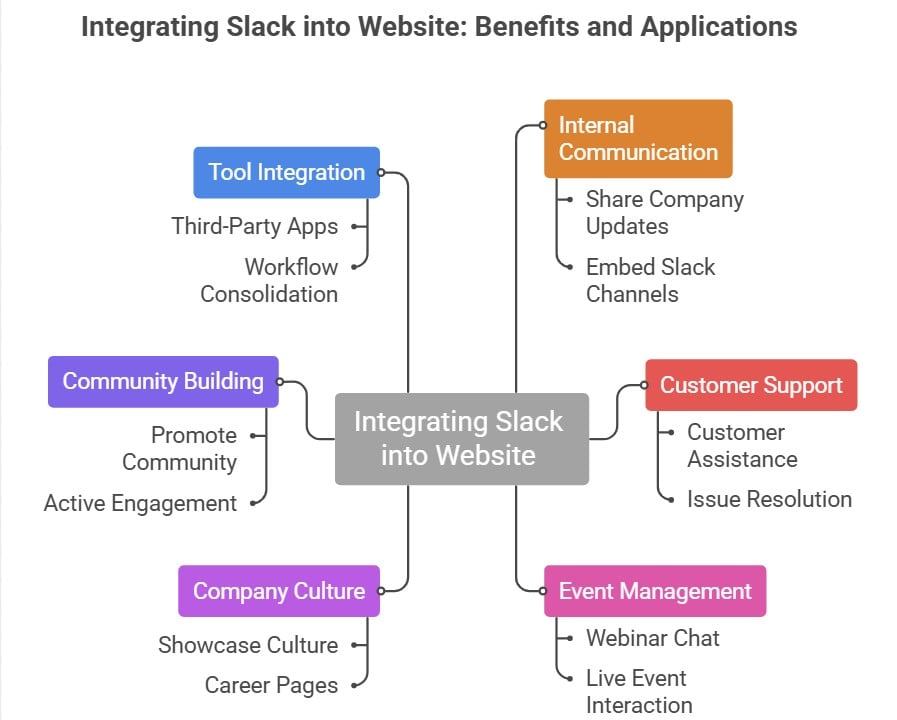
- Share Company Updates on Internal Wikis: Embed Slack channels used for announcements directly on internal wiki pages. Employees stay informed in real time without duplicating messages, streamlining internal communication.
- Display Live Issue Tracking on Password-Protected Sites: For teams handling bugs, outages, or customer requests, embedding a Slack channel on a secure site allows employees to see and respond to critical updates instantly.
- Customer Support: Embedding Slack on your support page can improve customer service by allowing users to reach out for assistance quickly. It can also facilitate collaboration on support tickets, leading to faster issue resolution.
- Event or Webinar Chat: If you host webinars, virtual events, or live streams on your website, embedding Slack can provide a chatroom for attendees to interact, ask questions, and share feedback during the event.
- Showcase Company Culture Externally: Feature your Slack “water cooler” or casual channels on public pages, such as career or “we’re hiring” sections. This provides visitors with a glimpse of your team’s culture, just ensure moderation to filter sensitive messages.
- Promote Your Slack Community: If you run a public or membership-based Slack community, embedding a channel on your landing page can entice visitors to join by showing real discussions and active engagement.
- Integration with Other Tools: Slack integrates with numerous third-party applications and services. Embedding Slack on your website can help consolidate various workflows and allow users to access these integrations more easily.
Embed Slack Channel in Website
Display Slack updates, channel, and announcements directly on your site with Taggbox Widget!
Start Your For Free

Taggbox has the best website widget for embedding Slack, making it easy to embed Slack. To do so, follow the easy steps below.
Step 1 – Get started with Taggbox
Log in or register to Taggbox. After selecting “Social Feeds on website“, verify your email.
Choose Slack as your network to show the Slack feed on the website.
Connect your Slack account, then click “Create Feed“.
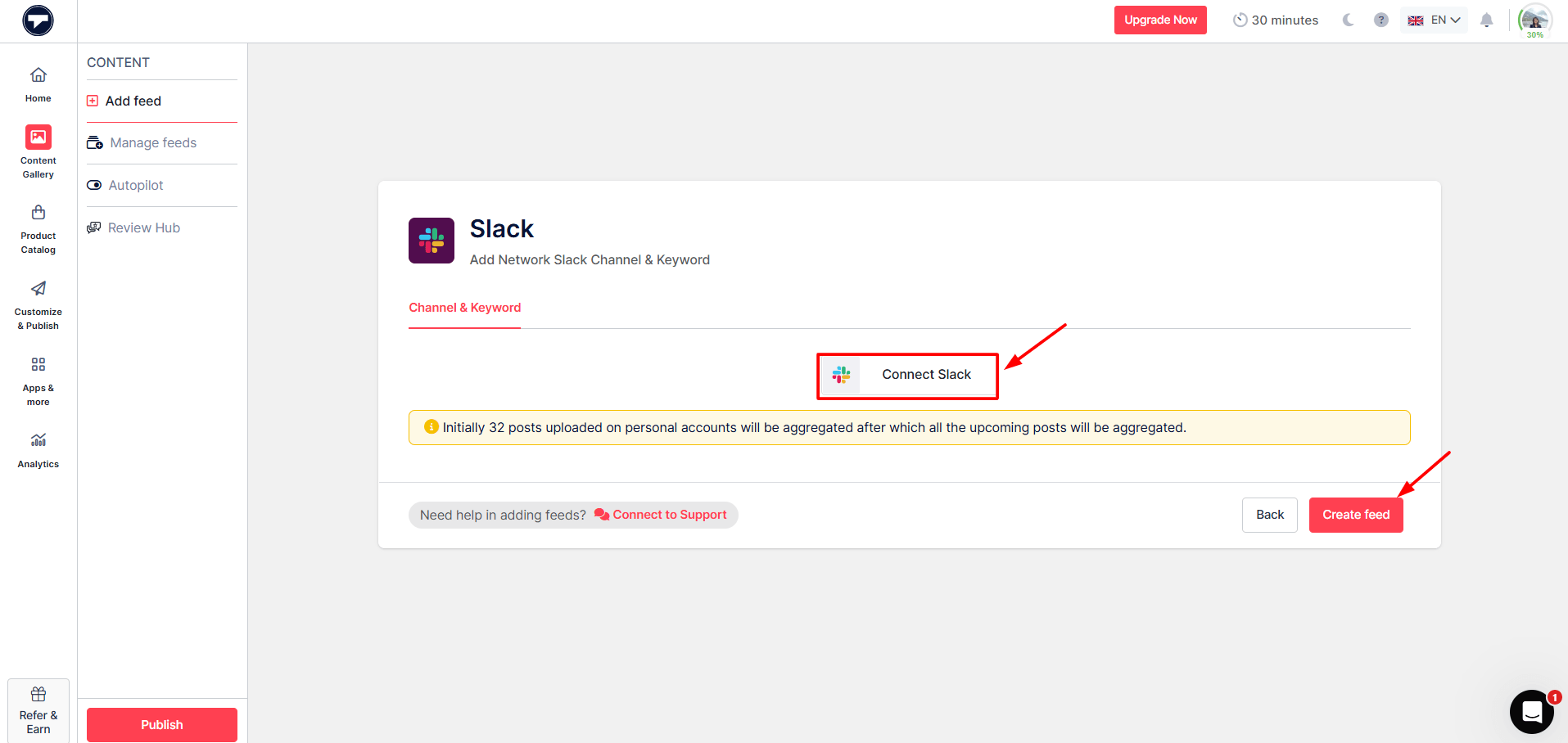
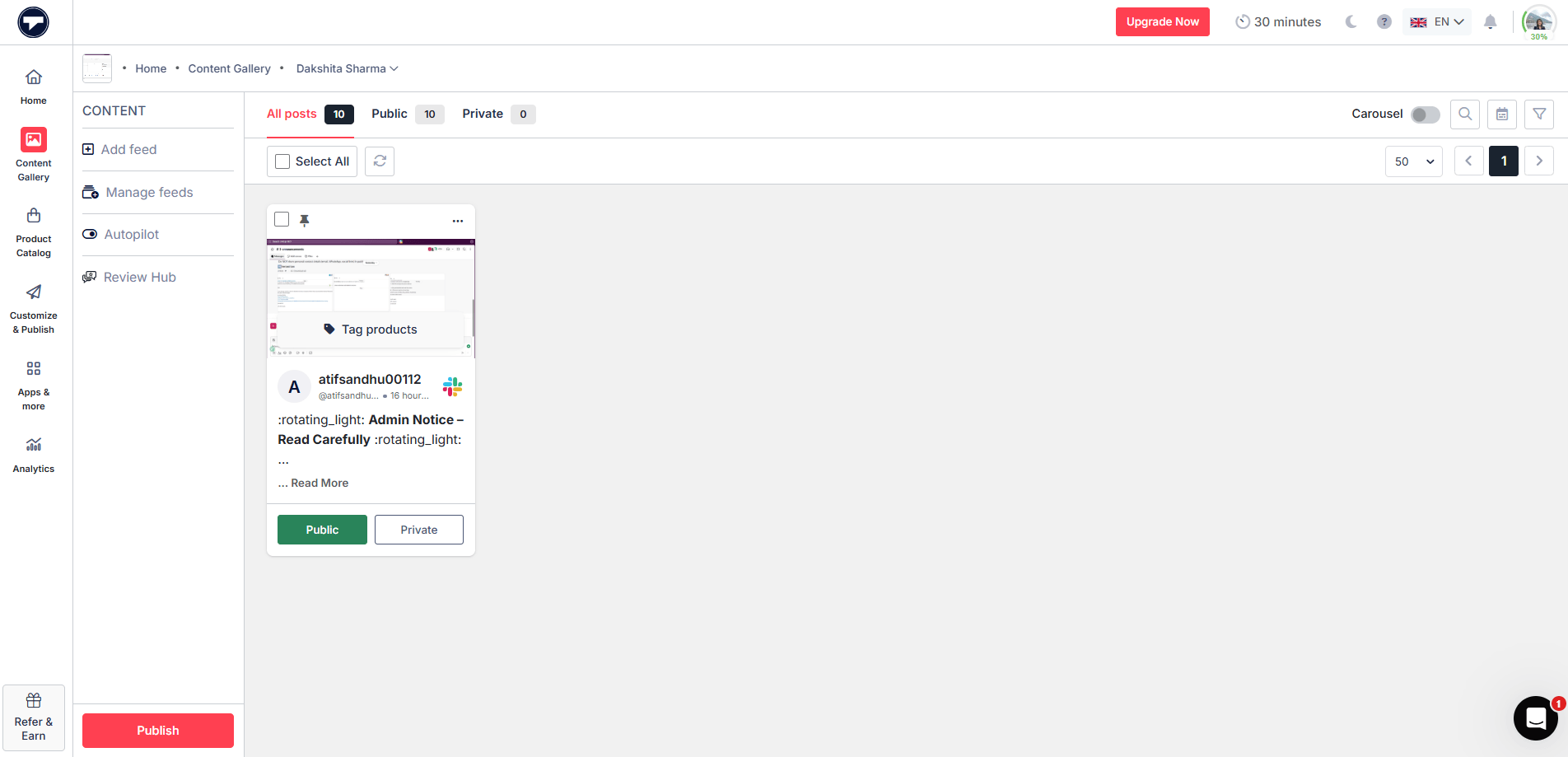
After connecting, your Slack feed is created. Now you can moderate it as you prefer.
Now click on “Customize & Publish” at the left. Then, select the website as a channel.
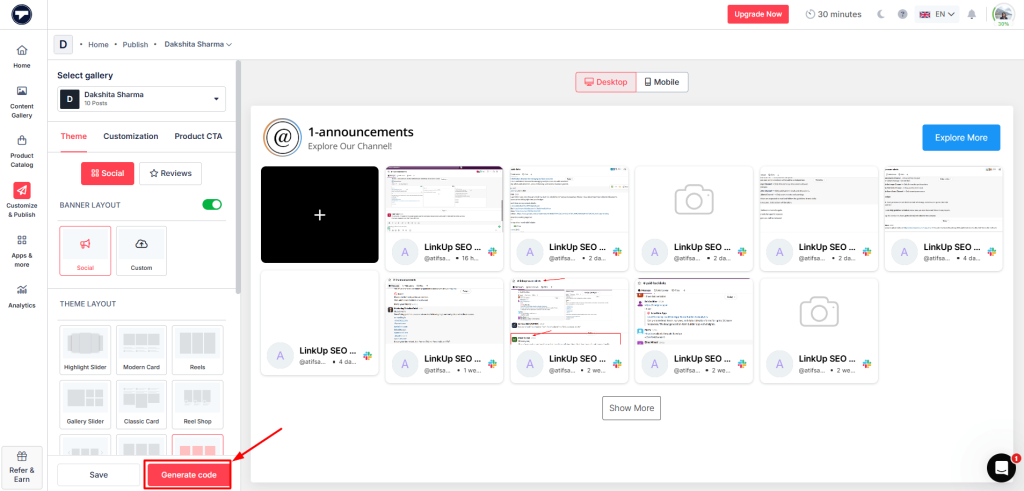
A new page will open, and from here you customize your feed. You can change layout, themes, fonts, etc.
After doing all these according to your preference, click on “Generate Code.”
Once you’re done, select any CMS platform where you want to add your Slack channel. Adjust the width & height, then copy the given embed code. Now paste that into the website’s backend.
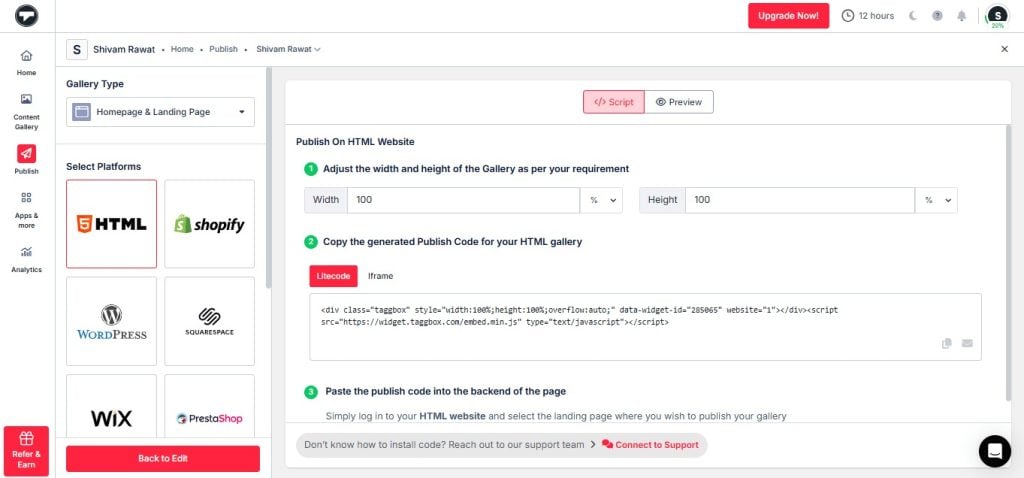
That’s it, your chosen content is now embedded on your website and can start enhancing visitor engagement instantly.
Display Slack Channel on Website
Display Slack updates, channel, and announcements directly on your site with Taggbox Widget!
Start Your For Free
There are numerous website-building platforms, and your website could have been created using any one of them. Hence, here are the steps to embed Slack on website for different website builders.
Embed Slack On HTML Website

- Start with selecting HTML.
- You will get the Embed Code from Taggbox, which you can copy.
- In this step, you need to go to the webpage’s backend and then paste the embed code where you want to integrate Slack into the website.
- Save the changes, and your website will be ready with a functional Slack Widget.
Embed Slack in WordPress Website
- Choose WordPress as your website platform.
- Generate the Website Embed Code from Taggbox, which you can paste on the backend of your webpage to add a Slack Channel on WordPress website.
- Now, click “(+)Add Block” in the WordPress Editor and select Formatting.
- Choose Custom HTML and then paste the embed code here.
- Lastly, you must click on Publish/Update post, and then you are ready with a Slack channel on the WordPress website.
Add Slack on the WIX Website

- Select the WIX.
- Like the aforementioned steps, you must generate the Embed Code from Taggbox. Now paste this embed code on the backend of the webpage of your WIX website where you want to embed the slack channel.
- Click on the “+Add” button and then select More.
- Now, click on HTML iframes in the embed.
- Paste the embed code in the Code Field here.
- In the end, save the changes.
Display Slack On Squarespace Website

- Select Squarespace and create the Embed Code from Taggbox.
- Now go to the backend of the webpage on your Squarespace website, where you want to embed the Slack.
- Now click “+ Add/Edit Block “and choose Embed Code from the menu.
- Click on the </> icon in the URL field and then paste the copied embed code here.
- Save the changes in the end.
Integrate Slack On Weebly Website

- Select Weebly.
- Generate the Embed Code from Taggbox and then paste this code into the backend of the webpage of your Weebly website where you want to embed the Slack channel.
- Press on the HTML box and select the Edit Custom HTML option.
- Then, paste the embed code in the box.
- Save the changes you have made.
Integrate Slack Channel in Shopify Website

- Select Shopify
- Create the Embed Code from Taggbox and go to the online store where you wish to embed the Slack Channel on Shopify website.
- Open its backend and then go to Edit HTML/CSS.
- Select Layout/ Templates/Section where you want to display your Slack feeds.
- Paste the copied code and then save all the changes you have made.
Final Words
Embedding Slack on a website presents a multifaceted solution for enhancing communication, collaboration, and engagement. By seamlessly integrating Slack channels into web platforms, businesses can facilitate real-time interactions, streamline workflows, and foster stronger connections with visitors and team members alike.
The benefits are vast, from providing instant customer support to nurturing online communities and facilitating internal communication. Simple steps outlined for embedding Slack across various website-building platforms make the process accessible to all.
Ultimately, embracing Slack integration offers a dynamic way to enrich user experiences, drive engagement, and propel organizational productivity into the digital age.