To add an Instagram Wall to a website, connect your Instagram account to Taggbox, choose a display layout, customize the design to match your branding, and paste the generated embed code into your site — no coding required.
An Instagram Wall is a live, auto-updating display of your Instagram posts, Reels, hashtags, and customer content shown directly on your website or event screen. Instead of manually uploading photos or letting your homepage go stale, the wall pulls in fresh content automatically every time you post, tag a customer, or run a hashtag campaign.
In this guide, you’ll learn exactly how to add an Instagram Wall to a website step by step, the features worth prioritizing in a widget tool, the most popular wall layouts, real examples across industries, and the best places on your site to display one.
What is an Instagram Wall?
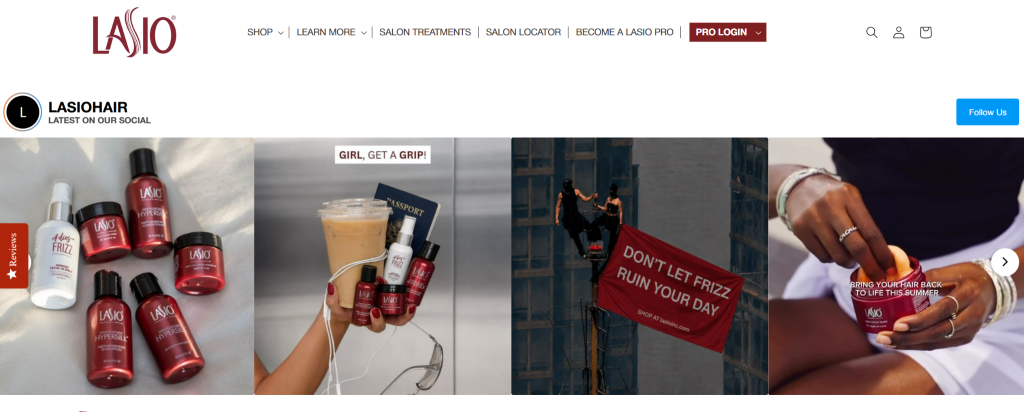
An Instagram Wall is a widget that displays live Instagram content, posts, Reels, hashtags, and tagged photos, updating automatically without manual work. It can be embedded on a website or displayed on a big screen at live events and venues, making it a popular Instagram wall for events looking to boost engagement in real time.
Instead of manually adding photos, the wall automatically pulls in content from your chosen sources and refreshes as new posts go live and keeps websites fresh and gives event screens real-time attendee content. Either way, it helps businesses showcase social proof and create a more interactive experience.
Depending on the tool, an Instagram Wall can pull in:
- Posts – Photos and videos from your own Instagram profile, ideal for showcasing products, announcements, and brand updates
- Reels – Short-form video content that grabs attention and drives higher engagement
- Hashtags – Posts published under a specific campaign or branded hashtag, perfect for contests and events
- Tagged Posts – Content where users have tagged your account, highlighting real customer interactions
- User-Generated Content (UGC) – Customer photos, reviews, and testimonials that add authenticity and build trust
Important Instagram Wall Features to Look For
Not every Instagram Wall tool is built the same way. Before you pick one, check that it offers:
- Profile feed support – Automatically pulls your latest posts so the wall never goes stale
- Reels and video support – Lets you showcase tutorials, demos, and behind-the-scenes clips
- Automatic content updates – Syncs new posts in real time, no manual refreshing
- Content moderation and filters – Approve, hide, or remove posts before they go live so only on-brand content appears
- Custom layouts and branding – Match colors, fonts, spacing, and card styles to your website design
- Mobile-responsive design – Adapts cleanly across desktop, tablet, and mobile screens
- Shoppable links and CTA buttons – Turn posts into a shoppable Instagram feed that gives visitors a direct path to purchase for ecommerce brands.
- Localization and Google Analytics – Serve region-relevant content and track how the wall performs
Display Instagram Posts Directly on Your Website
Use your Instagram content as a dynamic feed that updates automatically across your website pages.
Start For Free Now
Why Add an Instagram Wall to Your Website?
- Keep website content fresh – New posts appear automatically, so your site never looks outdated
- Display authentic customer content – Real photos and reviews build more trust than polished marketing copy
- Build social proof – Visible engagement and real interactions reassure new visitors before they buy
- Increase engagement – Visual, scrollable content keeps people on the page longer
- Promote campaigns – Hashtag walls extend the reach of contests, launches, and events
- Grow your following – Visitors who like what they see on your site are more likely to follow you on Instagram
How to Add an Instagram Wall to a Website
Adding an Instagram Wall with Taggbox takes just a few minutes and requires no coding.
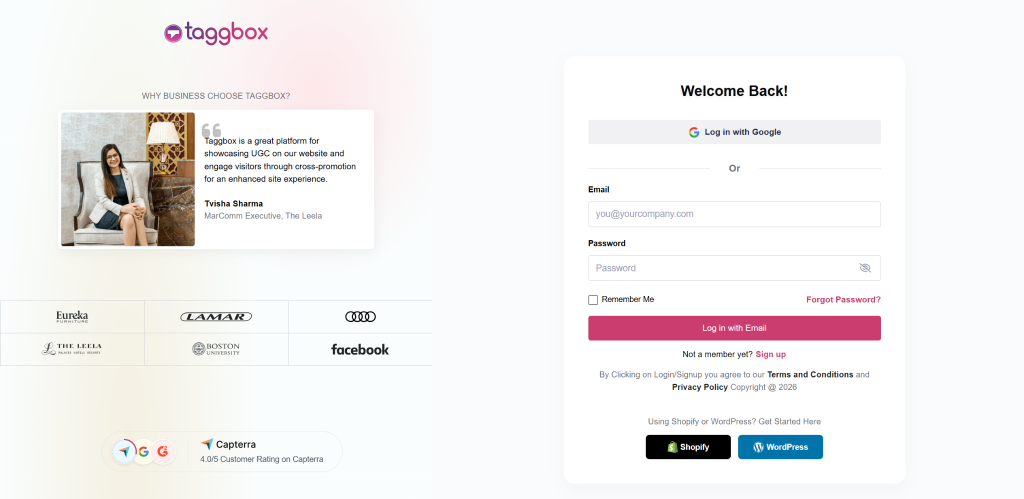
Step 1: Create Your Taggbox Account
Pick a tool like Taggbox that offers moderation, customization, automatic updates, and analytics. Head over to taggbox and log in if you already have an account. If not, sign up.
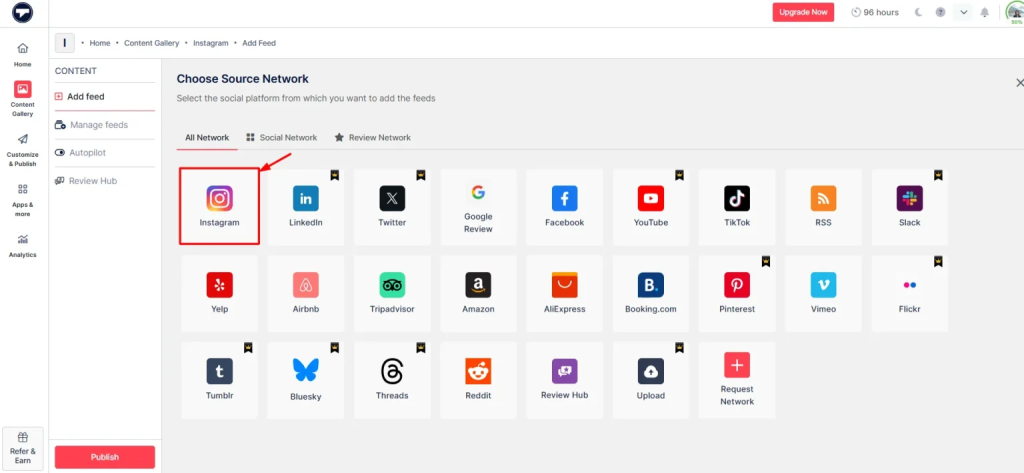
Step 2: Connect Your Instagram Account
Select Instagram as your content source. Then, you can pick how you want to pull content like using hashtags, tags, handles, mentions etc. Then, Click on “Create Feed”.
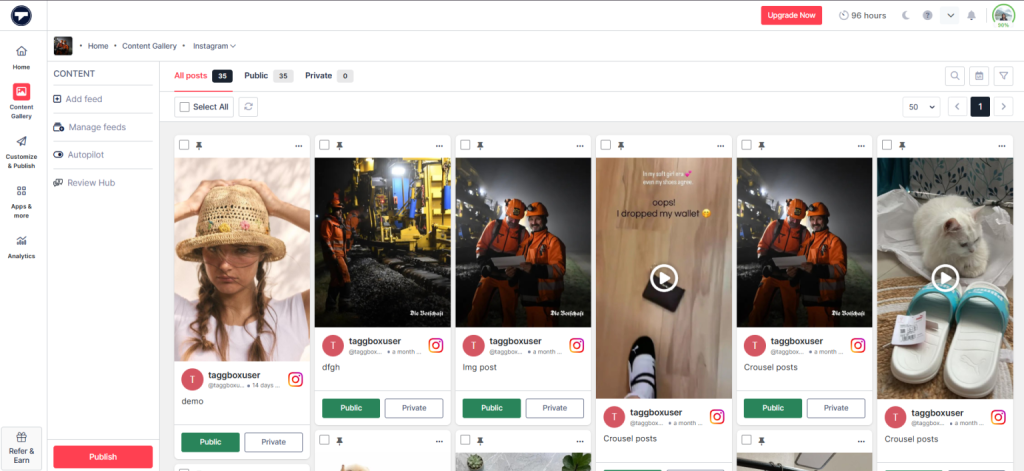
Step 3: Moderate Your Instagram Wall
Now, you will see your content gallery created. Now, moderate the content you want to make public or private and then create your feed accordingly.
Step 4: Customize Your Instagram Wall
Click on the “Customize & Publish” button on the left-hand side. Pick a layout that fits your site’s design — Grid, Masonry, Slider, Carousel, Collage, or a dedicated Reels format. Adjust colors, fonts, themes, spacing, and card styles to match your branding.
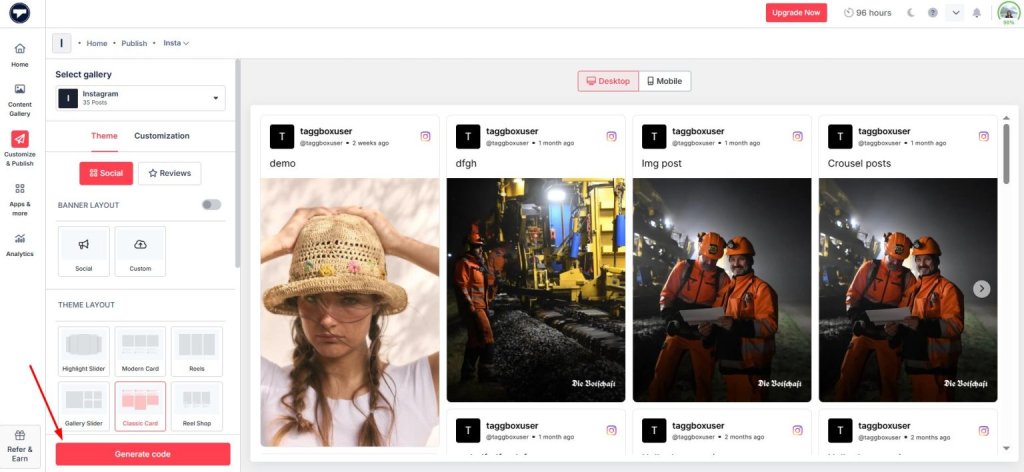
Step 5: Copy the Embed Code
Once the wall looks right, click on Generate Code and select the platform your site is built on (e.g., WordPress, Shopify) and copy the code for that platform.
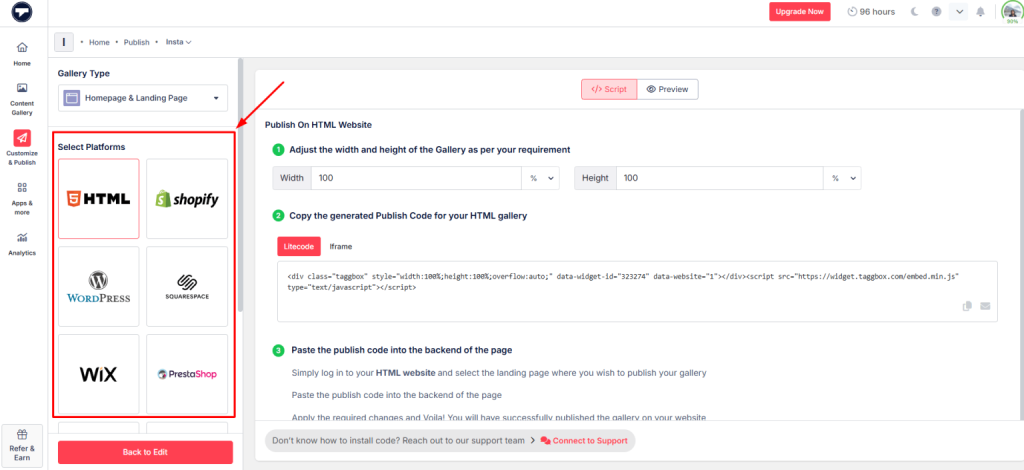
Step 6: Paste the Code Into the Website
Next, open the page where you want your Instagram widget to appear. Then, paste in the code you just copied. Preview it on desktop and mobile before publishing, then push the page live.
Add Instagram Wall to Website in Minutes
Easily add Instagram Wall to website and display posts, Reels, and UGC without any coding.
Add Wall Now
Popular Types of Instagram Walls
Instagram Walls come in different layouts, each designed to showcase content in a unique way. The right format depends on your website goals, content style, and the experience you want to create for visitors.
Classic Instagram Grid Wall
A clean, evenly spaced grid of your latest posts.
Best for: displaying recent Instagram content in a polished, organized way.
Instagram Masonry Wall
A dynamic layout that fits photos, videos, and Reels of different sizes without forcing uniform dimensions.
Best for: mixed image and video content.
Instagram Hashtag Wall
Pulls in posts published under a specific hashtag.
Best for: campaigns, contests, and events.
Instagram Reels Wall
Puts short-form video front and center.
Best for: short-form video content and product demos.
Instagram UGC Wall
Focused on customer-created content — photos, reviews, and testimonials.
Best for: building trust through real customer experiences.
Shoppable Instagram Wall
Adds product tags and CTA buttons to posts so visitors can shop directly.
Best for: ecommerce and product discovery.
Instagram Slider or Carousel
A compact, scrollable format that fits into smaller page sections.
Best for: tight spaces like sidebars or footers.
Instagram Collage Wall
A visually rich, creative arrangement of multiple posts.
Best for: homepages and creative portfolios.
Instagram Wall on Website Examples
HYUE — Beauty & Ecommerce (Shoppable Grid)
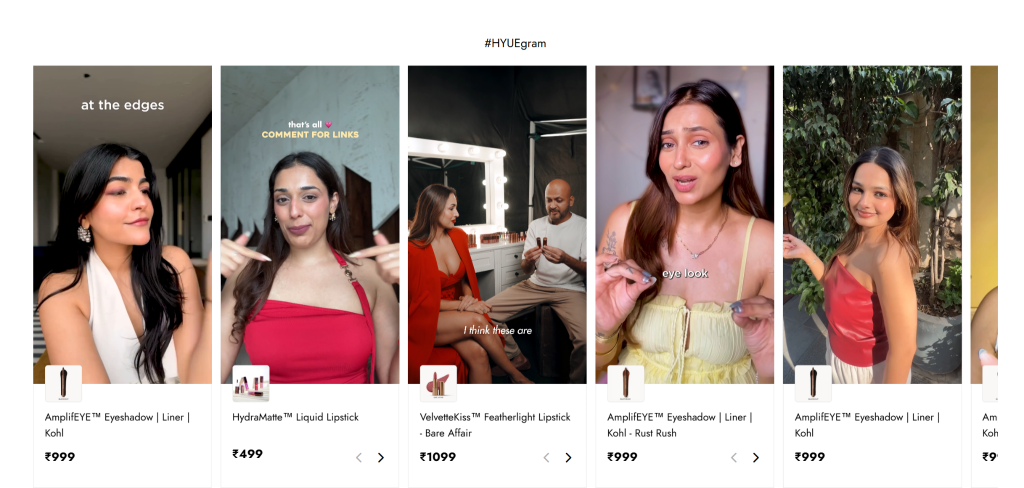 HYUE Instagram Wall Using Shoppable Grid Layout
HYUE used Taggbox to embed a shoppable UGC gallery on its product pages, tagging real customer content to drive purchases. The result: 17.2K widget views, 29.3K clicks, and a 171% click-through rate.
Mossberg — Firearms Brand (UGC Grid)
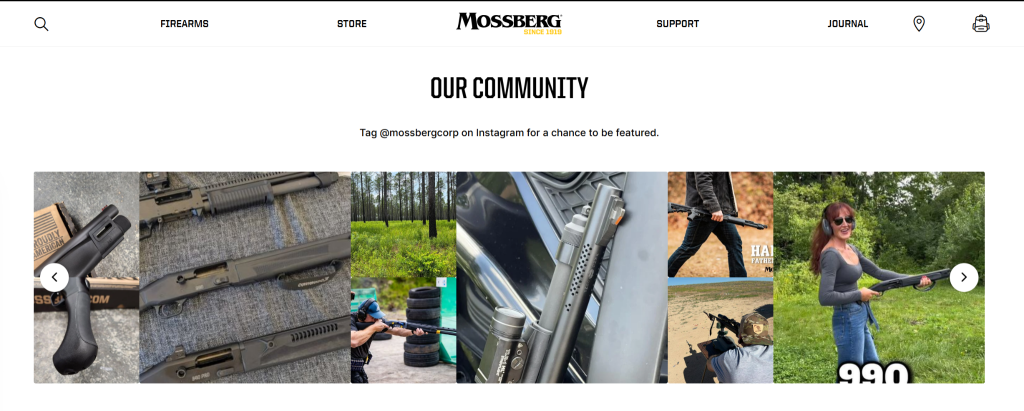 Mossberg Instagram Wall Using UGC Grid Layout
On their “Home Page”, Mossberg uses a clean grid layout and invites customers to “Tag @mossbergcorp on Instagram for a chance to be featured” — turning customer photos of their firearms in action into authentic, ready-made brand content.
Crescent Homes — Home Builder (Instagram Feed Grid)
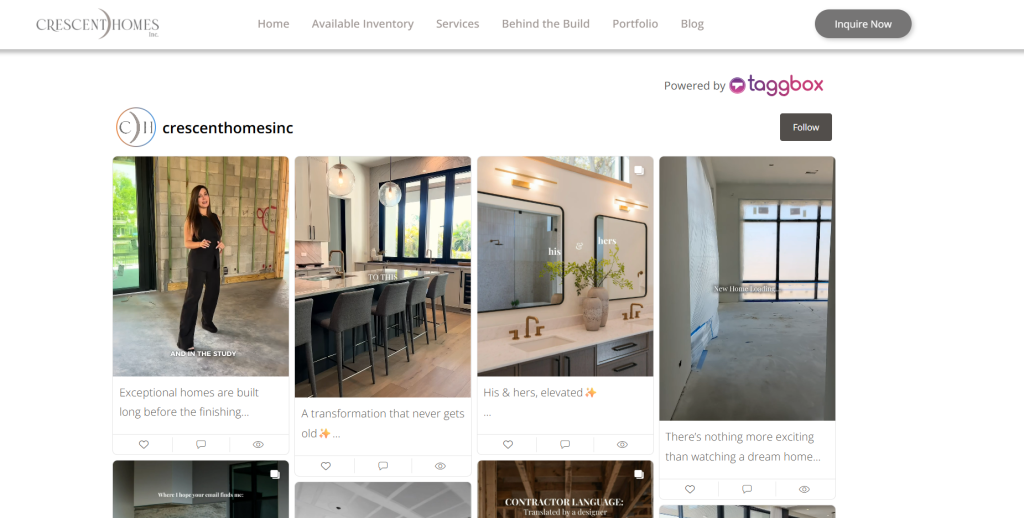 Crescent Homes Instagram Wall Using Instagram Feed Grid Layout
Crescent Homes embeds a live Instagram grid directly on its site, pulling in behind-the-scenes construction photos, before-and-after transformations, and team moments with captions intact — giving prospective buyers a real look at the building process before they inquire.
Grupo Libera (CAV 2026) — Event/Conference (Story-Style Carousel)
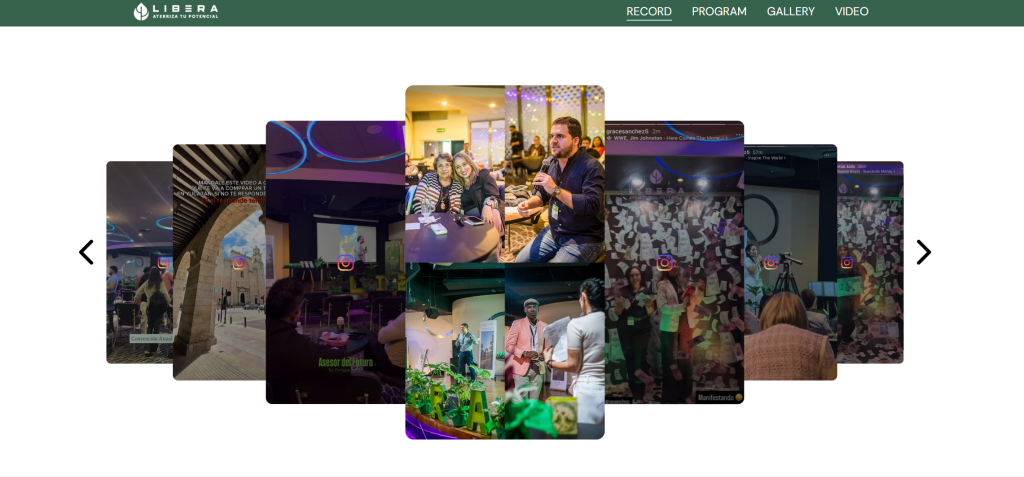 Grupo Libera Instagram Wall Using Story-Style Carousel Layout
For its annual convention, Grupo Libera uses a stacked, story-style carousel that mimics Instagram Stories – showing convention highlights, speaker sessions, and attendee moments in a scrollable format built specifically for event pages.
Playpoint Asia — Recreation & Playground Equipment (Rounded Card Grid)
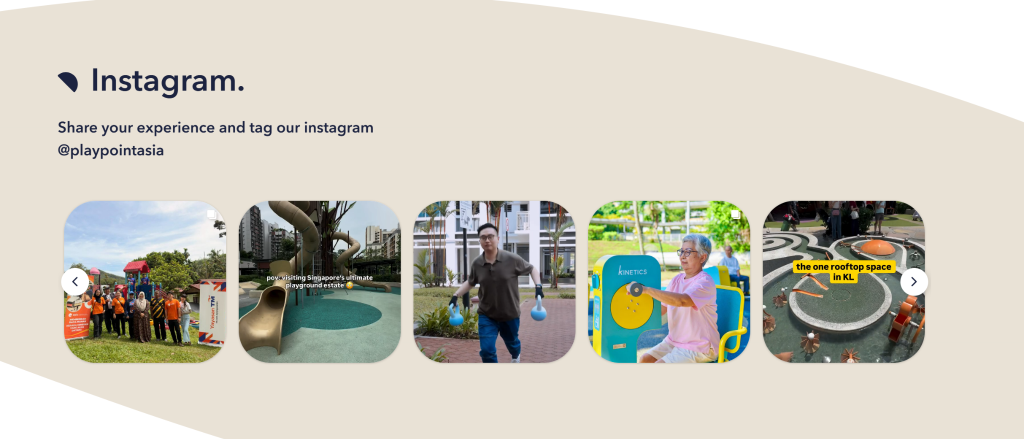 Playpoint Asia Instagram Wall Using Rounded Card Grid Layout
Playpoint Asia displays a rounded-card Instagram grid with a direct tag prompt (“Share your experience and tag our Instagram @playpointasia”), showcasing real installations and customer visits across its playground projects – strong social proof for a B2B/B2G buyer.
Across all five examples, the layout matches the business model: shoppable grids for ecommerce, UGC prompts for community-driven brands, story-style carousels for events, and portfolio-style grids for creative and B2B sites.
Make Your Website Look Like These Instagram-Driven Brands
Display Instagram posts, Reels, and UGC directly on your site and keep it constantly updated.
Start For Free Now
Where to Display an Instagram Wall
- Homepage — creates a strong, engaging first impression
- Product pages — real customer photos next to a product build buying confidence
- Landing pages — reinforce campaign messaging with authentic content
- UGC gallery — a dedicated hub for customer photos and tagged posts
- Event page — showcases live attendee content before, during, and after an event
- About Us page — adds personality through team moments and behind-the-scenes content
- Website footer — a subtle, always-visible way to keep social content in view across every page
Conclusion
An Instagram Wall turns a static website into a living, constantly updating showcase of your brand’s social presence. Whether you’re building trust with real customer photos, promoting a hashtag campaign, or simply keeping your homepage fresh without manual work, it’s one of the easiest upgrades you can make. With Taggbox, you can connect your Instagram account, choose a layout, customize the design, and publish — all without touching a line of code. Start building your Instagram Wall today and turn casual visitors into engaged followers and customers.