You can embed Tripadvisor reviews on your website using Tripadvisor’s official widgets or a third-party review widget such as Taggbox. These tools let you display ratings, review snippets, and customer experiences directly on your pages without requiring visitors to leave your website.
Adding Tripadvisor reviews can strengthen trust, support booking decisions, and provide visible social proof for hotels, restaurants, tour operators, and travel businesses. This guide explains how to add a Tripadvisor widget to your website, compares the available methods, and shows where to place reviews for maximum impact.
A Tripadvisor Reviews Widget is a tool that lets businesses display their Tripadvisor reviews directly on their website. It displays business Tripadvisor rating, recent review snippets, and other listing details.
The feed automatically pulls information from your Tripadvisor profile and presents it in an attractive format. This can include star ratings, written reviews, reviewer names, review dates, and overall customer experiences shared by previous guests or customers. Whether you run a hotel, restaurant, travel agency, or tour company, a Tripadvisor embed widget helps turn positive reviews into social proof that visitors can see instantly.
Why Should You Embed Tripadvisor Reviews on Your Website?

From building credibility to improving engagement, authentic reviews can positively influence how people interact with your business online.
Builds Trust with Visitors
Trust is one of the biggest factors behind online purchasing decisions. When visitors see genuine Tripadvisor ratings and feedback from previous customers, your business appears more transparent and reliable. Choosing to embed Tripadvisor reviews on website pages helps reduce uncertainty and creates confidence among potential customers.
Helps Increase Bookings and Enquiries
Positive reviews can act as the final push visitors need before taking action. Whether it is booking a hotel room, reserving a table, or requesting information, real customer experiences encourage conversions. A well-placed Tripadvisor embed widget can support higher bookings and enquiries.
Keeps Visitors on Your Website
Without embedded reviews, users may leave your website to check your Tripadvisor profile separately. By displaying reviews directly on your site, you provide the information visitors are looking for without disrupting their journey, helping them stay engaged and explore your offerings further.
Shows Real Customer Experiences
Tripadvisor reviews highlight authentic stories from people who have already experienced your services. They offer practical insights that traditional marketing messages often cannot deliver. When you embed Tripadvisor reviews, you allow prospects to learn from real experiences and make informed decisions.
Improves Website Engagement
Review widgets add dynamic and interactive content to your website. Visitors tend to spend more time reading customer feedback, exploring ratings, and comparing experiences. This increased interaction can improve overall website engagement and create more opportunities to convert interested visitors into customers.
Ready to Turn Reviews Into Bookings?
Add Tripadvisor reviews to your website and help visitors book with confidence.
Try Taggbox Free
How to Embed Tripadvisor Reviews on Website
Adding Tripadvisor reviews to your website can create more opportunities to build trust and support bookings. And here is how you can do it.
Using Taggbox
If you are looking for a simple way to embed Tripadvisor reviews on website pages without coding, Taggbox makes the process straightforward. In just a few steps, you can collect, customize, and display Tripadvisor reviews that help build trust and encourage more bookings.
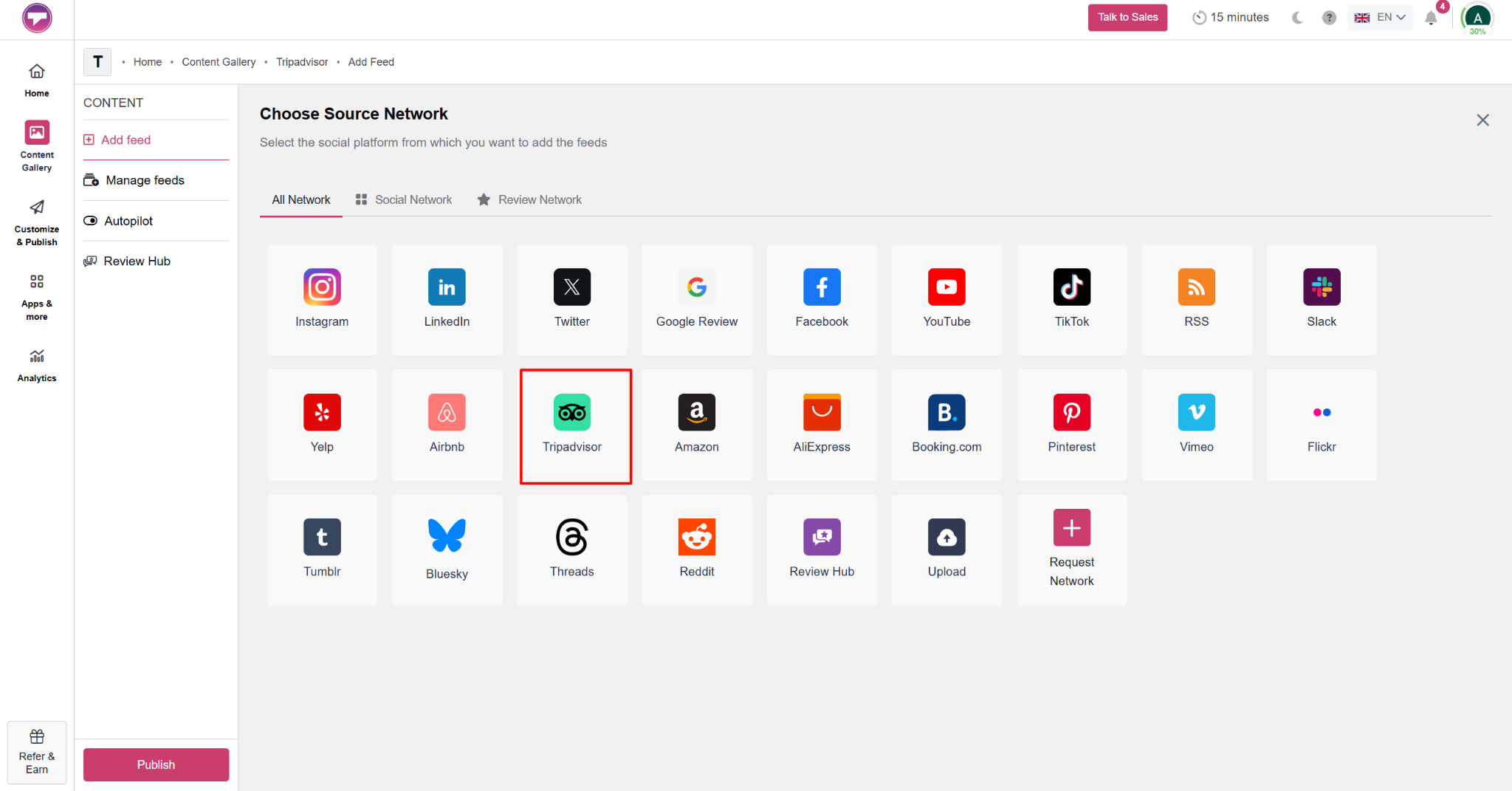
Step 1: Choose Tripadvisor as the Review Source
Sign up or log in to Taggbox, go to the Reviews Widget section, and create a new gallery. Then, select Tripadvisor as your review source to start collecting reviews from your business profile.
Step 2: Collect Tripadvisor Reviews
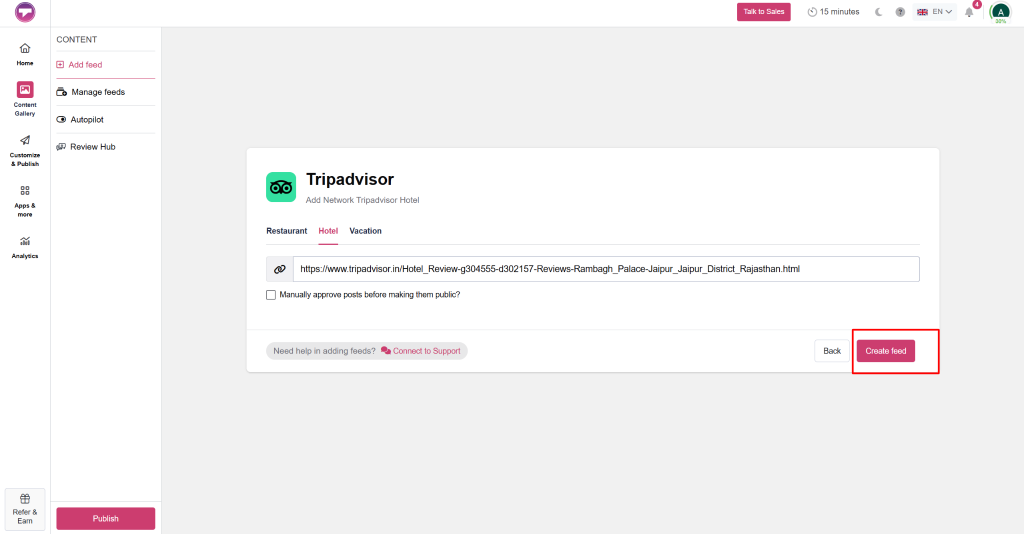
Enter your Tripadvisor business URL and click Create Feed. Taggbox will automatically collect reviews from your Tripadvisor profile, including ratings, reviewer names, review content, and other details, to create a complete review feed for your website.
Step 3: Moderate and Filter Reviews
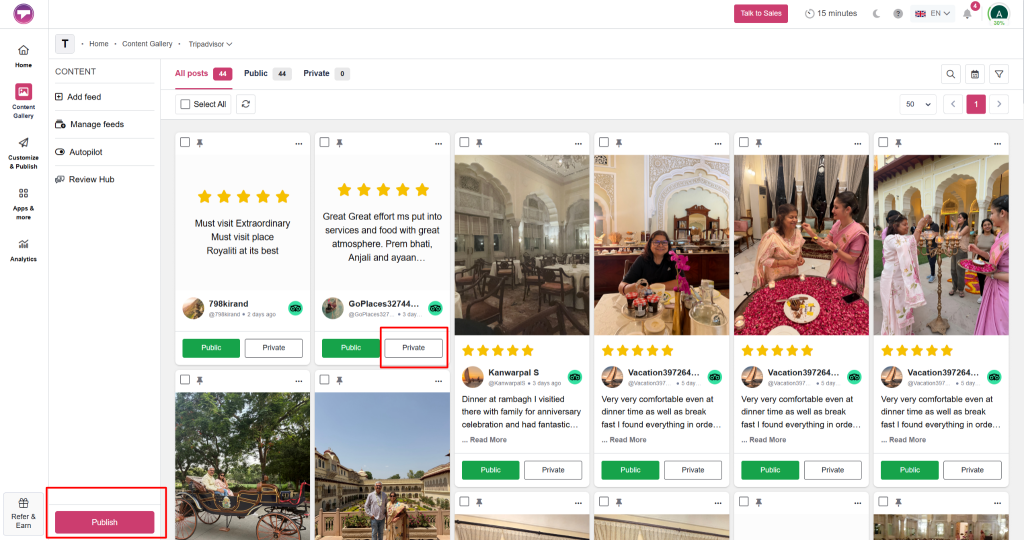
Use Taggbox’s moderation features to control which reviews appear on your website. You can filter out irrelevant content and highlight reviews that best represent your brand. Than, click on Publish
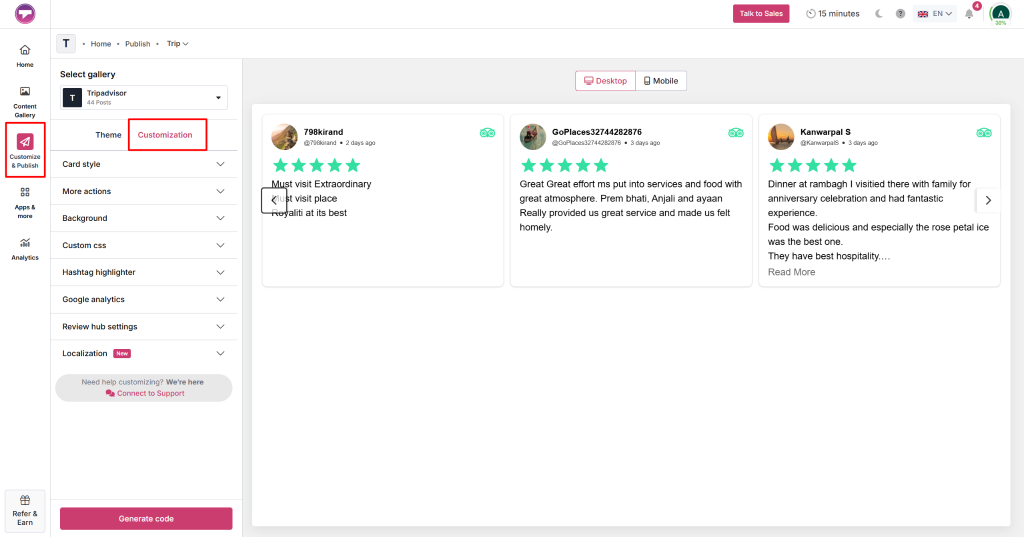
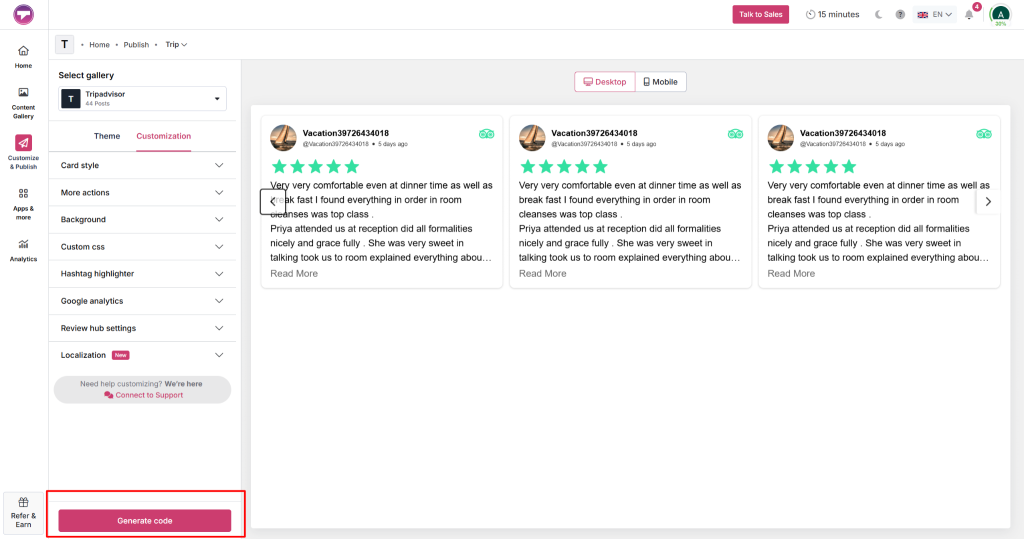
Choose a layout that complements your website design. Taggbox allows you to modify themes, colors, fonts, card styles, and display settings, helping you create a Tripadvisor embed widget that feels like a natural extension of your site.
Step 5: Generate Tripadvisor Embed Code
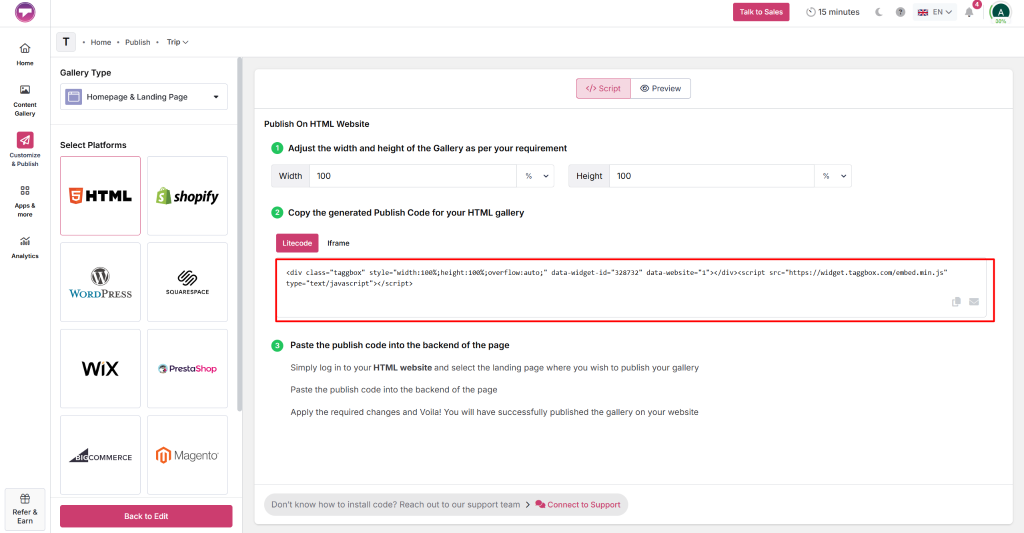
Once you are satisfied with your widget’s design and settings, click Generate Code from the Taggbox dashboard. Copy the embed code provided, which will be used to display your Tripadvisor reviews on your website.
Paste the copied embed code into the section of your website where you want the reviews to appear. After adding the code, save and publish the page.
Check the widget on both desktop and mobile devices to ensure it displays properly and provides visitors with easy access to your Tripadvisor reviews.
Create Your Tripadvisor Widget in Minutes
No coding, no complexity – just collect, customize, and publish.
Create Widget Now
To display Tripadvisor reviews on your website, you can use Tripadvisor’s official widgets. These widgets are free and come with an embed code that you can add to your website.
Follow these simple steps:
- Visit the Tripadvisor Widgets page and search for your business listing.
- Select your business profile from the search results.
- Choose the widget style that best suits your website. Options may include Review Snippets, Rating Badges, and other review display formats.
- Customize the widget settings, such as its size or appearance, if customization options are available.
- Tripadvisor will generate an embed code for the selected widget.
- Copy the embed code and paste it into the HTML section of the webpage where you want the Tripadvisor reviews to appear.
This method is quick and easy for adding Tripadvisor reviews to your website. However, it offers limited customization and moderation features.
While both methods help display customer feedback on your website, they differ significantly in terms of convenience, flexibility, and maintenance. Here’s a quick comparison:
| Feature | Traditional Method | Taggbox Tripadvisor Reviews Widget |
| Review Updates | Requires manual updates | Updates automatically |
| Setup Process | Time-consuming | Quick and no-code |
| Customization Options | Limited | Multiple layouts and styling options |
| Review Moderation | Not available | Filter and manage displayed reviews |
| Website Integration | Basic HTML implementation | Seamless integration across platforms |
| Scalability | Difficult to manage | Easily handles growing review volumes |
| User Experience | Static display | Interactive and visually engaging |
| Best For | Occasional review updates | Businesses seeking ongoing social proof |
Why Use Taggbox to Add Tripadvisor Reviews?

While there are different ways to embed Tripadvisor reviews on website pages, Taggbox offers features that simplify the entire process. From collecting reviews to analyzing their performance, it helps businessens create a more effective review experience.
Easy No-Code Setup
Taggbox is designed for users without technical expertise. You can collect, customize, and publish Tripadvisor reviews using a simple dashboard without writing a single line of code, making implementation fast and hassle-free.
Localization
If your business caters to an international audience, localization features can enhance the user experience. Taggbox allows you to display review widgets in multiple languages and formats, helping visitors engage with content that feels relevant to them.
Google Analytics Integration
Taggbox integrates with Google Analytics, enabling you to track how visitors interact with your review widget. You can gain insights into user behavior, measure engagement, and understand how reviews contribute to conversions and booking decisions.
Review Hub Feature
The Review Hub feature helps businesses collect reviews from customers through a dedicated review collection page. This simplifies reputation management by creating a centralized space where customers can share their experiences and feedback.
Review Moderation
Not every review may align with your website’s objectives. Taggbox provides moderation tools that allow you to filter content, remove irrelevant reviews, and showcase feedback that best reflects your brand image.
Customizable Layouts
Every website has its own style, and your review widget should complement it. Taggbox offers multiple customization layout options, themes, and design settings so you can create a review display that matches your website seamlessly.
AI Review Summarizer
Reading dozens of reviews can be overwhelming for visitors. The AI Review Summarizer condenses recurring themes and key insights into concise summaries, helping potential customers quickly understand what previous guests appreciate most about your business.
Experience Everything Taggbox Offers
From moderation to AI summaries, manage reviews with ease.
Explore Features
Where Can You Display Tripadvisor Reviews on Your Website?

If placed correctly, a Tripadvisor review widget can do wonders for your brand and website. These are some of the places where you can showcase Tripadvisor review widget to get most out of it.
Homepage
Feature Tripadvisor reviews on your homepage to establish credibility and create a strong first impression.
Booking Page
Display reviews near booking forms to reassure visitors and encourage them to complete reservations confidently.
Hotel Room or Service Pages
Show relevant customer feedback on service pages to help visitors evaluate specific offerings effectively.
Restaurant Reservation Page
Highlight dining experiences and guest satisfaction to motivate potential customers to reserve a table.
Tour Package Pages
Add Tripadvisor reviews alongside tour details to showcase memorable experiences shared by previous travelers.
Contact Page
Place reviews on contact pages to strengthen trust before visitors submit enquiries or requests.
Testimonials or Reviews Page
Create a dedicated review section that brings together authentic Tripadvisor feedback in one place.
Conclusion
Tripadvisor reviews have become an important part of how travelers evaluate hotels, restaurants, tour operators, and other hospitality businesses. When you embed Tripadvisor reviews on website pages, you bring authentic customer experiences directly into your visitors’ decision-making journey. This not only helps build trust but also improves engagement, keeps users on your site longer, and can encourage more bookings and enquiries.
Start Embedding Tripadvisor Reviews Today
Turn authentic customer feedback into trust, engagement, and more bookings.
Get Started Free