Gone are the days when Instagram was merely an app that was used to post filtered brunch photos and funny memes. Today, Instagram is basically a giant shopping mall where people discover products, get inspired, and buy stuff without ever leaving the app. And if you run a Shopify store, ignoring Instagram is like opening a store without putting up a sign.
In this guide, we’ll learn about the shopify instaram integration with different methods that work in 2026, best practices, tools, real examples, and everything in between.
Embed Instagram Feed on Shopify Store
What is Shopify Instagram Integration?
In simple terms, Shopify Instagram integration means linking your Shopify store with your Instagram account so the two platforms can talk to each other and work together.
There are three main ways this happens:
- Instagram Shopping – View product details and purchase with minimal friction, often without leaving Instagram.
- Instagram Feed on Shopify – Display your Instagram posts, Reels, or stories as a live feed or gallery on your Shopify store (homepage, product pages, etc.).
- Ads & Marketing Sync – Run targeted Instagram ads using your Shopify product catalog and track performance across both platforms.
Basically, it removes the friction between “I saw this and liked it” and “I just bought it.”
Why Shopify Instagram Integration Matters in 2026
Let’s be real, people don’t want to switch between 17 tabs to buy something. They want it easy.
Here’s why Shopify Instagram integration has become almost mandatory in 2026:
With Instagram Shopping, someone spots your stuff while doomscrolling, taps the product, throws it in the cart, and buys, all without leaving the app. No copying links, no searching your store manually. A lot of brands I’ve seen doing this right are getting higher conversion rates from Instagram traffic. It works exceptionally well.
b.) It makes people actually trust you
Real customers posting photos of themselves wearing your stuff is pure gold. When you plug that Instagram feed straight into your Shopify store, it shows genuine pics and videos right on your homepage. It feels way more real than fancy product shots. It’s like having a bunch of happy customers vouching for you 24/7.
c.) It keeps people from bouncing off your site
Let’s be real, a plain Shopify store can look kinda dead and boring. But throw in a live Instagram feed with nice photos and Reels? Suddenly, people start scrolling, liking what they see, and sticking around longer. Google likes that, and longer visits usually mean more people end up buying.
d.) It gets your brand in front of way more eyes
Your products show up where users already spend significant time (Instagram), and everything still links smoothly back to your store. It makes your brand feel consistent and put-together across both places without you doing extra work every day.
e.) It stops people from abandoning their carts so much
When buyers can see real photos and videos of your product in action (not just clean studio shots), they feel way more sure about what they’re getting. Less doubt = fewer people chickening out and leaving their cart behind.
f.) It gives you free marketing from your own customers
Every time someone posts a photo with your product, they become your brand ambassadors. With a good integration, you can easily grab those posts and show them off on your store. Your customers become authentic brand advocates, now that’s a pretty sweet deal.
g.) It helps small stores look legit and cool
It is difficult to win customers’ trust, but Instagram integrations make it easier for you. Even if you’re just a one-person Shopify shop, a nice Instagram feed makes everything look way more premium and social. You suddenly don’t look like a tiny store anymore; you look like you actually know what you’re doing.
Types of Shopify Instagram Integration
There are several types of Shopify Instagram integration, but here are four main types you should know about:
This is the official way from Meta. You connect your Facebook Business Manager, sync your Shopify product catalog, and start tagging products in posts and Reels. Customers can shop directly inside Instagram.
2. Embedding Instagram Feed on Shopify
There are many tools, like Taggbox, that help you display your Instagram posts, Reels, or stories as a live gallery on your Shopify store. Perfect for showing social proof on homepage, collection pages, or product pages. For stores using other ecommerce platforms, the same approach can extend to product-focused experiences, such as embed shoppable video on woocommerce, where video content can be integrated into the shopping journey.
3. Instagram Ads Integration
Connect your Shopify catalog to Meta Ads Manager so you can run highly targeted ads with your actual products, accurate pricing, and inventory.
4. Influencer & UGC Integration
Use tools to collect content from influencers and customers, then showcase it beautifully on your Shopify store through Shopify Instagram integration.
Step-by-Step: How to Integrate Shopify with Instagram
You have various ways to integrate Shopify with Instagram. Here are the simplest and most effective ways to do it.
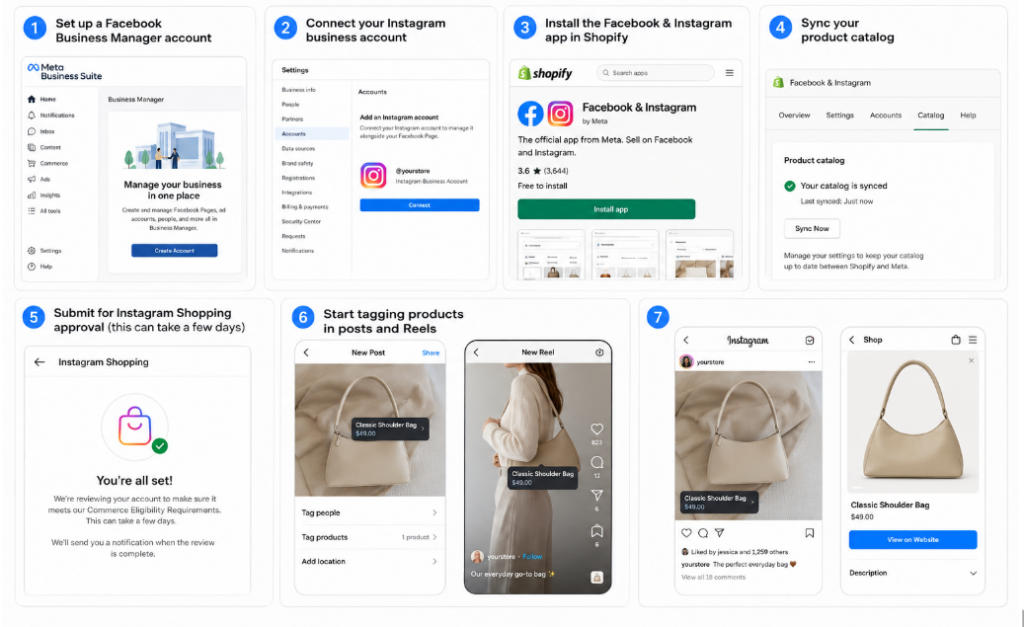
- Set up a Facebook Business Manager account
- Connect your Instagram business account
- Install the Facebook & Instagram app in Shopify
- Sync your product catalog
- Submit for Instagram Shopping approval (this can take a few days)
- Start tagging products in posts and Reels
Method 2: Add Instagram Feed to Shopify (Recommended for Most Stores)
This is where tools like Taggbox shine.
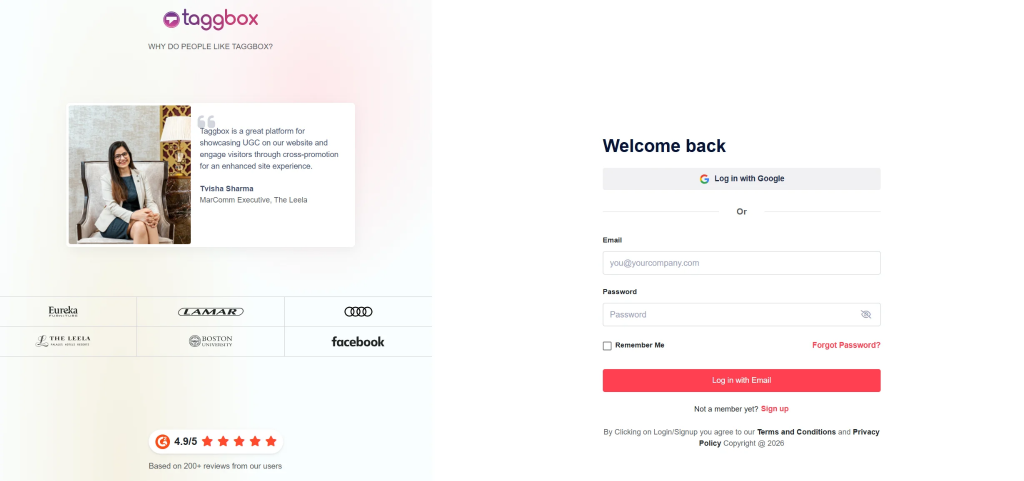
- Sign up at Taggbox
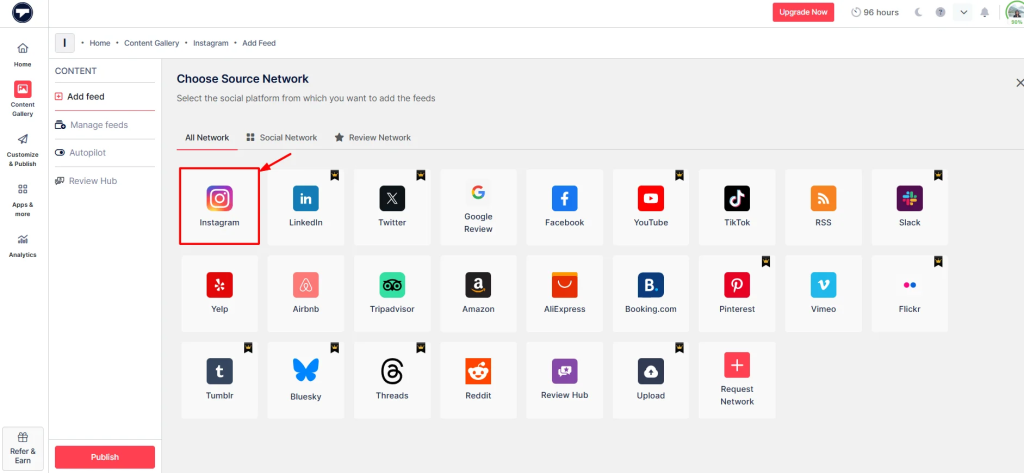
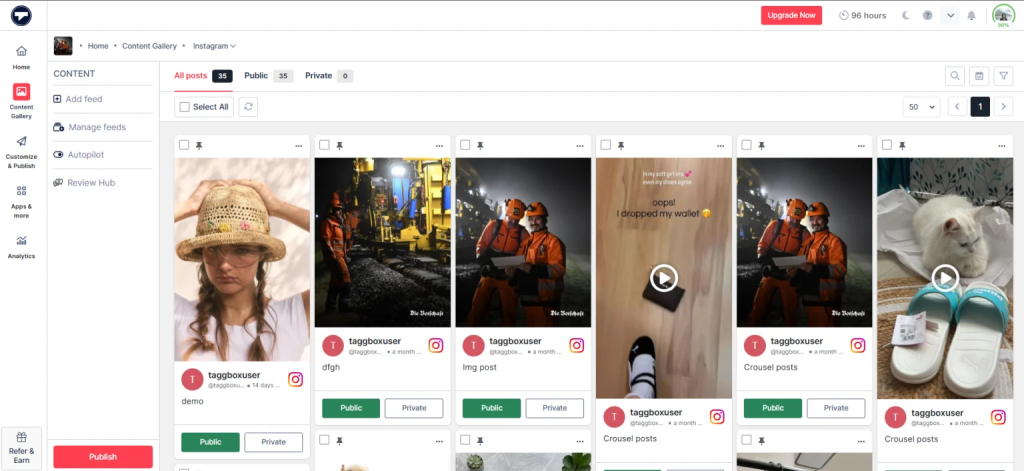
- Select Instagram as Source
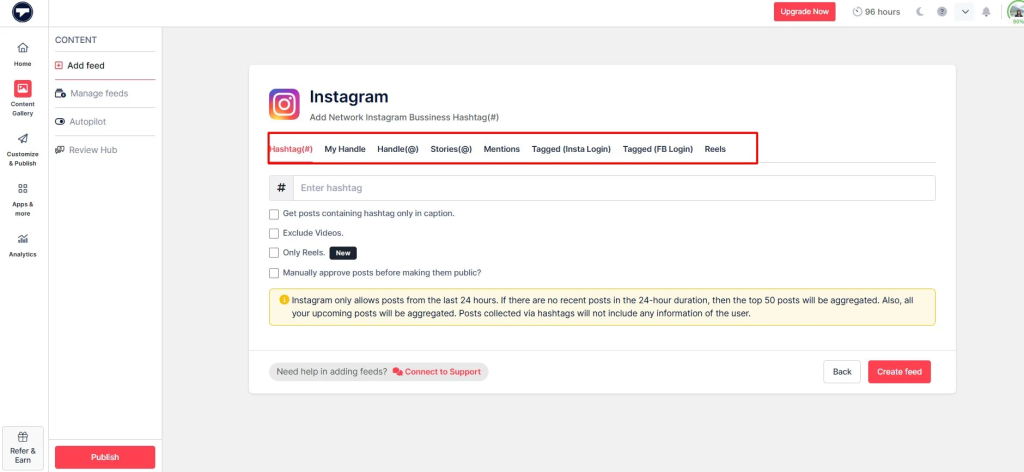
- Connect your Instagram account (personal or business)
- Moderate your instagram feed
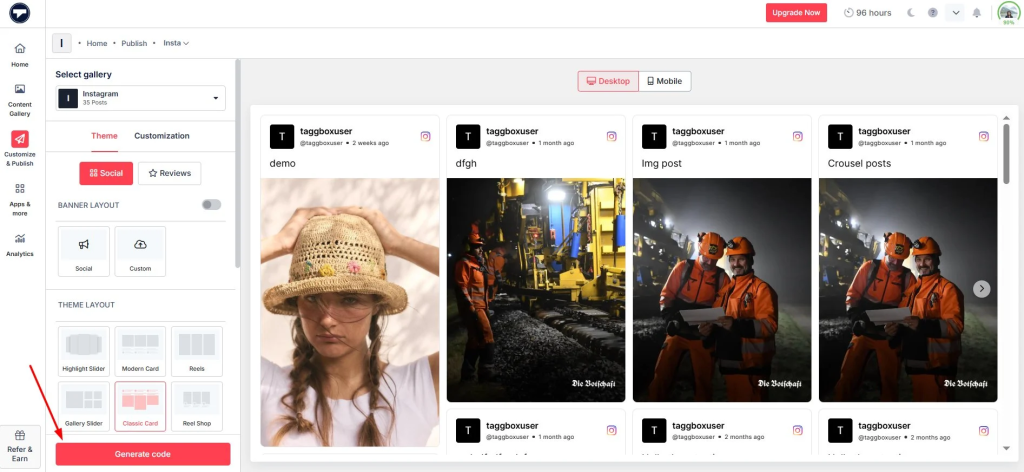
- Customize your instagram widget design to match your Shopify theme ((grid, carousel, slider, masonry, etc.)
- Copy the embed code
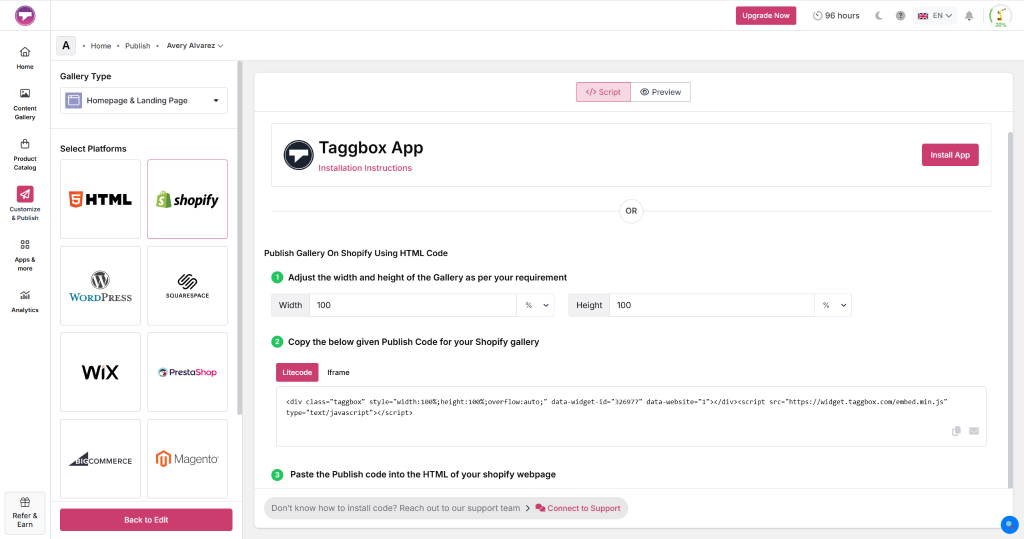
- Paste it into any page on your Shopify store using the “Embed” or “Custom code” section
It’s fast, looks beautiful, and updates automatically.
Integrate Instagram With Your Shopify Store
Best Practices to Actually Get Good Results
Alright, so you’ve connected Shopify with Instagram. Now, how do you make it actually work and not just sit there looking pretty? Here are some real tips that actually move the needle:
- Use killer photos and videos
Bad lighting or random phone snaps won’t cut it. Take high-quality photos with good lighting and maintain a consistent vibe across all your posts. When everything looks clean and consistent, people trust your brand more and are way more likely to stop scrolling and actually buy.
- Go heavy on Reels and videos
Static posts are cool, but Reels just hit differently. Instagram pushes video content way harder than photos right now. A short, fun Reel of someone using your product can get you 5-10x more reach. Videos are where the real attention is in 2026.
- Fix up your Instagram profile properly
Make your bio super clear. Tell people exactly who you are, what you sell, and throw in a strong call-to-action. Put your Shopify store link there, too. A messy or confusing profile makes people bounce before they even check your stuff.
- Use hashtags smartly
Don’t just spam random trending ones. Mix a few of your own branded hashtags with popular but relevant trending ones. It helps new people discover you without looking desperate or spammy. A good balance goes a long way.
- Add clear CTAs everywhere
Don’t make people guess. Tell them straight up – “Tap to shop”, “Shop now”, or “Link in bio to grab yours”. The more direct you are, the more people actually take action instead of just liking and forgetting.
- Show off real customer photos (UGC)
Nothing builds trust faster than actual customers posting with your products. Repost their pics and videos on your feed and embed them on your store. It feels way more genuine than professional shots and makes new buyers feel confident.
- Work with micro-influencers
Forget chasing huge influencers with millions of followers. Micro-influencers (10k–50k followers) usually give way better results for the money. Their audience is more engaged, and they feel more real, which means higher ROI for small Shopify stores.
Common Problems & Quick Fixes
- Instagram Shopping keeps getting rejected
Super common headache. Just go back and carefully check that all your products follow Meta’s rules. Make sure your catalog is filled out with proper descriptions, prices, and images. Fix the small stuff and try again – it usually gets approved after that.
- The embedded Instagram feed gets almost no engagement
If people aren’t liking or commenting on your feed, it’s probably because you’re not posting regularly. Try using trending audio in Reels and actually reply to comments. Consistency plus interaction usually wakes things up pretty fast.
- The feed doesn’t match your brand’s look
Nothing kills the vibe faster than a mismatched feed. Use tools like Taggbox and play with the colors, fonts, and layout until it blends perfectly with your Shopify store. A clean, on-brand feed makes everything look way more professional.
Conclusion
With competition getting fierce, keep in mind that Shopify Instagram integration is no longer optional; it’s one of the smartest moves you can make in 2026. Whether you go for Instagram Shopping, embed a beautiful feed with Taggbox, or run targeted ads, the combination of visual discovery and seamless shopping is incredibly powerful.
Start small. Connect your accounts, embed a clean Instagram feed on your homepage, and watch how it changes the energy of your store. Your customers are already on Instagram; it’s time to meet them there.