Marketing no longer takes place on just one platform. People don’t discover you on one platform and magically convert there. They research, ensure your brand’s name appears on multiple platforms, from Instagram to your website, to your emails, and sometimes back again. This is the journey from discovery to purchase, where Mailchimp Instagram integration plays an important role.
Instagram builds awareness. Mailchimp converts leads. And when you combine the two, you’re no longer guessing where your audience is; you’re guiding them through a connected journey.
Instead of treating Instagram and email as separate channels, brands today are creating a unified experience by:
- Someone discovers your brand on Instagram
- Subscribers enter your email funnel
- Customers get nurtured through campaigns
- They get retargeted on Instagram later
This continuous loop is where sustainable growth happens.
What is Mailchimp Instagram Integration?
Mailchimp’s Instagram integration connects your Instagram presence with your email marketing efforts, so the two work together rather than compete for attention.
Think of it as an ecosystem where content, audiences, and campaigns flow between platforms.
There are multiple ways this integration works:
1. Instagram Content Blocks (Native Mailchimp Feature)
Mailchimp lets you pull Instagram posts directly into your emails with built-in content blocks. This keeps your emails visually engaging without extra effort.
2. Instagram Custom Audiences
Using tools like LeadsBridge, you can sync your Mailchimp audience with Instagram ads. This helps you retarget email subscribers directly on Instagram.
Platforms like Taggbox help display your Instagram profile within emails or web experiences, increasing follower growth.
4. Automation Workflows
Tools like Pabbly Connect enable automated workflows between Instagram and Mailchimp, such as new followers → email lists or campaign triggers.
In short, Instagram Mailchimp integration is less about a single feature and more about connecting your marketing funnel end-to-end.
Types of Mailchimp + Instagram Integrations
Let’s break down how brands actually use this in real-world marketing.
1. Instagram Content Blocks (Native Mailchimp Feature)
This is the simplest way to get started. Mailchimp lets you:
- Embed Instagram posts directly into emails
- Display a single post or multiple posts in a grid
- Link each post back to Instagram
According to Mailchimp’s official documentation, this works via a secure authorization process in which your Instagram account connects to the email builder and dynamically syncs content.
This is perfect for brands that already create content on Instagram and want to reuse it in newsletters.
2. Instagram Profile Embedding in Emails
Instead of just posts, you can showcase your entire Instagram presence.
This helps:
- Drive email subscribers to your Instagram
- Increase followers from your existing audience
- Build brand consistency across channels
While Mailchimp doesn’t natively support full-profile embeds, third-party tools like Taggbox fill the gap.
3. Instagram Custom Audiences Sync (Advanced Marketing)
This is where things get interesting. With integrations like LeadsBridge:
- Your Mailchimp contacts sync with Instagram ads
- You can retarget subscribers who didn’t convert
- Or create lookalike audiences for scaling
This turns your email list into a powerful ad targeting engine. Instead of cold audiences, you’re advertising to people who already know your brand.
4. Third-Party Automation Integrations
Tools like Pabbly Connect and LeadsBridge allow deeper automation.
You can:
- Trigger email campaigns from Instagram actions
- Sync CRM data with ad campaigns
- Build full-funnel automation
For example:
Someone engages with your Instagram → enters your Mailchimp list → receives a tailored email sequence → gets retargeted later.
That’s a complete growth loop.
How to Connect Instagram to Mailchimp
Let’s walk through how to actually set up Instagram Mailchimp Integration.
Requirements Before Setup:
Before starting, make sure you have:
Without these, the integration won’t work properly.
Integration Setup (Content Blocks)
Here’s how to connect Instagram using Mailchimp’s built-in feature:
- Go to your Mailchimp dashboard
- Open the email campaign builder
- Drag and drop the “Instagram Content Block.”
- Log in to your Instagram account
- Authorize permissions
- Select the posts you want to display
Once connected, Mailchimp imports selected Instagram posts into your email design.
This is one of the easiest ways to start Mailchimp Instagram integration without extra tools.
How to Integrate Instagram with Mailchimp via Taggbox
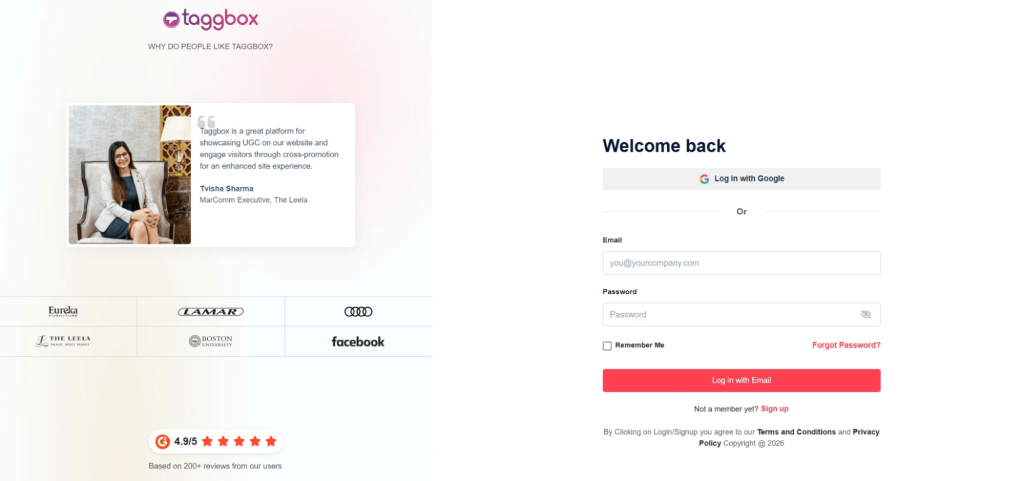
To set up Mailchimp Instagram Integration, you can use Taggbox to collect Instagram content and add it to your email campaigns or landing pages. This method helps you reuse Instagram posts and turn engagement into conversions.
Sign up on Taggbox and create an Instagram widget by choosing your source (handle, hashtag, or mentions). This pulls your content into one feed.
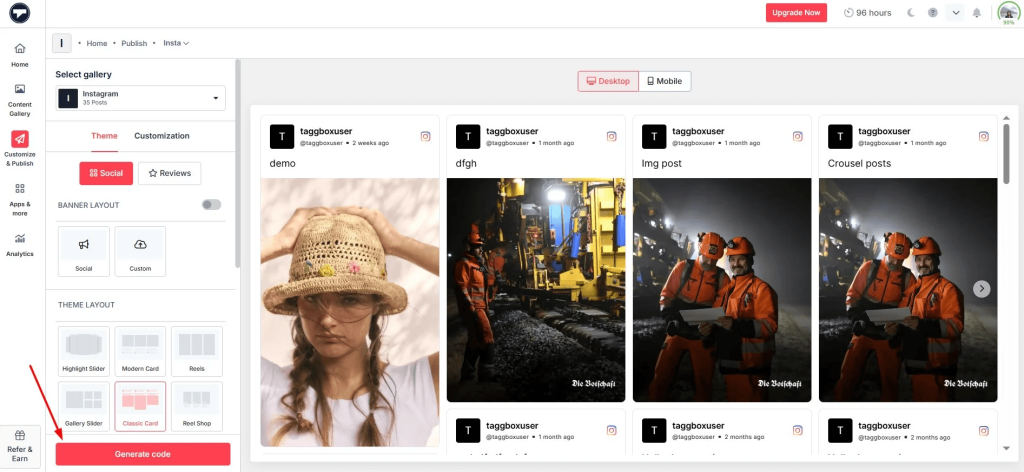
Step 2: Customize Your Instagram Feed
Moderate and design your feed to match your brand. You can choose layouts like a grid or an Instagram slider widget to make your content more engaging.
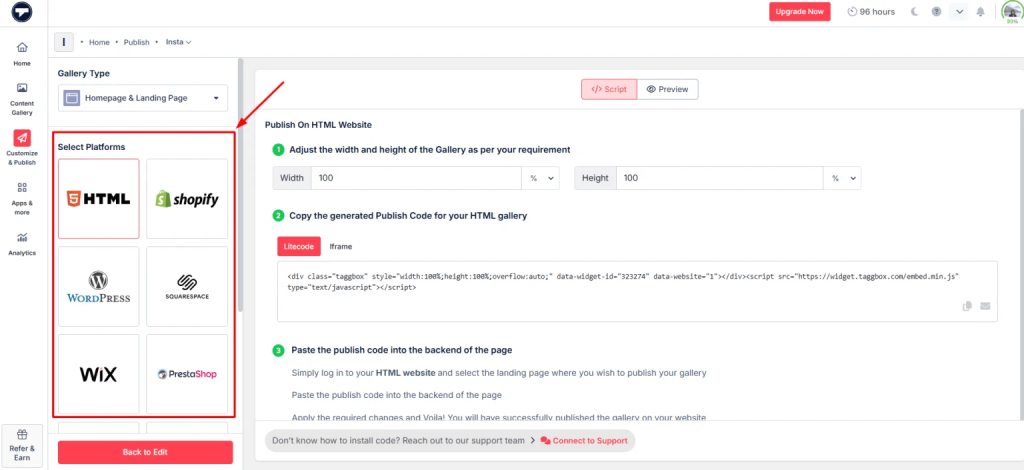
Step 3: Generate Embed Code
Once your feed is ready, copy the embed code. This will allow you to embed an Instagram feed on a landing page or website linked in your email.
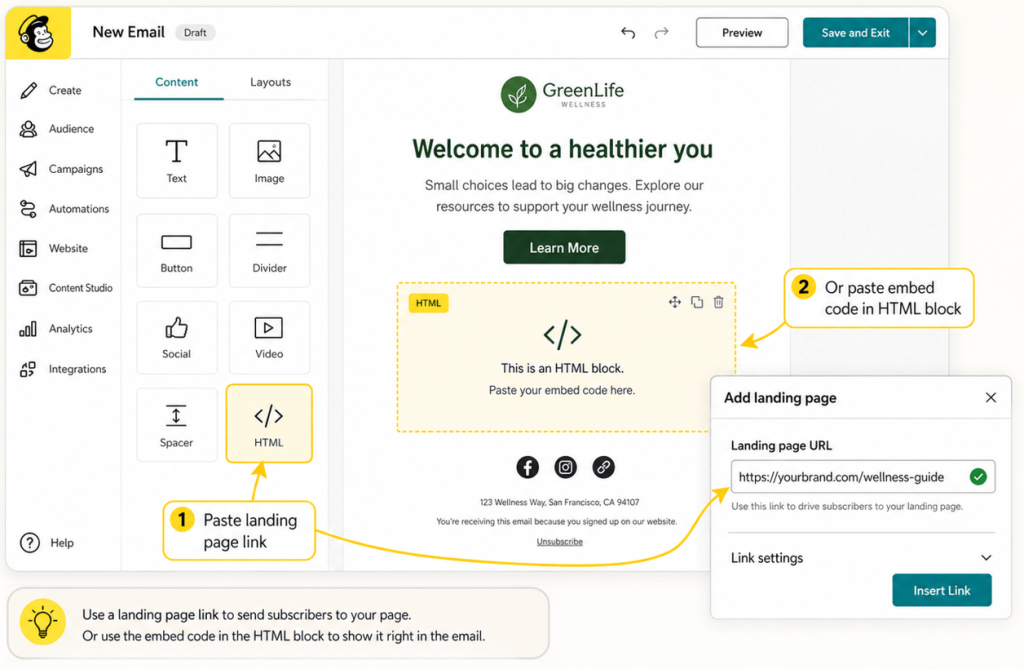
Step 4: Add Feed to Your Mailchimp Campaign
In Mailchimp, add the landing page or use the embed code in your email template (via HTML block).
Send your campaign and monitor engagement. Visual content, such as embedding Instagram reels on websites, videos, and stories, often improves click-through rates.
Disconnecting or Changing an Instagram Account
There are a few limitations to keep in mind:
- You can only connect one Instagram account per Mailchimp setup
- Disconnecting removes all embedded content from emails
- You’ll need to reconnect if switching accounts
Mailchimp also follows a strict authorization flow, so access must be reapproved if permissions change.
How Mailchimp Uses Instagram Content
Once integrated, Mailchimp lets you do more than just embed posts.
You can display:
- A single Instagram post
- A row of posts
- Clickable images linking back to Instagram
- Profile name and logo for brand recognition
This adds visual depth to emails, making them feel less like promotions and more like experiences.
And it works.
Emails with visual content tend to:
- Get higher click-through rates
- Keep users engaged longer
- Drive more traffic back to social channels
Common Use Cases of Mailchimp Instagram Integration
Here’s how different industries actually use it.
1. E-commerce Brands
E-commerce brands thrive on visuals.
With Instagram Mailchimp integration, they can:
- Showcase product images in real-life scenarios
- Use Instagram as a social proof layer
- Drive traffic from email → Instagram → website
Instead of static product shots, you’re showing how products look in real life.
2. Influencer Marketing
Influencer content performs better than branded content most of the time.
Brands can:
- Embed influencer posts into email campaigns
- Highlight user-generated content (UGC)
- Build trust instantly
This works especially well when paired with tools that let you embed an Instagram feed or curate content at scale.
3. SaaS Companies
Even SaaS brands benefit from Instagram.
They can:
- Share product updates visually
- Break down features in short-form content
- Increase newsletter engagement
Adding visual snippets from Instagram makes emails less text-heavy and more engaging. Consider reading this to learn how one can embed an Instagram hashtag feed on a website.
4. Local Businesses
For local businesses, Instagram is often the primary discovery channel.
With Mailchimp integration, they can:
This works especially well when combined with an Instagram widget for HTML on their website.
Best Practices while using Mailchimp Instagram Integration
Now that you have come this far, it’s important to remember that just integration isn’t enough; you need to use Instagram Mailchimp Integration smartly to maximize results.
1. Use High-Performing Content Only
Not every Instagram post belongs in your email. Pick posts with strong engagement.
2. Align Content Across Channels
Your Instagram and email should feel connected. Same tone. message. & same campaign.
3. Segment Before Syncing Ads
If you’re using audience syncing, segment your lists first. Better targeting = better ROI.
4. Don’t Overload Emails
Too many visuals can slow down load time and overwhelm readers. Balance is key.
5. A/B Test Everything
Test:
- Different post formats
- Number of images
- Placement in email
Small tweaks can lead to big improvements.
Beyond Email: Extending Instagram Content to Your Website
While Mailchimp handles email, your website is where conversions often happen.
That’s where tools like Taggbox come in.
Instead of limiting Instagram content to emails, you can:
You can even create:
- An Instagram slider widget for interactive browsing
- A full Instagram widget for HTML that updates automatically
This creates consistency between:
Instagram → Email → Website
Which is exactly what modern marketing needs.
Conclusion
Mailchimp Instagram integration isn’t just about embedding posts; it’s about building a complete marketing loop.
Instagram brings attention. Mailchimp converts that attention into action. Retargeting brings users back again. When you connect these channels, you’re no longer chasing customers; you’re actually guiding them. And in this turn of events, they just happen to become from mere prospects to purchasers or browsers to buyers, which is exactly what you want for your business.
If you’re serious about growth, don’t treat platforms separately.
Make them work together.
That’s where the real results are.