Instagram Stories are among the most engaging content formats on social media today. They are visual, fast, and personal, which is exactly what your visitors also love. When you embed Instagram Stories on website, you bring that same energy directly to your site. Adding an Instagram widget to your website keeps your content fresh. Every time you post a new Story, it can automatically be reflected on your site.
In this blog, you will learn what Instagram Stories are, why you should embed them on your website, and exactly how to do it. Let’s get into it.
What are Instagram Stories?
Instagram Stories are short, full-screen photo or video posts that disappear after 24 hours on the platform. They appear at the top of the Instagram feed and are a great way to share content like – share behind-the-scenes content, promotions, and real-time updates with your audience in an engaging format.
📌 Limitations of Embedding Instagram Stories
Before you put Instagram stories on a website, there’s one important thing to keep in mind: however, Instagram doesn’t make it easy.
Instagram Stories are designed to be temporary (ephemeral content). They disappear after 24 hours, which is great for urgency, and must be seen within that timeframe.
Here are its key limitations:
- No direct Instagram story embed option
Unlike posts or embedding instagram reels, Instagram doesn’t provide a native way to embed stories.
- Limited API access
Instagram’s API does not support story embedding, making manual integration difficult.
- Short lifespan of content
Stories automatically disappear unless you save them as Highlights.
Because of this, many brands that already embed Instagram feed on website are starting to look for ways to also showcase Stories.
That’s where Taggbox comes in. We help you showcase your Instagram Stories, even on your website, so that people can see them within the timeframe.
Steps to Embed Instagram Stories On Your Website With Taggbox
Step 1: Create Your Account on Taggbox
Sign up for taggbox, or if you already have an account, please log in. Choose “Social feeds on website” from the given choices. Select the industry type, and verify your email.
Strep 2: Create Instagram Stories Gallery
Choose Instagram as your source network.
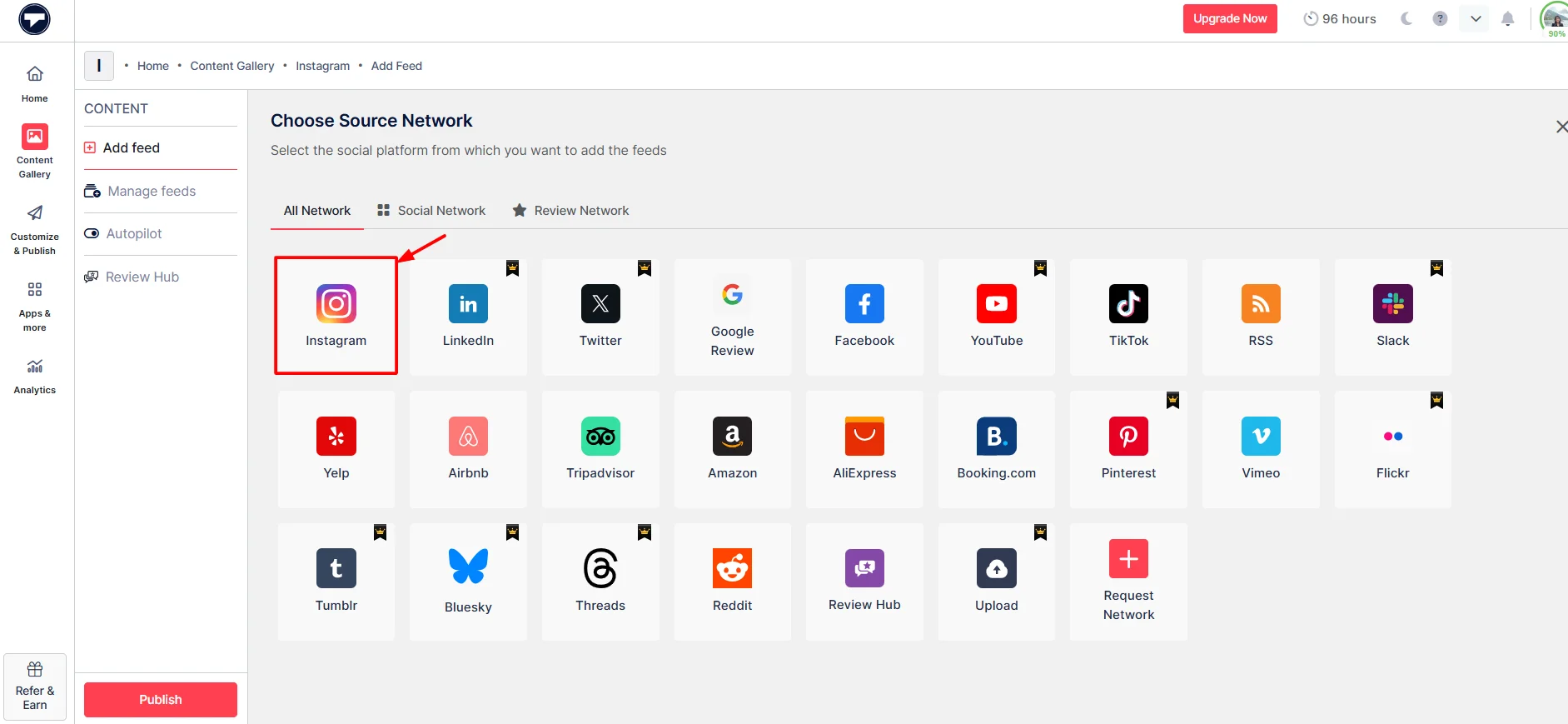
Select Stories as your connection type. After that, click on “Create Feed”.

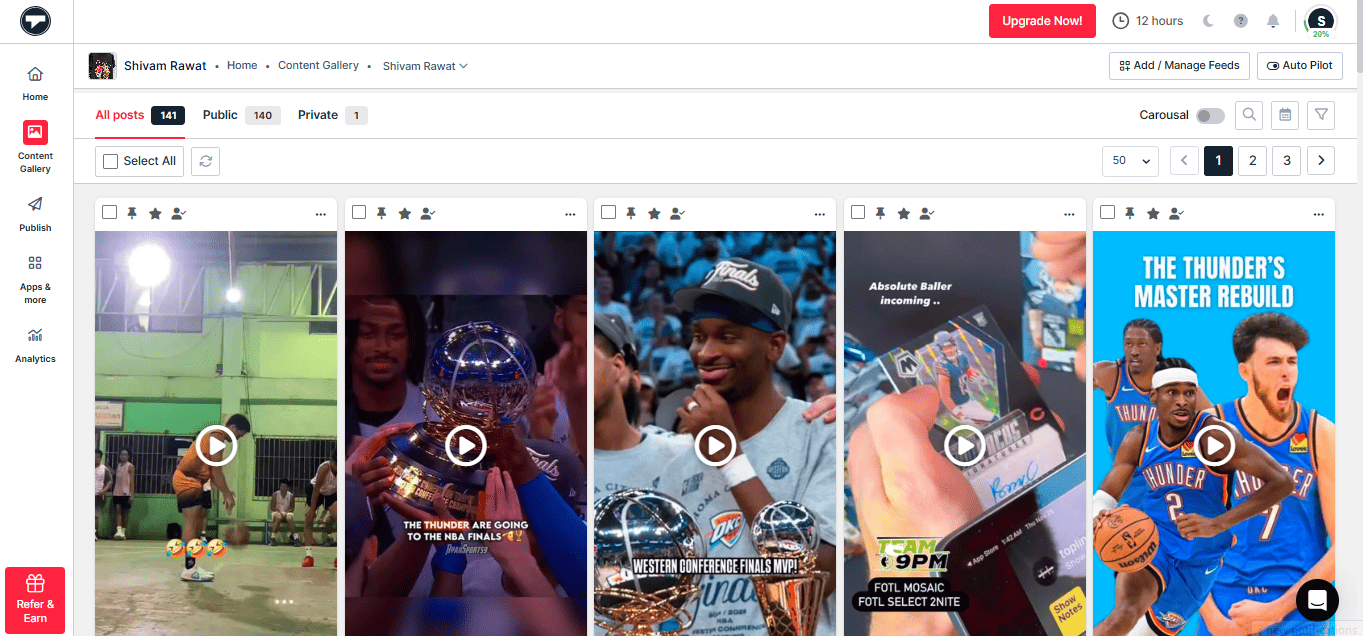
You will be redirected to your content gallery, where an instagram feed is created. You can modify it, such as removing unwanted content.
Step 3: Customize the Feed
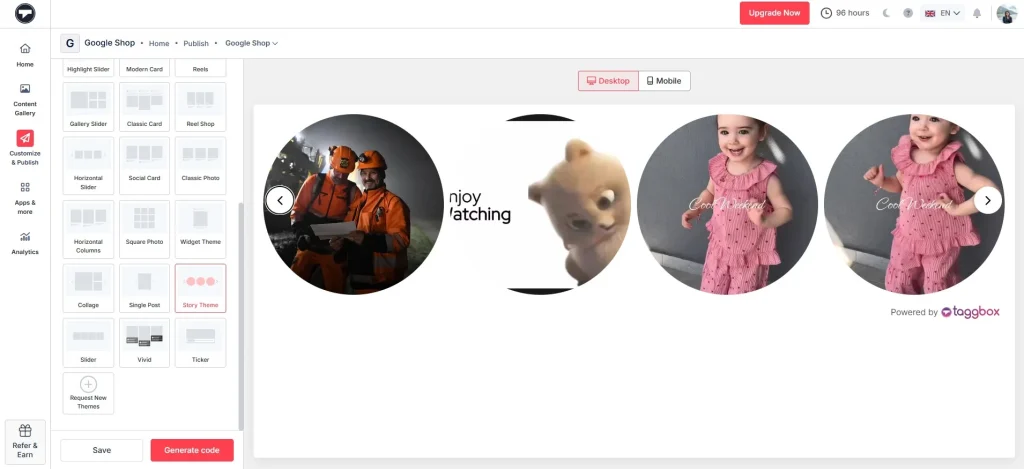
Then, click on “Customize & Publish” on the left sidebar. Select the theme, then customize the feed, and you can add a Call-to-action button if you want and your instagram story widget is created.
Step 4: Embed Instagram Stories Feed
When everything appears to be in order, click “Generate Code”. You can even try this with the Taggbox Instagram Embed Code Generator.

Next, copy the generated code and paste it wherever you want to add Instagram stories.
Note: You can also check the live preview of your Instagram Stories gallery by clicking on the Preview button.
Embed Instagram Stories on Your Website (No Coding!)
Hook visitors. Build trust. Drive clicks.
Follow these steps to display Instagram stories on your chosen website-building platforms, including HTML, WordPress, Shopify, Wix, Squarespace, and more.
1) How to Add Instagram Stories to HTML?
Follow these simple steps to embed Instagram stories on your website using Taggbox:
- First, copy the embed code from Taggbox.
- Next, open the HTML file of the page where you want to display the Stories.
- Then, paste the code into the desired section of the body.
- After that, save the file and upload it back to your server.
- Finally, refresh your website to see the Instagram Stories live.
2) How to Add Instagram Stories on WordPress?
You can easily display Instagram Stories using the block editor:
- Start by logging in to your WordPress dashboard.
- After that, navigate to Pages or Posts and choose the page you want to edit.
- Once there, click the “+” icon to add a Custom HTML block.
- Then, insert your embed code into the block.
- Lastly, click Update or Publish to make it live.
3) How to Display Instagram Stories to a Shopify Website?
Shopify allows seamless integration through its theme editor:
- Go to your Shopify admin panel.
- Navigate to Online Store → Themes → Customize/Edit Code.
- Choose the section where you want to display the Stories.
- Paste the embed code into the file or section.
- Save the changes and preview your store.
4) How To Embed Instagram Stories on Squarespace?
Embedding Instagram Stories in Squarespace is straightforward:
- Open your Squarespace editor.
- Navigate to the page where you want the Stories.
- Click Add Block and select Code Block.
- Paste the embed code into the block.
- Apply changes and save the page.
5) How To Add Instagram Stories On Wix?
You can embed Instagram Stories easily using the Wix editor:
- First, click on the “+” (Add) icon in the editor.
- Then, select the section where you want to display the Stories.
- Next, choose Embed Code → HTML Embed.
- Afterwards, paste your Taggbox embed code into the field.
- Then, adjust the size and placement of the widget.
- Finally, click Publish to make it live on your site.
6) How To Display Instagram Stories to Elementor?
Elementor makes embedding code simple with widgets:
- Open the page in Elementor editor.
- Drag and drop the HTML widget onto the page.
- Paste the embed code into the widget area.
- Adjust alignment and spacing if needed.
- Click Update to publish the changes.
7) How To Embed Instagram Stories to Weebly Website?
Weebly also supports quick code embedding:
- First, go to your Weebly editor and open the page where you want to add the Stories.
- Next, drag and drop the Embed Code element onto the page.
- Then, click on the element and choose Edit Custom HTML.
- After that, paste the embed code.
- Finally, publish your website.
You can easily embed Instagram Stories on website with almost any CMS, not just WordPress, Shopify, or Wix. Most website builders support custom code or embed blocks, which means you can integrate an Instagram stories widget seamlessly. Whether you’re using platforms like Webflow, BigCommerce, or custom-built websites, tools like Taggbox provide a simple embed code that works universally.
As long as your CMS allows you to paste HTML or script code, you can integrate Instagram stories on your website without any technical hassle.
Why Embed Instagram Stories on a Website?
Embedding Instagram Stories on a website serves numerous benefits, with increased engagement and dynamic content. Come and check some of it with us:
Turn short-lived content into long-term value
When you embed Instagram stories on website, your content no longer disappears after 24 hours and continues to deliver value over time.
Build trust with real-time social proof
An Instagram stories widget showcases authentic customer experiences, helping you build credibility instantly.
Increase engagement on your website
Moreover, adding an Instagram story embed makes your pages more interactive and visually appealing, keeping visitors hooked longer.
Keep your website fresh and dynamic
When you integrate Instagram stories on your website, your content updates automatically without extra effort.
Boost conversions with authentic content
Visitors are more likely to take action when they see real Stories through an Instagram stories widget.
Maximize your Instagram content reach
Don’t let Stories disappear, embed Instagram stories and make them work across multiple touchpoints.
| Category | Question | Taggbox Support | Details |
|---|
| Content Embedding & Customization | Does your platform support embedding Instagram Stories specifically, not just posts or reels? | ✅ | Taggbox allows embedding Instagram Stories alongside posts and reels. |
| How does the embedding work? (iframe, JavaScript widget, etc.) | ✅ | Embeds are provided via JavaScript widgets compatible with various platforms. |
| Can I customize the look and feel (colors, fonts, layout) of the embedded stories to match my brand? | ✅ | Advanced customization options including themes, layouts, and CSS styling. |
| Can I display Stories in real-time (as they are posted), or do I need to upload them manually? | ✅ | Supports real-time updates by connecting directly to your Instagram account. |
| Can I schedule or curate which stories appear (e.g., by hashtags, highlights, or filters)? | ✅ | Allows aggregation by hashtags, handles, and offers moderation features for curation. |
| Analytics & Reporting | What engagement data do you track on the embedded stories (e.g., views, clicks, swipe interactions)? | ✅ | Tracks metrics like clicks, views, and interactions in real-time. |
| Do you support integration with Google Analytics or Meta Pixel for advanced tracking? | ✅ | Supports integration with Google Analytics for advanced tracking. |
| Can I track CTA clicks (e.g., “Shop Now” links inside stories)? | ✅ | Tracks post clicks and interactions, including CTA engagements. |
| Do you provide a centralized analytics dashboard? | ✅ | Offers a centralized dashboard displaying key insights and metrics. |
| How long is story data retained? | ✅ | Data retention policies are in place, but specific durations are not detailed publicly. |
| Integration & Compatibility | Is your tool compatible with all website platforms (e.g., WordPress, Shopify, custom HTML)? | ✅ | Compatible with platforms like WordPress, Shopify, HTML, Wix, and more. |
| Does it work on mobile and desktop? Is it responsive? | ✅ | Widgets are fully responsive and adapt to various screen sizes. |
| Can I integrate it into my mobile app? | ✅ | While primarily web-focused, integration into mobile apps is possible via web views. |
| Data Privacy & Permissions | Do you require Instagram login or API access to fetch stories? | ✅ | Requires secure authentication with your Instagram account to fetch stories. |
| Is your solution GDPR-compliant? | ✅ | Taggbox adheres to GDPR regulations, ensuring data privacy and protection. |
| What permissions do you need from my Instagram account? | ✅ | Needs permissions to access and aggregate content from your Instagram account. |
| Pricing & Plans | What are your pricing tiers? Are there limits on the number of stories, views, or embeds? | ✅ | Various pricing tiers with different limits on widgets, sources, and views. |
| Are there additional fees for analytics, customization, or support? | ✅ | Advanced features may be available in higher-tier plans. |
| Do you offer a for free or demo period? | ✅ | Provides a try for free without requiring a credit card. |
| Support & Maintenance | What kind of support is available (live chat, email, phone)? | ✅ | 24×7 customer support through various channels. |
| Do you provide onboarding or technical assistance? | ✅ | Onboarding resources and technical assistance. |
| What’s your uptime and SLA for hosted content? | ✅ | Specific SLA details are not publicly disclosed; direct inquiry recommended. |
Conclusion
Instagram Stories may disappear fast, but their impact doesn’t have to. When you embed Instagram stories on your website, you turn short-lived content into something that keeps working for you, building trust, increasing engagement, and helping visitors take action.
Even though there’s no direct Instagram story embed option, you can still make it happen easily with an Instagram stories widget. It’s a simple way to keep your website fresh and more interactive.
So instead of letting your Stories fade away, integrate Instagram stories on your website and make the most out of the content you already create.