Businesses are always looking for better ways to grow their brand, increase sales, and build customer trust. One of the biggest challenges is convincing website visitors to trust a business before making a purchase or inquiry. This is where a Google Reviews Badge can make a big difference. By showing real customer feedback and ratings, businesses can create trust and improve their online credibility.
Adding a Google Rating Badge on website helps visitors instantly see genuine customer experiences and understand the quality of your products or services. A well-placed Google review badge acts as social proof and encourages potential customers to engage with your business more confidently.
In this blog, we will discuss embedding Google My Business Reviews Badge to your website, its benefits, and the best ways to showcase Google reviews easily.
Add Your Google Reviews Badge to Your Website – Start Free
Google My Business
Reviews(GMB)
Try Now

What is a Google Reviews Badge?
A Google Review badge is a visual icon that shows a business’s Google rating and customer feedback on its website. Businesses use a Google review badge to showcase real customer feedback, build trust, and help visitors feel more confident about their products or services.
A Google Reviews Badge for website usually appears as a small widget, floating badge, or star rating section that highlights your business reputation through Google reviews. Businesses often use it to embed Google reviews widget on website, landing pages, online stores, and other digital platforms to improve credibility, customer trust, and engagement.
The Google Rating Badge includes:
- The store’s average star rating
- The number of reviews the store has received
- A link to the Google reviews or ratings page
- Real customer feedback and experiences
- Google branding or review source information
Benefits of Using Google Reviews Badge on Your Website

Adding a Google Reviews Badge to your website helps businesses showcase real customer feedback, build trust, and improve customer engagement. Here are some key benefits of using a Google review badge on your website.
1. Build Customer Trust
Displaying a Google customer reviews badge on your website acts as strong social proof and helps visitors trust your business. People often rely on customer experiences before making a purchase decision, and seeing positive reviews can make your brand look more reliable.
In fact, 98% of people occasionally read online reviews for local businesses, making Google reviews an important trust factor for websites and businesses.
2. Boost Conversions
To enhance your website’s conversion rate, showcase the purchase experience of your previous customers. You can create a relatable environment that encourages visitors to purchase or share their contact information by presenting authentic, emotionally engaging content like Google reviews. This approach is a highly effective strategy for driving conversions across your site.
3. Improve Website Engagement & SEO
While Google reviews don’t directly impact your website’s search engine ranking, it is essential to note that it contributes to factors that help in better SEO results. For starters, showcasing the Google Rating Badge on website acts as a trust signal for the search engine and helps the algorithm rank the website. Another reason is the engagement factor, which is often increased in the presence of a Google review badge on a website.
4. Benefits for Local Businesses
For local businesses, adding Google review badges can help attract more customers and improve local credibility. When visitors see positive customer reviews, they are more likely to choose your business over competitors. A Google business badge also helps local brands showcase their reputation online and build stronger relationships with customers. Whether you run a restaurant, salon, agency, or retail store, displaying Google reviews can help improve customer confidence and encourage more inquiries and visits.
5. Create Strong Social Proof
A Google Reviews Badge on website works as a powerful form of social proof. It shows that real customers have interacted with your business and shared their experiences publicly on Google. By showcasing positive reviews and ratings, businesses can create a stronger first impression and make their website look more trustworthy to new visitors.
Add Google Reviews Badge to Your Website
Display authentic Google reviews on your website and help visitors make confident decisions.
Methods to Add Google Reviews Badge on Your Website
There are two ways to add a Google Reviews Badge on website pages depending on your business needs, customization preferences, and the type of review display you want. Whether you want to manually share reviews or create a professional review badge, each method offers different benefits.
- Google Reviews Badge & Widget Tools: If you want to display multiple reviews in a more professional and visually appealing format, using Google Reviews Badge tools like Taggbox is a better option. These tools help businesses embed Google reviews widget on websites with customizable layouts, live updates, moderation features, and responsive badge designs.
- Google Review Link Method: The simplest way to display a Google review badge on your website is by using Google review links. This method helps businesses add individual Google reviews or ratings to website pages by copying and pasting the review link directly from their Google Business Profile.
The right method depends on whether you want a simple review link display or a fully customizable Google Reviews Badge for website experience.
How to Embed Google Reviews Badge Using Taggbox
To add Google reviews badge on website, here are the steps you need to follow.
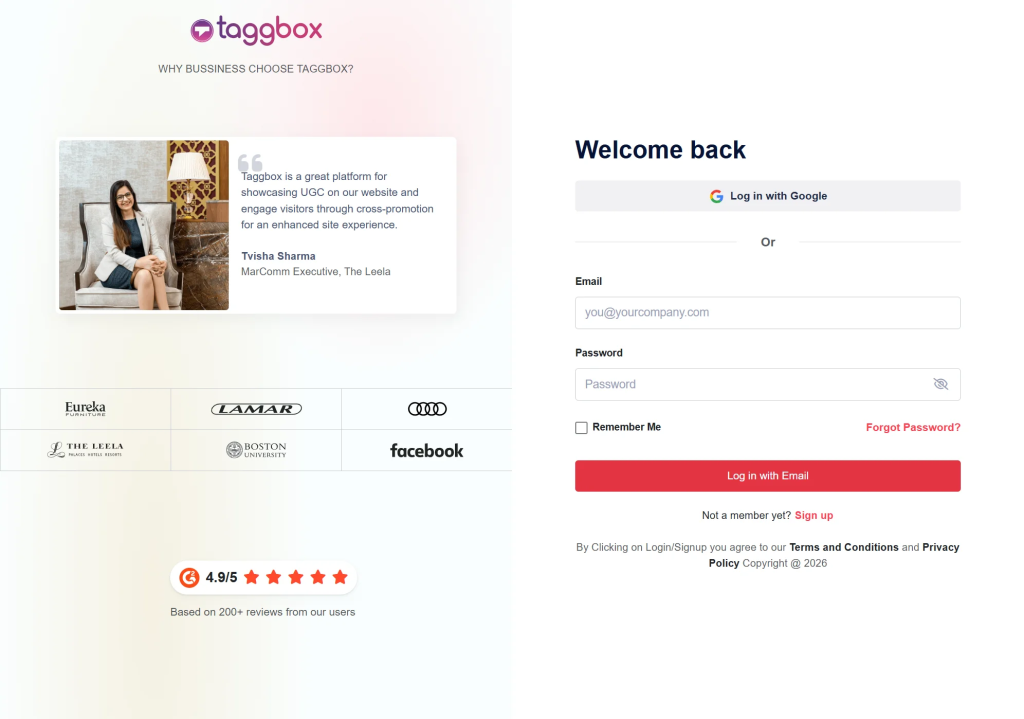
Step 1: Log In or Create a Taggbox Account
Sign in to your Taggbox account. If you are a new user, create a free account to start collecting and displaying Google reviews.
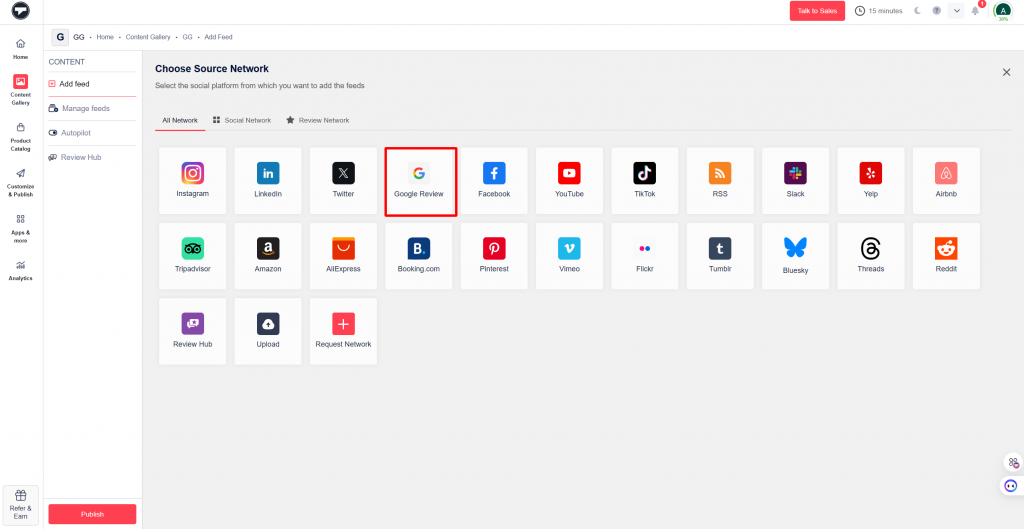
Step 2: Select Google Reviews as Your Source
Choose Google Reviews as the source network to collect customer reviews and ratings.
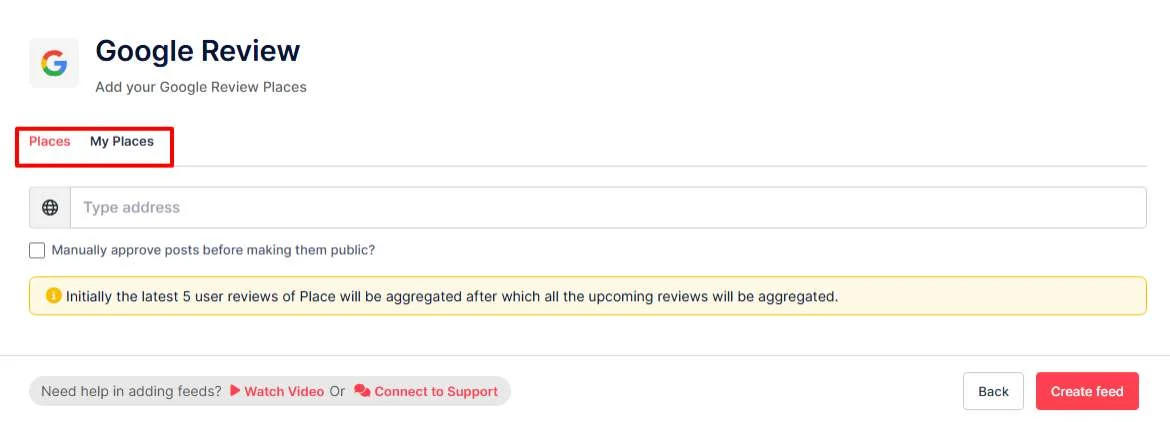
Step 3: Connect Your Google Business Profile
Now choose your preferred connection method:
- Connect your Google Business Profile directly, or
- Search for your business manually
After selecting your business, click on “Create Feed.”
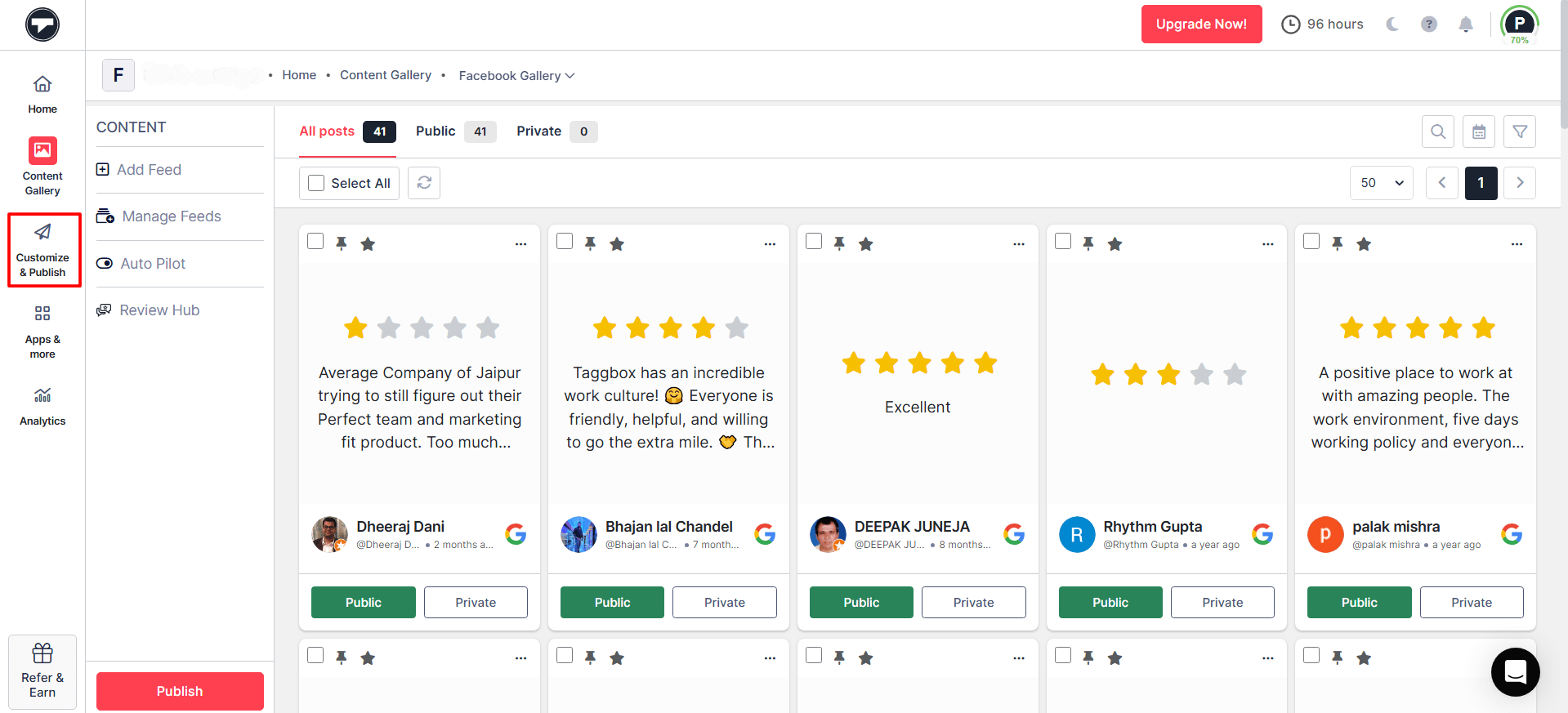
Step 4: Moderate & Customize Your Google Reviews Badge
- Your Google review badge feed will now be created. You can review, filter, and moderate the content before publishing it on your website.
- After moderation, click on “Customization & Publish“, then choose your gallery type.
Step 5: Select Google Reviews Badge Layout
Choose the “Badge” layout option and click on “Generate Code.”
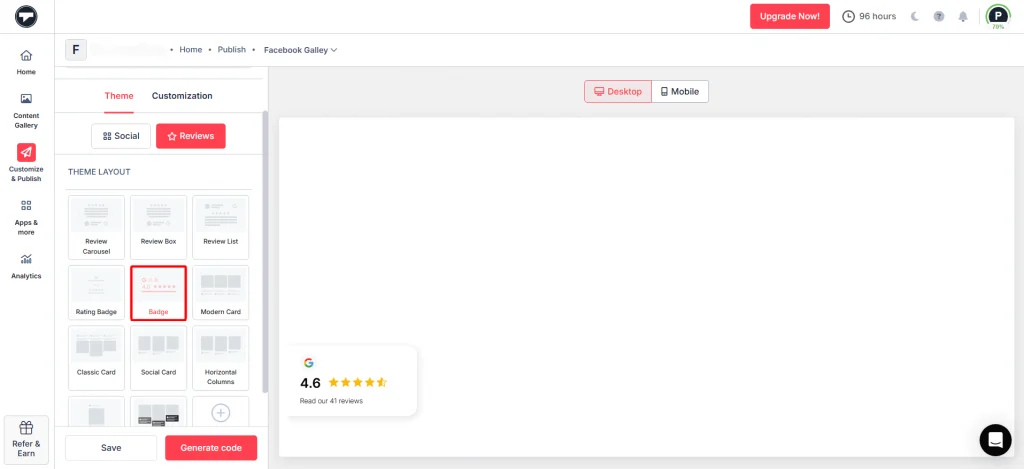
Step 6: Generate the Embed Code and Add to your Website
- Copy the generated Google Reviews Badge code and select your website platform or CMS.
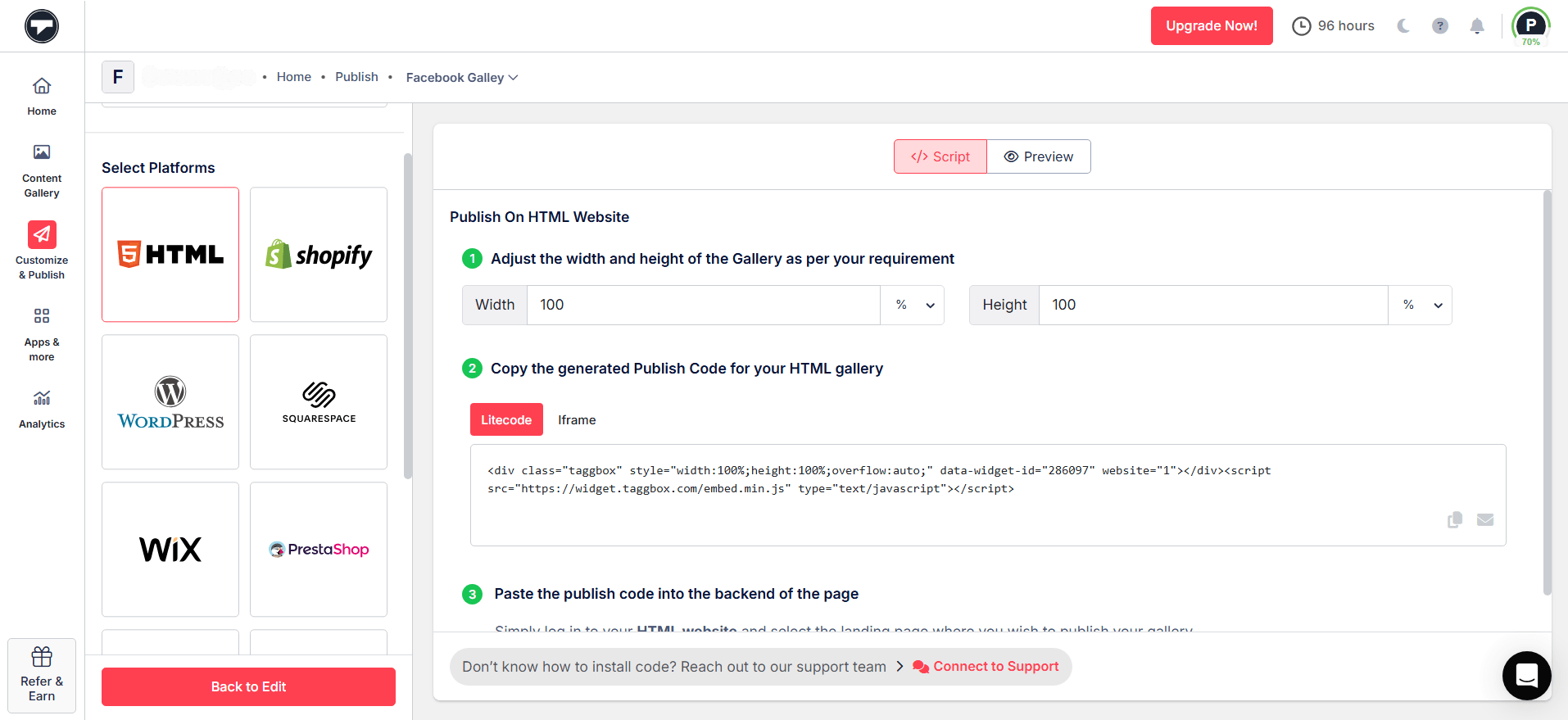
- Paste the embed code into your website’s backend or HTML section where you want the Google Reviews Badge on website to appear.
Why Use Taggbox Google Reviews Badge?
Taggbox offers several features that help businesses create a better review display experience, including:
- Clickable Google business profile links
- Review moderation and filtering
- Real-time review updates
- Mobile-responsive badge layouts
- Easy customization options
- Better customer engagement
Add Google Reviews Badge Using Google Review Links
To integrate Google reviews into your website, follow these steps.
- From Google Maps, go to your Google business page.
- Tap on the “Reviews” button.
- Select a review.
- Click on the ‘share’ button and copy the link.
- Go to the backend of your website and paste the link.
Create Your Google Reviews Badge in Minutes
Collect, customize, and display Google reviews on your website with an easy no-code solution.
Best Practices for Displaying a Google Reviews Badge
Displaying a Google Reviews Badge on your website is a great way to showcase customer trust and improve your brand credibility. A well-placed Google customer reviews badge helps visitors quickly see your ratings and customer feedback, making your business look more reliable and trustworthy.
Here are some best practices to follow when adding a Google review badge to your website.
1. Positioning for Maximum Visibility
Position your Google Rating Badge prominently on your homepage or product pages to highlight your business’s authenticity. Ensure that the placement is appropriate and not distracting, helping build trust without cluttering the website with content.
2. Keep Your Reviews Updated
Regularly updating your Google Reviews Badge helps visitors see recent customer experiences and ratings. Fresh reviews make your business look active, authentic, and more trustworthy.
3. Highlighting High Ratings
Online reviews and ratings have become essential parts of purchasing decision-making. Since you can showcase a high rating on your web page, instilling social proof would pay off in the long run.
4. Responsive Design Considerations
Choose clean and professional designs that align with your brand. The Google 5 Star Badge should be visually appealing and easy to read, standing out without conflicting with your website’s aesthetics.
5. Authenticity and Transparency
Always display reviews from trusted platforms like Google and provide access to original customer reviews whenever possible. Authentic and transparent review displays help build stronger trust with website visitors.
How Google Reviews Badge Helps Businesses Grow
A Google Reviews Badge for website not only improves trust but also helps businesses showcase an aggregate review view that can positively impact customer engagement, conversions, and local visibility.
Here are some important statistics that show the impact of Google reviews on businesses:
- According to reports, Google reviews have about a 20% impact on your business’s local visibility. This means that businesses with strong reviews tend to get more clicks from search results, driving more traffic to your website or physical location.
- Around 58%of customers say that having a Google Business Profile increases their likelihood of visiting a physical store or location.
- Positive Google reviews can increase website conversion rates by up to 15%, helping businesses generate more inquiries, purchases, and customer actions.
Display Google Reviews Easily With Taggbox Now
Add a Google Reviews Badge to your website and help visitors feel more confident about your business.
Conclusion
Adding a Google Reviews Badge to your website can be highly beneficial for your business. It helps improve credibility, build customer trust, and showcase real customer feedback on your website. All you need is the right tool to make the process simple and effective. In this blog, we also explained how you can easily add a Google Rating Badge for website using Taggbox.
A Google customer reviews badge on your website helps visitors trust your business and make confident decisions. To get better results, you should also encourage your customers to leave genuine Google reviews, helping you build stronger social proof over time.
A well-placed Google Reviews Badge on website pages can improve how people see your business online. Use your Google review badge strategically across important website pages to create a more trustworthy and engaging experience for visitors.