Taggbox, Videowise, Whatmore, JOIN, Firework, Bambuser, Clipara, and Idukki are Tolstoy alternatives for shoppable video and UGC commerce. Taggbox suits brands building shoppable galleries from customer photos and videos, Videowise and Whatmore focus on video shopping experiences, and Bambuser supports live shopping.
The comparison below covers each platform’s features, pricing, and limitations, with specific attention to product tagging, storefront integrations, content management, and usage limits. For a wider shortlist beyond these eight tools, compare our selection of shoppable video platforms.
Tolstoy Alternatives: What Your Budget Actually Includes
| Platform | Plan to compare | Included allowance | What could require an upgrade |
| Taggbox | Growth — $39/month for shoppable photo and video galleries | 50,000 views/month; 4 feeds | More feeds, higher view limits, or AI moderation. |
| Videowise | Pro — $9/month for on-site shoppable videos | 5,000 unique widget impressions | Additional impressions cost $10 per 1,000. |
| Whatmore | Starter — $29/month for social video syncing and AI product matching | 3,000 video clicks/month; 100 uploads; 10 AI matches/month | More AI matches or video clicks, even if your upload allowance is sufficient. |
| JOIN | Starter — $99/month for shoppable stories | 50,000 impressions/month; 1 user | Add to Cart and Product Matcher require Growth at $249/month. |
| Firework | Starter — $39/month for interactive video and Klaviyo integration | 10,000 video views/month; 50 uploads; 10 playlists | Branding removal and unlimited uploads require Growth at $259/month. |
| Bambuser | Essential — $79/month for live shopping plus social UGC imports | 3 users; confirm the paid view allowance | Simultaneous streaming to social channels requires Growth at $249/month. |
| Clipara | Basic — $24/month for website video publishing | 60 minutes of video storage; streaming subject to fair use | More storage or white-label presentation; white-label starts at $79/month. |
| Idukki | Growth — $99/month for social content collections | 250,000 views/month; 5 collections | Confirm shoppable-feature inclusion—the listing does not clearly specify it by tier. |
8 Best Alternatives to Tolstoy for Ecommerce in 2026
1. Taggbox
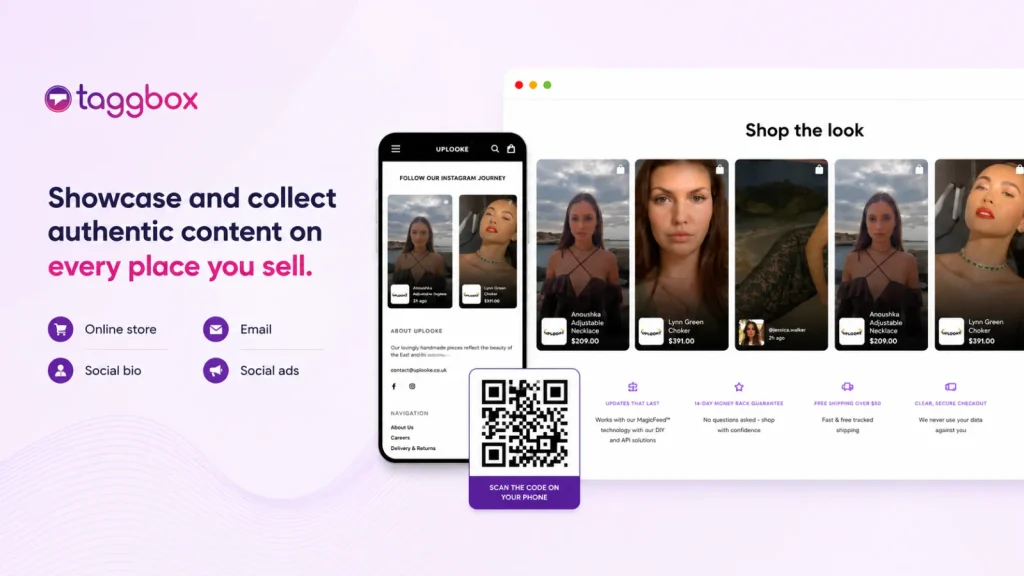
Best for: Creating shoppable galleries from customer photos, social videos, and creator content.
Taggbox is a Tolstoy alternative for brands that want to connect customer content with product discovery. It brings photos and videos from sources such as Instagram, TikTok, and YouTube into shoppable feeds, lookbooks, and product galleries. You can tag multiple products within a post, helping shoppers find the items featured in a customer’s outfit, product demonstration, or unboxing video.
Key features
- Shoppable photos and videos: Manually link featured products to customer and creator content.
- Multiple gallery formats: Create shoppable Instagram feeds, lookbooks, and “Shop the Look” galleries.
- UGC collection and permissions: Collect social content and request permission to reuse it.
- Content moderation: Select posts manually or use Autopilot rules to manage duplicates, profanity, and content organisation.
- Performance tracking: Monitor engagement and conversion activity associated with your published content.
Why consider it instead of Tolstoy?
Taggbox combines shoppable photos and videos with UGC collection, permissions, and moderation. You can build product galleries from customer content, while AI moderation helps organise campaign submissions and keep duplicate posts private. This is useful for brands that regularly add fresh UGC to their storefront. If shoppable Instagram galleries are your main requirement, our Foursixty alternatives comparison covers more tools for that workflow.
Limitations: Taggbox does not offer AI product tagging. Allow time for manual product selection, and check which moderation and rights capabilities your plan includes.
Pricing: Shoppable UGC starts at $39/month on the Shopify Growth plan, which includes 50,000 monthly views and four feeds. The Free and $19/month Starter plans do not include shoppable UGC.
2. Videowise
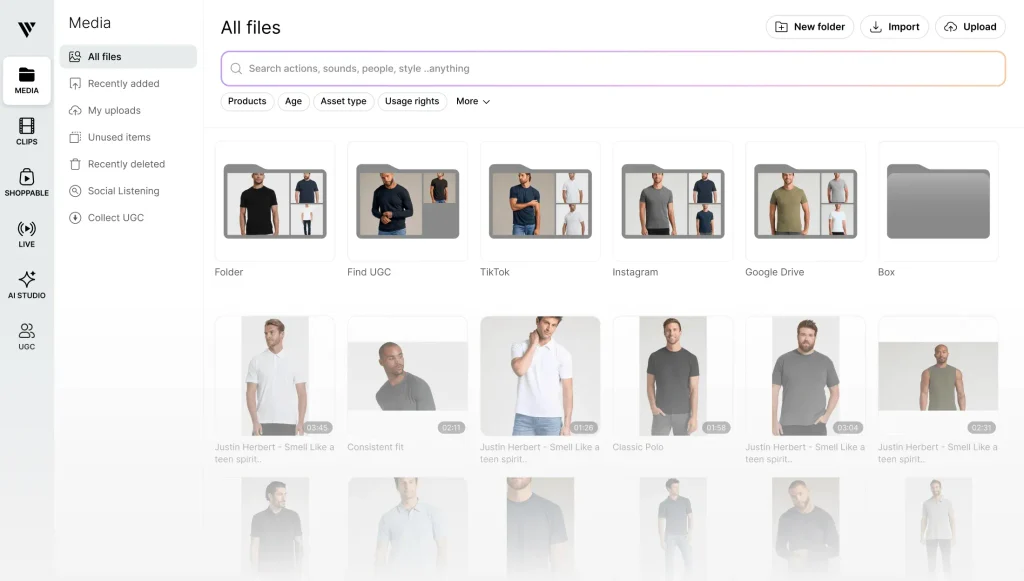
Best for: Stores managing many videos across multiple pages and placements.
Videowise is a close alternative when the difficult part is organizing, updating, and distributing video. Its media-library approach gives teams a central place to manage assets before publishing them across product pages, collections, and other storefront locations. That makes it relevant for stores where content is growing faster than the team’s ability to maintain individual embeds.
Key features
- Centralized media library with video editing.
- Imports from social platforms and cloud-storage sources.
- Bulk video publishing and updates.
- More than 16 widget themes, including stories, sliders, and carousels.
Why consider it instead of Tolstoy?
Evaluate it for the day-to-day work of maintaining a substantial video library. Compare how easily your team can find assets, update placements, and reuse content across pages. If Videowise makes your shortlist, compare Videowise alternatives to assess other options for storefront video and UGC.
Limitations: Unlimited videos do not mean unlimited delivery. The entry paid plan includes 5,000 unique widget impressions, with $10 per additional 1,000.
Pricing: A free plan is available; Shopify Pro is listed at $9/month, plus applicable usage charges.
3. Whatmore
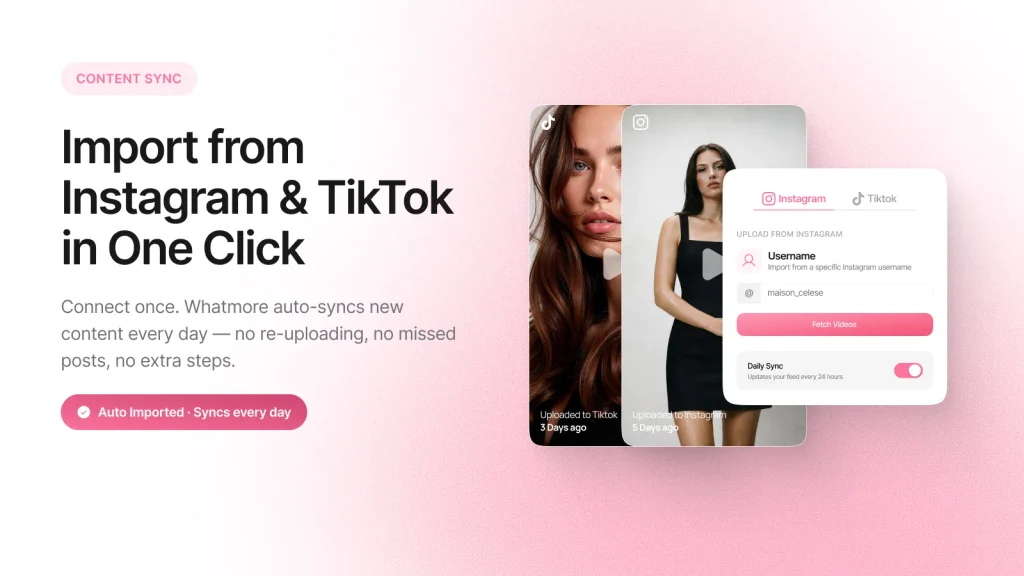
Best for: Brands regularly turning Reels, TikToks, and creator clips into shoppable video.
Whatmore focuses on moving social content into storefront video formats. Its published interface shows social-import controls and product-matching suggestions, while the listing documents daily synchronization on eligible plans. For teams adding fresh content every week, the useful comparison is how much work remains between importing a clip and publishing it against the correct product.
Key features
- Instagram and TikTok imports.
- Daily social-content synchronization on eligible plans.
- AI product matching.
- Carousels, floating videos, stories, banners, and galleries.
Why consider it instead of Tolstoy?
Shortlist it for a recurring social-video workflow and compare the import, matching, and publishing process using your own clips. For a shoppable TikTok feed, compare how easily each platform turns imported clips into product-linked videos on your website. Automated matching is a shared capability, so workflow quality matters more than its presence on a feature list. Shopify merchants comparing apps for Reels and TikTok content can also review ReelUp alternatives.
Limitations: Plans restrict both video clicks and AI matches. Starter includes 3,000 monthly video clicks but only 10 AI product matches.
Pricing: Free plan available; Starter is $29/month, Growth $79/month, and Scale $149/month.
4. JOIN
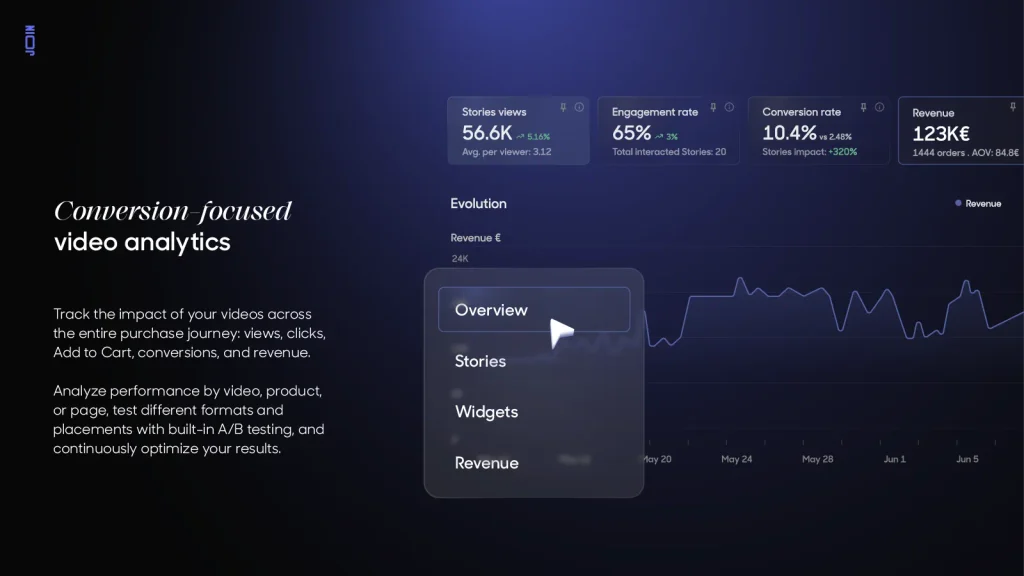
Best for: Teams that need tools to create stories as well as publish them.
JOIN combines content creation, shoppable publishing, and measurement. Its story builder is relevant when your team has product assets but still needs to assemble them into usable website content. Its published analytics interface also illustrates reporting across views, engagement, conversions, and revenue, although the displayed sample figures should not be treated as expected results.
Key features
- Story builder with templates and music.
- Shopify and CSV product-catalogue connections.
- Shoppable widgets.
- AI content creation and A/B testing on higher tiers.
Why consider it instead of Tolstoy?
JOIN belongs on the shortlist when creation and merchandising are both requirements. Compare the relevant plan against your actual production process, including who creates, approves, and measures each story.
Limitations: Starter does not include every advertised capability. Add-to-cart and advanced analytics appear on Growth; the full AI suite, UGC Hub, and A/B testing appear on Scale.
Pricing: Starter $99/month, Growth $249/month, and Scale $599/month on Shopify.
5. Firework
Best for: Connecting interactive video with email and customer follow-up.
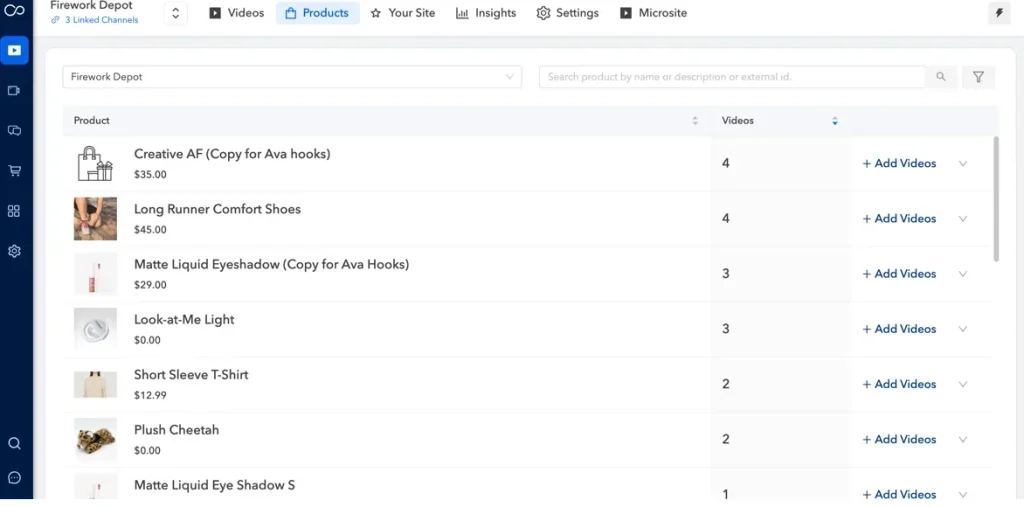
Firework is relevant when video interactions need to inform what happens after the initial visit. Its Shopify listing describes Klaviyo integration for enriching customer profiles and triggering flows from video interactions. It also offers interactive elements that let marketers build more than a conventional watch-and-click experience.
Key features
- Shoppable videos and product-focused playlists.
- Social imports and bulk uploads.
- Quizzes, polls, coupons, and other video interactions.
- Klaviyo integration and video-related analytics.
Why consider it instead of Tolstoy?
Evaluate Firework when the intended workflow spans storefront engagement and follow-up campaigns. Test whether the interaction data supports the exact segments or messages your team wants to create.
Limitations: Tolstoy also supports lifecycle integrations, so this is a workflow comparison rather than an exclusive feature advantage. Firework’s plans also differ in views, uploads, and branding removal.
Pricing: Pilot is free to install with 1,000 monthly views and 10 uploads. Starter is $39/month; branding removal is listed on Growth.
6. Bambuser
Best for: Brands planning hosted live shopping and product demonstrations.
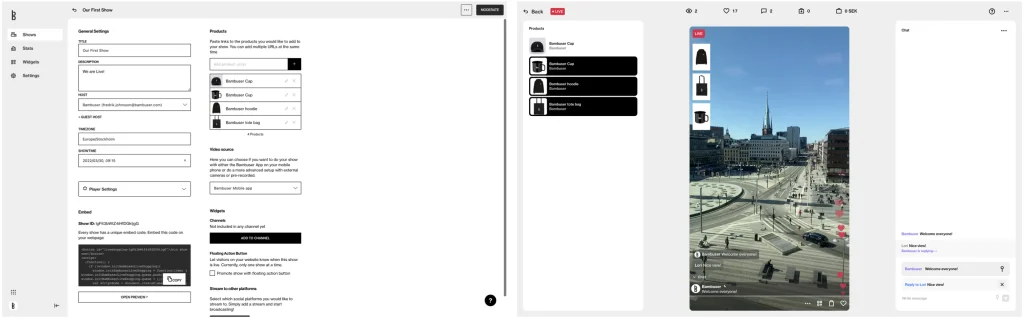
Bambuser becomes a relevant alternative when your goal includes scheduled broadcasts, product launches, or demonstrations with a host. Its offering combines live shopping with prerecorded shoppable content. A beauty brand running product tutorials or a retailer launching a collection can therefore evaluate it around an event-led sales experience.
Key features
- Live-shopping shows.
- Shoppable product cards and in-player shopping.
- Simultaneous streaming to social channels and the website.
- Prerecorded shoppable video from UGC and social content.
Why consider it instead of Tolstoy?
Shortlist Bambuser when live selling is a central requirement. Its value is easier to assess against a planned show than against a simple product-page carousel.
Limitations: Live shopping adds operational work: presenting, promotion, moderation, and follow-up. If your team only needs to reuse existing clips, that broader setup may be unnecessary.
Pricing: A free plan includes 250 views/month. Essential is listed at $79/month; confirm the allowance and features needed for your expected audience.
7. Clipara

Best for: Buyers looking for a different approach to video-delivery pricing.
Clipara combines shoppable video with customizable website embeds and shareable collections. Its paid Shopify plans are organized around stored video minutes, with streaming included subject to fair use. That makes it worth examining when you have a manageable content library but want to reconsider how traffic affects your costs.
Key features
- Shoppable video and a video CMS.
- Shareable video links.
- Website publishing and custom branding on paid plans.
- Engagement and conversion analytics.
Why consider it instead of Tolstoy?
Its pricing structure creates a meaningful comparison for brands whose main concern is delivery cost. Model your expected storage and traffic before deciding whether it offers better value.
Limitations: Fair-use streaming is not an unconditional unlimited allowance. Website publishing is explicitly listed on Basic, while the free tier focuses on a small library and shareable links.
Pricing: Basic is $24/month for 60 stored minutes; Pro is $79/month for 180 minutes.
8. Idukki
Best for: Brands collecting social and review content with permission-management needs.
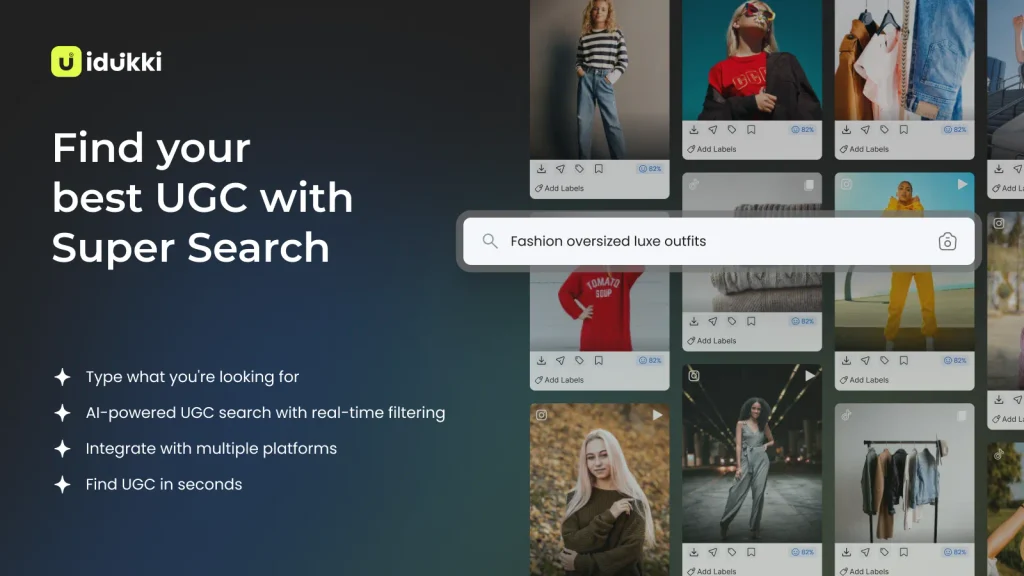
Idukki takes a broader UGC approach, bringing customer photos, videos, and review content into shoppable galleries. Its published interface includes content-search and organization views, while its listing describes curation and options to request UGC rights. It is relevant when the bottleneck is finding and preparing customer content for publication. Our UGC platforms comparison covers the broader category of tools for collecting, curating, and publishing customer content.
Key features
- Collection from social and review platforms.
- Product tagging within UGC galleries.
- Content filtering and automated rights requests.
- Engagement and conversion tracking.
Why consider it instead of Tolstoy?
Shortlist Idukki when customer-content collection and permissions are central to your workflow. Its overlap with Taggbox makes source coverage, approval controls, and gallery behavior useful comparison points. For more options focused on visual UGC and social galleries, see our flowbox alternatives comparison.
Limitations: The Shopify pricing cards do not clearly assign every advertised rights-management and shoppable feature to a tier. Confirm these before assuming that the free plan covers your requirements.
Pricing: Free plan available. Growth is listed at $99/month, including 250,000 monthly views and five collections.
Which Tolstoy alternative should you choose?
Start with the requirement that matters enough to justify switching:
- Customer content and social proof: Compare Taggbox and Idukki.
- Video-library management and storefront publishing: Compare Videowise and Whatmore.
- Content creation alongside publishing: Evaluate JOIN’s relevant tier.
- Interactive campaigns and follow-up: Examine Firework’s integrations.
- Hosted live shopping: Test Bambuser against a real event plan.
- A different billing structure: Calculate Clipara’s storage needs and fair-use terms.
Before committing, run the same small test in your shortlisted tools: import representative content, connect real products, publish on a test page, and complete the shopping journey on mobile. Check a product with variants and confirm what happens when an item becomes unavailable. Review shoppable video examples to decide which placements and shopping experiences to reproduce in your trial.
Finally, compare the cost of the plan you actually need. Viewers, widget impressions, video clicks, and storage minutes are different measures. A lower entry price is only useful when it includes the publishing features, allowances, and controls your team will use.