Taggbox widgets include Analytics for performance tracking, Social Banner to grow social followers, Rating Schema, Bulk UGC Rights Requests, Automated Moderation for rule-based filtering, AI Moderation for context-aware filtering, AI Review Summarizer for condensed review summaries, and AI Recommendations for top-performing post suggestions.
The Taggbox widget comes with a growing set of features that help you enhance how you display content and improve its performance. With the new features of Taggbox widget in 2026, you get tools for tracking performance, managing content, moderating UGC, and all without needing too much manual work.
So, whether you’re setting up your first widget or refining an existing one, this blog covers what each feature does, why it’s useful, and how to access it.
A widget is only as useful as the features running behind it. Taggbox introduces new features to meet user needs for performance tracking, content moderation, rights management and AI-assisted curation, all designed to work without heavy manual effort.
Analytics
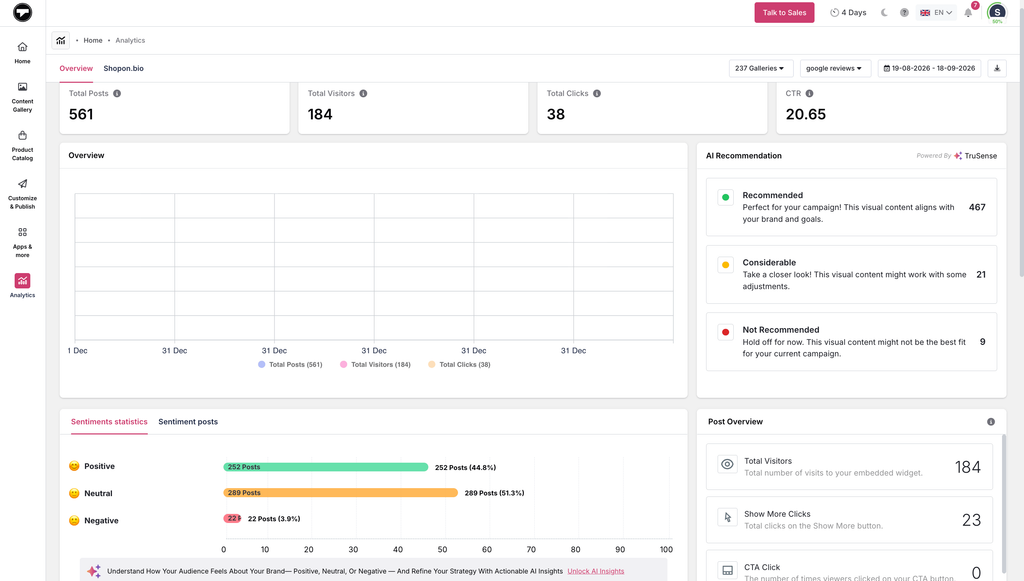
Understanding how your widgets perform shouldn’t require guesswork. Taggbox Analytics feature shows you exactly how your content is engaging visitors, so you can double down on what’s working.
- Monitor total impressions, views, post clicks, and CTA clicks with graphical charts.
- Find active, positive influencers to turn into brand advocates.
- Use data-driven insights to optimize your content and strategy.
- Integrate Google Analytics to see your widget’s performance directly in GA.
- Evaluate positive and negative audience emotions toward your social walls.
How to access Analytics: Log in to your Taggbox account, open your widget from the dashboard, and click the Analytics tab to view your performance metrics.
Social Banner
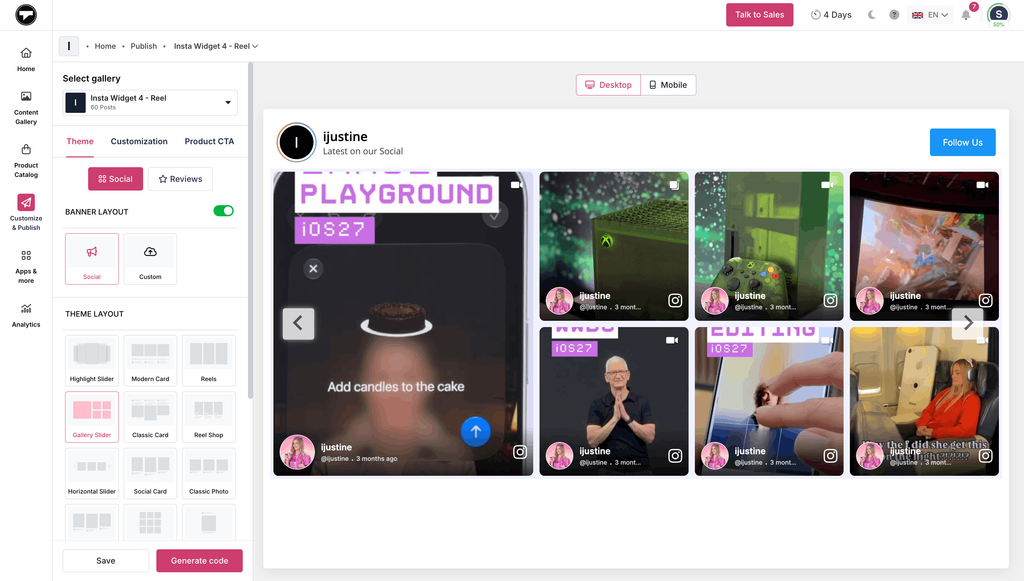
Social Banner turns website visitors into social media followers. It’s a customizable banner within your widget that invites people to follow your social accounts, keeping them connected to your brand beyond your website.
- Boost your social media following directly from your website.
- Promote your social handles without being pushy.
- Build a community that stays tuned to your latest updates.
- Add a customizable header image or message at the top of embedded social media feeds and social walls.
- Highlight time-sensitive updates like live event details, countdowns, or flash sales above your feed.
How to access Social Banner: Under “Customize & Publish”, turn on “Banner Layout” under themes, then go to customization and make required changes under “Banner Style’.
Rating Schema
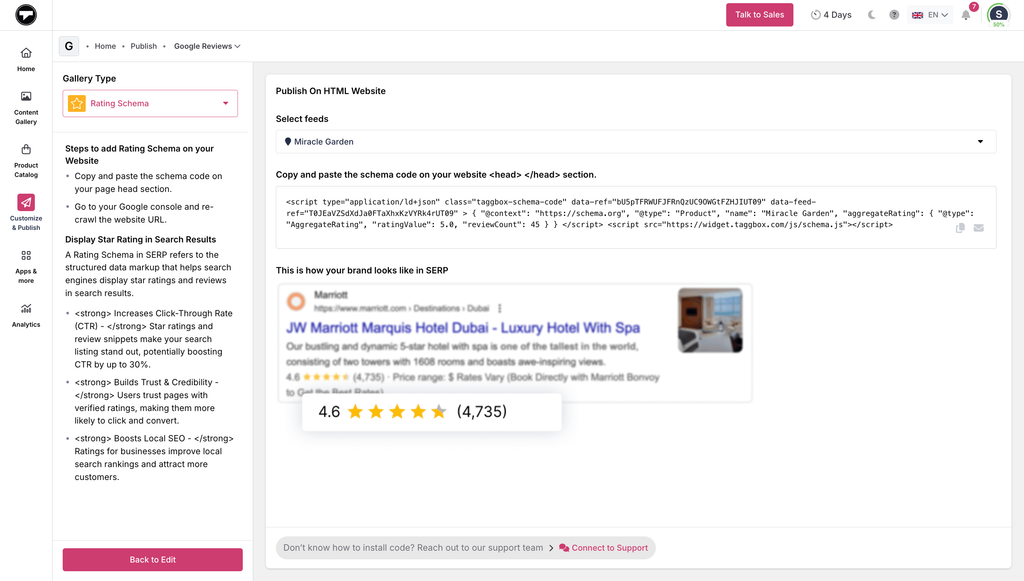
A great rating doesn’t help much if no one sees it before they click. Rating Schema adds structured markup to your reviews so search engines can read and understand them, making your pages eligible to show star ratings directly in Google search results.
- Helps eligible pages display star ratings in Google search results, alongside your regular listing.
- Gives potential visitors a visible trust signal before they land on your site.
- Improves click-through rates by making your listing more eye-catching next to competitors without ratings.
- Adds credibility and social proof at the search results stage, not just on-page.
How to access Rating Schema: Go to Customize & Publish, then click “Publish” and “Generate Code”. In Gallery Type, select “Rating Schema” from the dropdown.
Bulk UGC Rights Requests
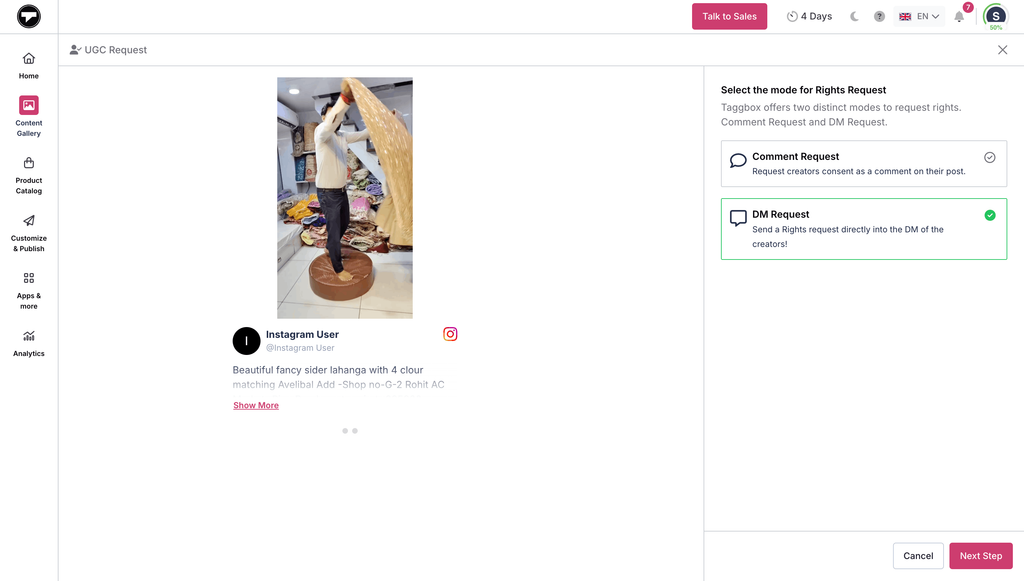
Getting rights one post at a time slows you down, especially when a single creator has shared multiple pieces of content worth using. Bulk UGC Rights Requests helps you obtain content rights and build a UGC marketing campaign legally and avoid copyright or GDPR complaints.
- Taggbox UGC Rights Management lets you send bulk UGC rights requests to users and legally use their content in brand marketing.
- Create & send trustful content rights requests to users with personalized messages & branding to maximize your request approvals.
- Speed up your UGC rights workflow when a creator has multiple relevant posts.
- Remove the legal team’s hassle and complexities of maintaining rights status for all your UGC posts.
- Easily acquire UGC rights to a user’s multiple posts by sending requests for all posts with one click.
How to access Bulk UGC Rights Requests: Create a new gallery, then select the posts you want to get rights for and then select the “Get Rights” option.
Collect UGC rights the easy way & avoid GDPR complaints.
Start Free
Content Moderation
Taggbox now offers three ways to moderate your content, depending on the plan you choose as per your requirements.
Manual Moderation
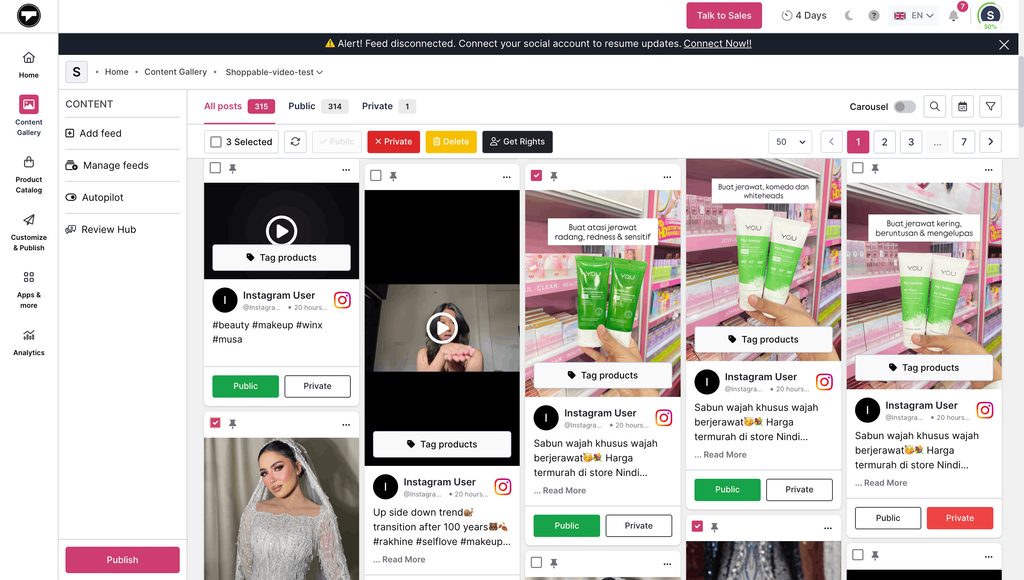
Choose the content you want to display and decide whether you want to keep your post public or private.
How to access Manual Moderation: Go to “Content Gallery,” select the posts you want to make public/private, or delete them.
Automated Moderation
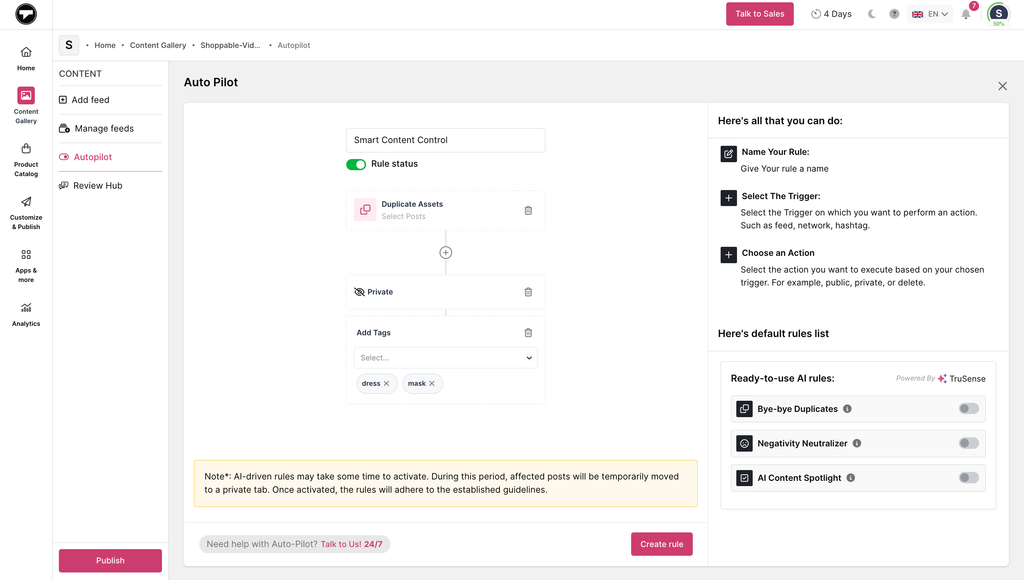
Automated moderation applies the rules you set once and then filters incoming content automatically, without needing manual approval for every post.
- Set filter rules once and let Taggbox apply them to all new posts automatically.
- Reduce manual review time as your feed volume grows.
- Keep unwanted content out before it ever reaches your widget.
- Works alongside manual moderation, so you can still spot-check flagged posts if needed.
How to access Automated Moderation: Go to “Autopilot”, enter rule name, add trigger and add action to create a rule.
AI Moderation
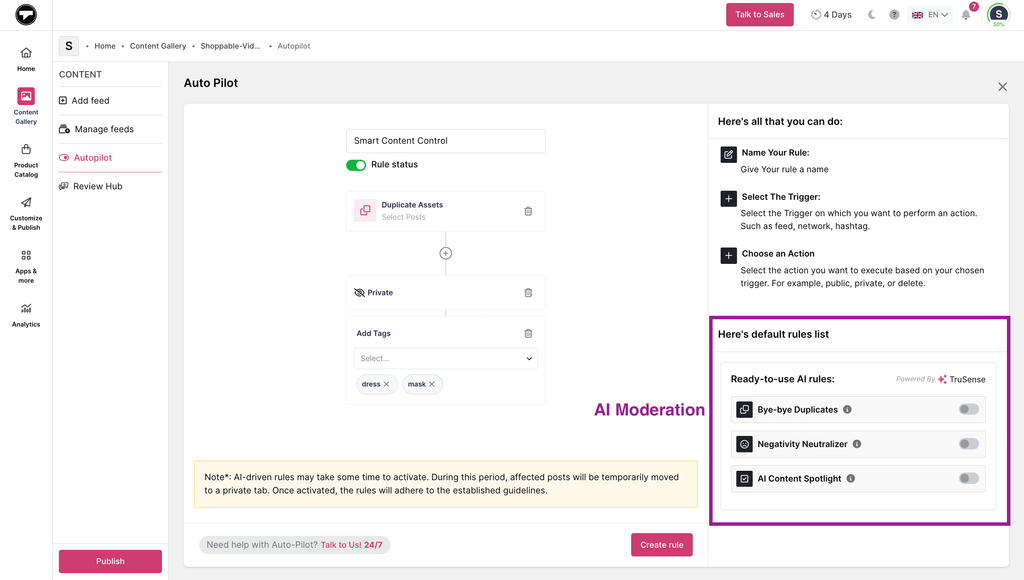
AI moderation goes further by understanding context, so it catches duplicate posts, neutralizes negative posts, and flags AI content even when no keyword rule flags them.
- Automatically filters out posts.
- Neutralizes or removes posts with negative sentiment to protect brand perception.
- Reduces reliance on manually written keyword rules.
- Keeps your widget consistently on-brand as new content comes in, without constant supervision.
How to Access AI Moderation: Go to “Autopilot”. On the bottom right, select the desired “Ready-to-use AI rules”.
Did You Know?
The content moderation AI market size is expected to grow to $10.04 billion in 2030 at a compound annual growth rate (CAGR) of 26.8%
AI Review Summarizer
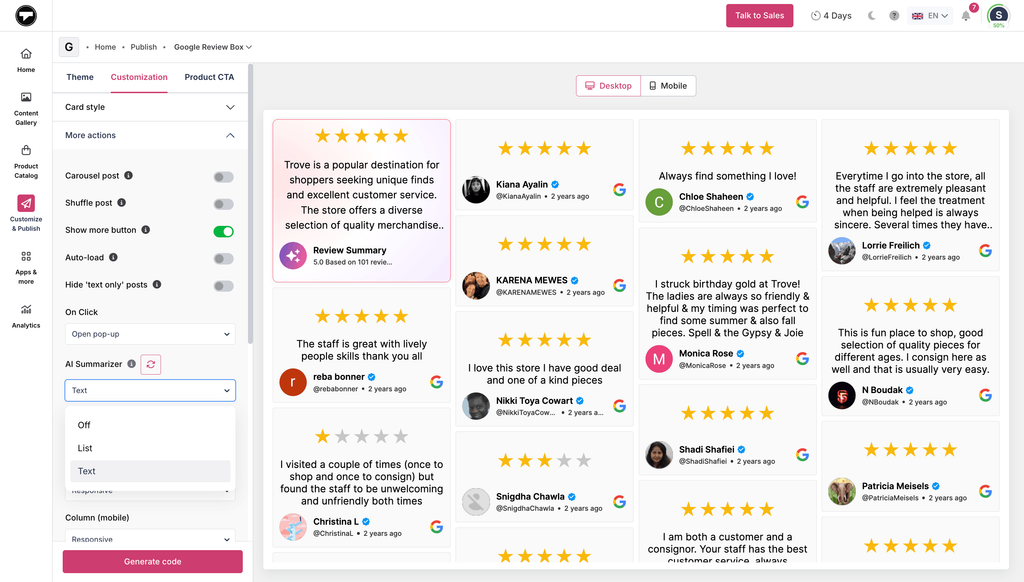
Reading through hundreds of individual reviews takes time, and most website visitors won’t do it either. AI Review Summarizer scans all the reviews curated in your widget. It condenses them into one concise, easy-to-read summary that highlights key themes and overall sentiment, so both your team and your customers get the insight without the scrolling.
- Skip manually reading through every review to spot what’s working and what isn’t.
- Get a consistent, unbiased sentiment analysis instead of relying on subjective manual review, so your team can act on real, recurring feedback faster.
- Help customers see a quick, digestible summary so they can understand overall sentiment and make faster, more confident purchase decisions.
- Improve the overall browsing experience on product or review pages for visitors, while building trust through transparent, easy-to-scan feedback.
How to access AI Review Summarizer: Go to “Customize & Publish”, select “Customization” and you’ll see “AI Summarizer” under “More Actions”.
AI Recommendations
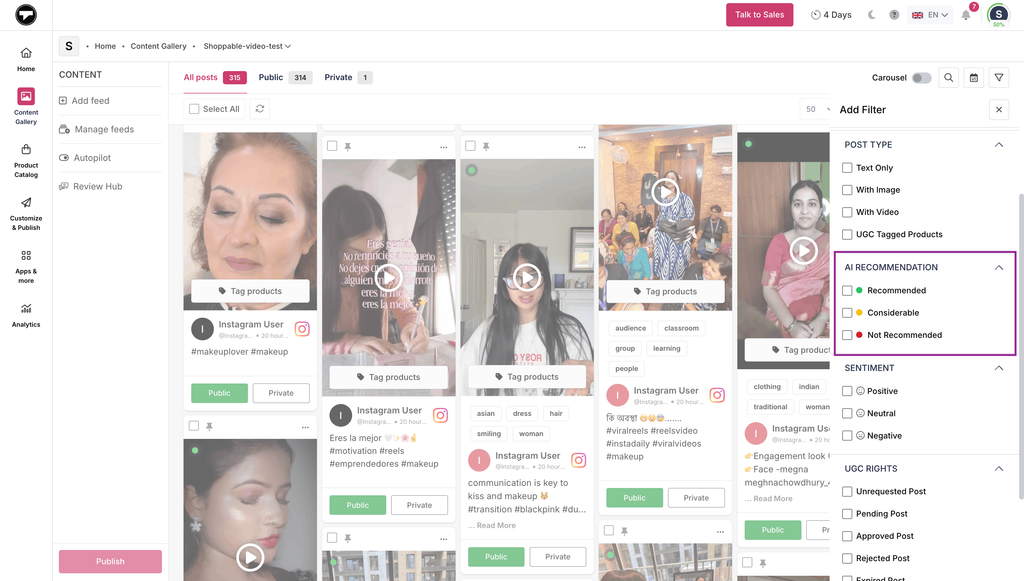
Manually judging which posts are worth featuring gets harder as your feed grows. AI Recommendations analyzes your curated content and highlights the posts on the basis of ‘Recommended’, ‘Considerable’, and ‘Not Recommended’, so you can prioritize what to feature without reviewing everything yourself.
- Surfaces posts most likely to increase engagement, based on content signals.
- Speeds up curation by highlighting top candidates instead of requiring a full manual review.
- Works alongside Autopilot to help automate ongoing content selection.
- Reduces guesswork when deciding what to feature in your widget.
How to access AI Recommendations: Go to Manage Feeds, open Autopilot, and enable AI recommendations to see suggested posts ranked by performance potential.
Have questions about which features fit your brand?
Book a demo
Conclusion
Taken together, these features cover the three things most brands struggle with once a widget is live: knowing whether it’s working, keeping it clean without babysitting it, and staying compliant while reusing customer content.
- Analytics and AI recommendations tell you what’s performing and worth featuring.
- Automated moderation and AI moderation keep your feed on-brand with less manual effort as it scales.
- Bulk UGC Rights Requests and Rating Schema handle the legal and visibility side, so your content is both safe to use and easier for new customers to find.
- Social Banner and AI Review Summarizer turn that content into more engagement, whether that’s growing your social following or helping visitors trust your reviews faster.
Brands using Taggbox’s UGC tools have seen measurable results: HYUE saw a 171% CTR, and Reina Olga grew monthly revenue by 21.6%.
Not every feature needs to be turned on at once, and the right starting point depends on your specific setup. Get in touch with our team, and we’ll help you figure out which features solve your biggest challenge first.