Learning how to post a link on Instagram is important for creators, brands, and businesses that want to drive traffic from Instagram to websites, product pages, blogs, booking pages, landing pages, or UGC galleries.
Instagram does not make every link clickable, especially links added inside normal post captions. But there are several practical ways to share links on Instagram, including Story link stickers, bio links, product tags, profile action buttons, ads, and website embeds.
Sharable links can help you in different aspects such as selling your product, increasing traffic on your website, etc. Many brands also use tools like an instagram feed widget to display clickable content externally and drive traffic effectively. In this guide, we will explain where Instagram links work, where they do not work, and how businesses can use each method to drive more traffic and conversions by deploying smart instagram marketing strategies.
Display Instagram Posts on Website in 5 mins
| Multiple Themes |
Can You Add Clickable Links on Instagram?
Yes, you can add clickable links on Instagram, but not everywhere.
Instagram supports clickable links in selected places such as Stories through link stickers, profile bio links, product tags for eligible shops, action buttons, and paid ads. Instagram Help confirms that users can use a link sticker to include a link in Instagram Stories, and viewers can tap the sticker to visit the linked page.
However, if you paste a website URL into a regular Instagram post caption, it usually appears as plain text and is not clickable. That is why businesses often guide users to “link in bio,” use Story link stickers, run ads, or create shoppable Instagram galleries on their website.
Places Where You Can Post a Link on Instagram
Below are some of the methods for adding a link on Instagram that you can use.
- Link in Story
- Link in Bio
- Link in Post
- Link in Reels
- Link on Your profile
1.) How to Post a Link on Instagram Story?
Add Link Sticker
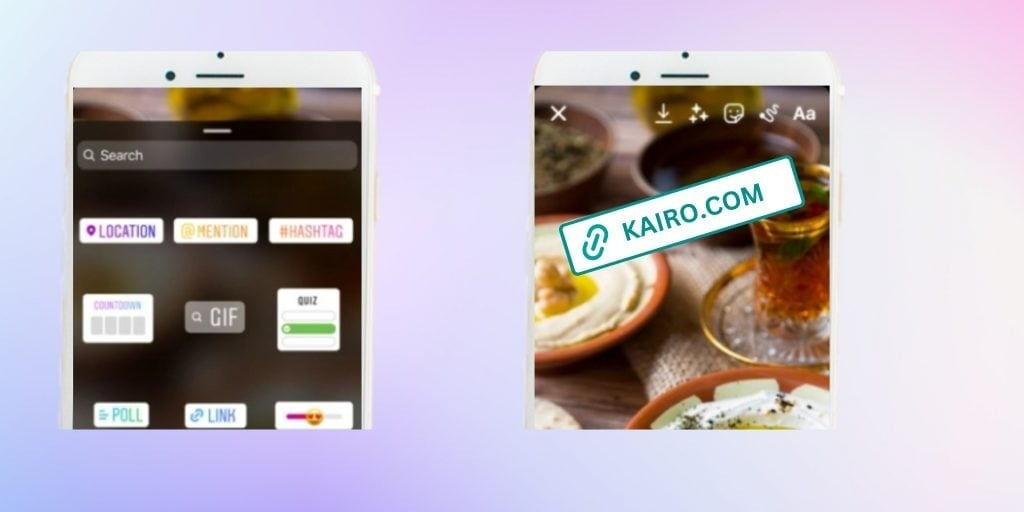
Instagram allows all users to add links to their stories. This feature, known as the Link Sticker, offers a convenient way to direct your audience to external websites. If you want to dive deeper into this specific feature, you can read our complete guide on how to add a link to your instagram story. Here’s how to post a clickable link on Instagram story:
- Tap on your profile photo to create a new story.
- Capture a photo or upload one from your phone gallery.
- Tap on the top Sticker icon.
- Browse for the Link Sticker in the sticker menu.
- Select the Link Sticker and add your desired link.
- Customize the sticker’s appearance and placement.
- Once done, your link will appear as a clickable sticker on your story, allowing viewers to easily navigate to the linked URL.
To make your stories more interactive before adding links, you can also research fresh instagram story ideas for business to drive up participation.
Support Stickers
Instagram introduced three new types of Story stickers designed to support small businesses in transitioning their operations online. These stickers include “Order Food,” “Gift Card,” and “Donate,” which enable users to take specific actions directly from the story. Businesses and creators can utilize these stickers to facilitate transactions and engage with their audience effectively.
Stories Ads
For those willing to invest in advertising, Instagram offers the option to run Story ads. Through the Ads Manager, businesses can create targeted ad campaigns designed to reach their desired audience. By selecting the appropriate ad objective and crafting engaging content, brands can effectively drive traffic and conversions through Instagram Stories. Understanding Instagram user behavior trends can help businesses fine-tune their ad strategies, ensuring maximum engagement and ROI.
Whether you’re a business looking to promote products or an individual seeking to share valuable content. This leverages Instagram’s features to post links on your Story can significantly enhance your online presence and drive customer engagement. Experiment with these methods to discover what works best for your goals and audience.
2.) How to Post a Link on Instagram Bio?
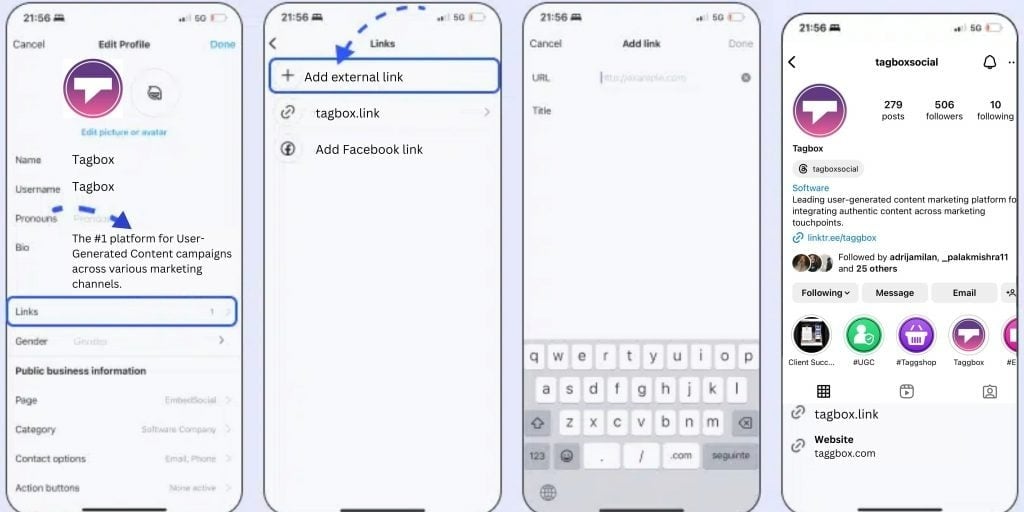
If you’ve ever come across a compelling Instagram post prompting you to visit the “link in bio” for more information, you’re not alone. Adding a clickable link in Instagram bio is a straightforward process that allows you to direct your followers to external websites or specific pages. The latest update on Instagram also allows a user to add multiple links with the same process. Here’s how you can do it:
- Open the Instagram app on your device and log in to your account.
- Navigate to your profile by tapping on your profile picture icon in the bottom menu.
- Once on your profile, tap on the “Edit Profile” button located near the top of the screen.
- Locate the “Links” field visible on the edit profile menu and tap on it.
- Tap on the “Add external link” option.
- Copy the URL you want to share before proceeding.
- Paste the links into the given field. Add a title if you want.
- Tap on the “tick” icon in the top right corner.
- You can add more links by using the “Add external link” option
- Once done, Go back and your links will be visible in your bio.
- Your Instagram bio should now display the clickable URLs you’ve added.
Read More – How to Repost a Story On Instagram
3.) How to Post a Link on Instagram Post?
Can’t figure out how to share a link on Instagram Post? With Instagram’s limitations on clickable links within captions, it’s essential to explore various methods to drive traffic effectively. Hereess review widget is a website widget that collects and displays AliExpress product reviews on your website. Instead of manuall are several strategies you can use to include links before your schedule your Instagram posts.
Shorten Your Link
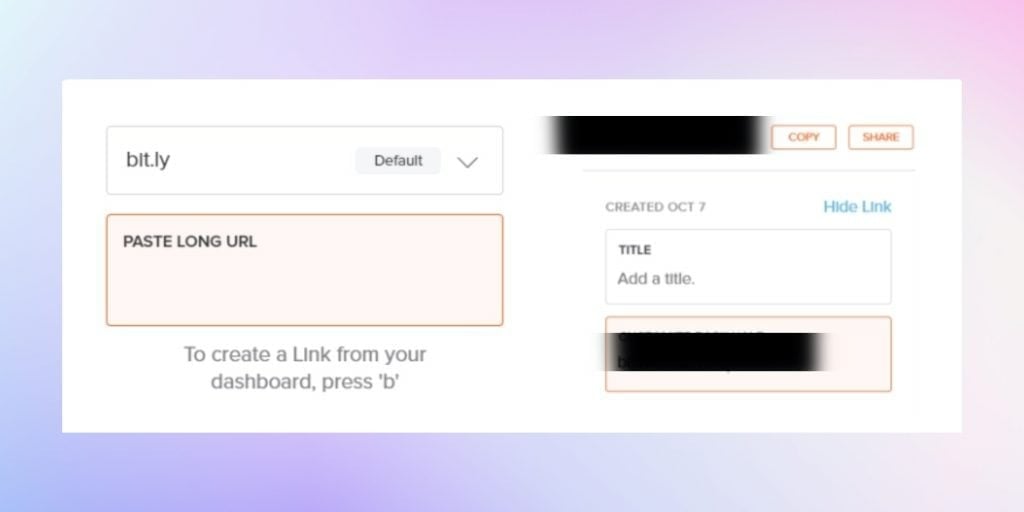
One of the simplest methods is to shorten your link using tools like Bitly. By shortening your link, you can include it in your post caption, making it easier for users to remember it. However, relying solely on this method may result in lower engagement, as users are less likely to manually enter URLs.
For businesses with online shops, leveraging Instagram Checkout and Product Tags is a powerful way to include links in posts. By enabling the checkout option, you can tag your posts showcasing products with shopping links synced to your best e-commerce platform. This streamlines the purchasing process for users and encourages direct sales. When you know how to embed Instagram feeds, you can post your trending products over there and showcase them on your website.
Another option for businesses with Instagram business profiles is to invest in sponsored posts. These posts can include a linked call-to-action at the bottom, directing users to the desired URL. Sponsored posts are promoted to a targeted audience, even those who don’t follow your account, increasing visibility and potential engagement.
As Instagram continues to evolve its features, brands must adapt their strategies to maximize engagement and drive conversions.
4.) How to Post a Link on Instagram Reel?
Instagram does not currently allow users to directly add clickable links to Reels like they can with other content. However, there are alternative methods available, particularly for businesses and creators who have a shop set up on Instagram.
One such alternative is to add product links to your Reels. This feature enables you to tag products directly within your Reels, allowing viewers to access additional information and make purchases. Here’s how to post a link on Instagram reels in the form of a product tag:
- Create Your Reel: Begin by creating your Reel as you normally would, selecting the content and adding any necessary captions.
- Tag Products: After finalizing your Reel, tap on the “Tag Products” option before sharing it. You can tag up to 30 products or a collection within your Reel.
- Publish Your Reel: Once you’ve tagged the products, tap “Done” and then proceed to share your Reel as usual by tapping “Share.”
When viewers watch your Reel, they’ll see a link to the tagged product(s) below the caption. This link enables them to learn more about the product and purchase directly from the Reel, providing a seamless shopping experience.
Explore Also – How to Repost on Instagram
5.) How to Add a Link to Your Instagram Profile?
If you’re eager to direct your Instagram audience to external websites or specific actions, adding links to your profile is a must. Here are the steps you can follow:
Another way to share your links is by setting up Instagram action buttons on your profile. These buttons will appear next to your Contact and Message tabs, providing a convenient way for users to take specific actions. Here’s how you can do it:
- Ensure you have a business profile on Instagram.
- Navigate to your profile and tap on “Edit Profile.”
- Scroll down to the “Action Buttons” section and tap on it.
- Select from a variety of Call-to-Action (CTA) copies, including Call, Text, Directions, Book, Buy Tickets, Start Order, Reserve, and e-mail buttons. You can also choose support CTAs like Gift Cards, Order Food, Donate options, or even link to a digital flipbook magazine that showcases your products or services.
- Once selected, these buttons will appear on your profile, allowing users to take action directly from your profile page.
- When a user clicks on a CTA button, they will be directed to the third-party app you’re integrated with to complete the desired action, such as making a purchase or placing an order.
Conclusion
Posting links on Instagram is not as simple as adding a clickable URL anywhere you want. Instagram limits clickable links in captions, but it gives brands several other ways to drive traffic.
You can use Story link stickers, bio links, link-in-bio landing pages, product tags, Instagram ads, profile action buttons, and website embeds to guide users toward your website, products, offers, bookings, or campaigns.
For best results, choose the link method based on your goal. Use Stories for timely traffic, bio links for evergreen pages, product tags for ecommerce, ads for paid campaigns, action buttons for bookings, and Taggbox for turning Instagram content into shoppable website experiences.
The best Instagram link strategy is not only about clicks. It is about moving users from interest to action with the right content, CTA, and destination.